
freshcrate
Home > AI Agents > agencycli

agencycli

Lightweight CLI to build self-managing AI agent teams. Define roles, skills & projects in Markdown+YAML — agents run autonomously on a heartbeat schedule, talk to each other via inbox, and delegate ta

Description

Lightweight CLI to build self-managing AI agent teams. Define roles, skills & projects in Markdown+YAML — agents run autonomously on a heartbeat schedule, talk to each other via inbox, and delegate tasks. Works with Claude Code, Codex, Gemini, Cursor & more.

README

agencycli

npm Release Go License: MIT Go Report Card Works with Spin up a self-managing AI agent team in minutes.
One CLI + built-in web console. Agents that plan, execute, and talk to each other — while you sleep.

中文文档  |  Quick Start  |  Install  |  Commands  |  Workspace Layout

What is this?

agencycli is a lightweight CLI for building and operating teams of AI agents. You define the org chart once — teams, roles, projects, skills — and agents assemble their own context, pick up tasks, and run autonomously on a heartbeat schedule.

The killer feature: agents can hire, message, and coordinate with each other. Your PM agent can create a task for the dev agent, the dev agent can ask a human for confirmation before merging, and the QA agent wakes up every 30 minutes to scan for open PRs — all without you lifting a finger.

copy_0FA2208D-DB48-49D3-B93E-686C22E82D1C.MOV

Six design pillars

1 — Context grid: role × project

Context composes from two axes — role (horizontal) and project (vertical). Every agent gets agency → team → role → project context merged automatically at hire time. Change a role prompt once; every agent with that role gets it on the next sync.
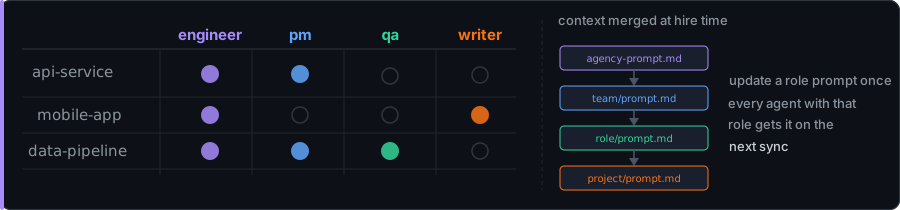
Context grid

2 — Autonomous heartbeat + wakeup routine

Agents wake up on a schedule, drain their task queue, then — when the queue is empty — execute a wakeup routine (wakeup.md) to proactively find new work. Time windows, active days, cron schedules — all configurable. Startup jitter prevents thundering herd when the scheduler restarts.
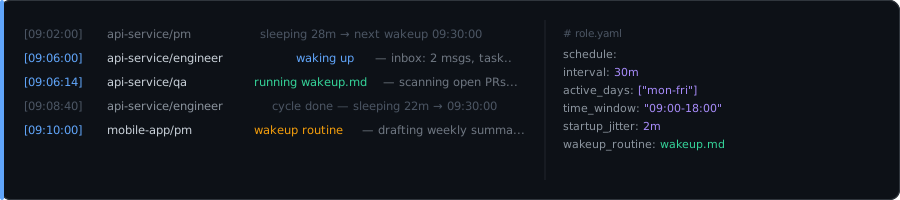
Heartbeat scheduler

3 — Inbox: agents talk to each other

Every participant (agent or human) has an inbox. Messages are non-blocking and async — unread messages are auto-injected at the top of every wakeup prompt. confirm-request creates a blocking gate: the task pauses until you decide.
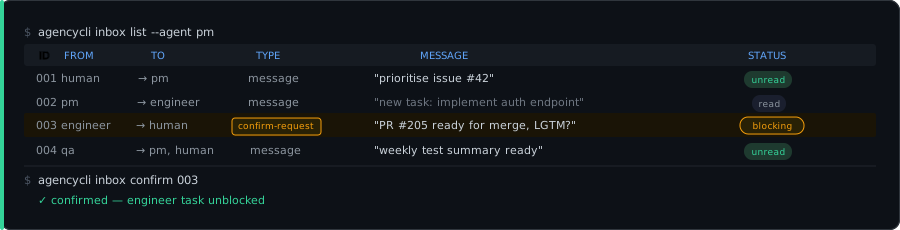
Inbox messaging

4 — Templates: package and reuse entire teams

Bundle your whole agency setup — teams, roles, skills, agent playbooks, project blueprints — into a single .tar.gz. Share it. Apply it to a new project in one command.
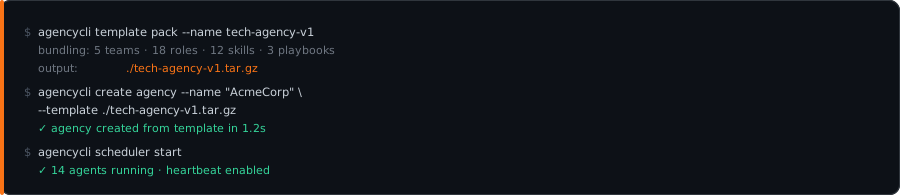
Templates

5 — Docker sandbox: safe by default

Agents run inside isolated Docker containers. No accidental host damage, no credential leaks, no runaway processes. The workspace and agencycli binary are mounted read-write; credentials are mounted read-only.
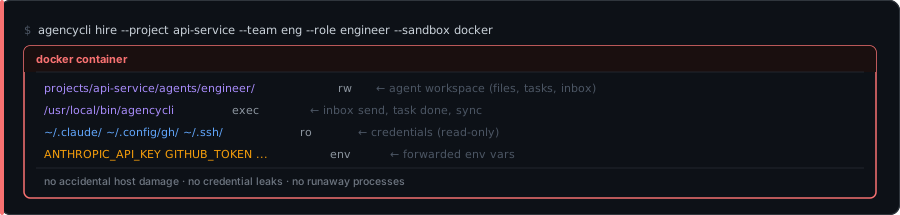
Docker sandbox

6 — Skills: reusable, bundled capabilities

Skills are a SKILL.md (YAML frontmatter + Markdown prompt) plus optional scripts, deployed into every agent that has the skill bound. Define once, attach to a role, propagate automatically on sync.
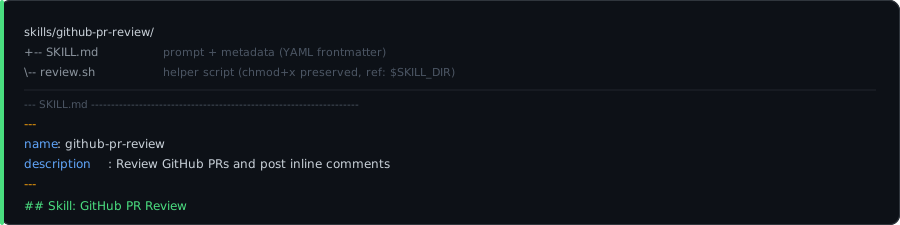
Skills

Install

Install & Configure via AI Agent (Recommended)

The easiest way — send this to Claude Code or any AI coding agent, and it will handle the entire installation and configuration for you:

Follow https://raw.githubusercontent.com/chenhg5/agencycli/refs/heads/main/INSTALL.md to install and configure agencycli.

Manual install

npm install -g @agencycli/agencycli      # npm, no Go required

go install github.com/chenhg5/agencycli/cmd/agencycli@latest  # Go

# From source (includes web console)
git clone https://github.com/chenhg5/agencycli && cd agencycli && make install

From source (development)

git clone https://github.com/chenhg5/agencycli
cd agencycli
make build          # builds web frontend + Go binary → dist/agencycli
make install        # builds and installs to $GOPATH/bin

Quick start

# 1. Create a workspace (generates .gitignore + agency-prompt.md)
agencycli create agency --name "MyAgency"
cd MyAgency

# 2. Apply a project blueprint — hires all agents + configures heartbeats + installs playbooks
agencycli create project --name "my-service" --blueprint default
agencycli project apply  --project my-service

# 3. Start the scheduler — agents wake up and run autonomously
agencycli scheduler start

# 4. Open the web console — manage everything from the browser
agencycli start                   # http://127.0.0.1:27892
agencycli start --addr 0.0.0.0:8080 --open   # custom port + auto-open browser

# 5. Check in (CLI)
agencycli inbox list              # task confirmations waiting for your decision
agencycli inbox messages          # async messages from agents
agencycli task list --project my-service --agent pm

Web console

The web console is embedded in the binary — no separate process or Node.js required. One command to launch:

agencycli start                          # default: 127.0.0.1:27892
agencycli start --addr 0.0.0.0:8080     # custom address
agencycli start --api-key my-secret     # with auth

Capabilities: workbench (messages + tasks), team/role management, project members, schedule (heartbeat/cron/runtime), run history & token costs, session management, agent run, prompt editing, skills — all with i18n (English / 中文 / 繁體中文 / 日本語) and dark mode.

For local development with hot-reload: agencycli api serve + cd web && pnpm dev.

Works with any AI coding agent

agencycli is a runtime layer, not an SDK. Agents are whatever CLI tool you already use:

Agent runtime --model
Claude Code claudecode
OpenAI Codex codex
Gemini CLI gemini
Cursor cursor
Qoder qoder
OpenCode opencode
iFlow iflow
Any CLI tool generic-cli

Mix models freely — your PM can run on Claude, your dev agents on Codex, your writer on Gemini. Each gets its context in the exact format its runtime expects.

At a glance

agencycli
├── start                                  # launch web console (API + frontend)
├── overview                               # CLI dashboard
├── create agency / team / role / project  # scaffold your org
├── hire / fire / sync                     # manage agents
├── task add / list / done / confirm-request # task queue (7-state lifecycle)
├── run / exec                             # manual agent execution
├── inbox send / messages / reply / fwd    # async messaging
├── scheduler start / stop / status        # heartbeat scheduler
├── session show / set / reset             # agent session management
├── cron add / list / delete               # scheduled tasks
├── template pack / info                   # share your setup
├── api serve                              # JSON API only (for dev)
└── --dir <path>                           # work on any agency from anywhere

Full command reference
Workspace layout
Docker sandbox
HTTP / OpenAI-compatible agent

Why not LangGraph / CrewAI / AutoGen?

Those are frameworks — you write Python to wire agents together. agencycli is infrastructure — you write Markdown and YAML. Agents are whatever CLI tool you already use. No SDK, no lock-in, no server to run.

agencycli Framework-based
Agent runtime Your existing CLI tool Framework's agent loop
Config format Markdown + YAML Python code
Multi-model Any CLI, mix freely Usually one SDK
Context management Layered, auto-merged Manual prompt assembly
Web UI Built-in (single binary) Separate deployment
Server required No Often yes

License

MIT

Release History

VersionChangesUrgencyDate
v0.5.0## What's New in v0.5.0 ### Added - **Provider management CLI** — `agencycli provider` commands (add/list/remove/set-default) - **Setup guidance system** — interactive first-run wizard for new workspaces - **Cron editing UI** — inline expression/prompt/toggle editing in web console - **Fire crons during sleep** — pending crons execute immediately during heartbeat sleep phase - **Agent identity env vars** — `AGENCYCLI_AGENT`, `AGENCYCLI_PROJECT`, etc. injected into every process - **Abort runninHigh4/19/2026
v0.4.1AgencyCli v0.4.1 发布说明 主要更新: 🔐 环境变量管理 - 全新工作区环境变量(envvars):支持全局或指定 Agent 作用域 - 运行时自动注入,优先级链:全局 → Agent 级 → Provider → 独立 Agent 环境变量 - CLI 命令:agencycli envvar add/list/remove + agent set-env/unset-env/list-env - Web 设置页:按项目分组的 Agent 多选器,环境变量增删改查 - Agent 详情页:环境变量面板,敏感值遮盖 + 👁 切换查看,内联编辑 ⚡ 事件触发调度 - 新增触发式调度:收到消息或分配任务时自动唤醒 Agent - CLI 和 Web 心跳编辑器均可配置触发器 - 去重执行 + 可配置冷却时间 📊 工作台增强 - 项目调度概览卡片:Agent 数、运行中数、调度状态、任务/消息数 - 支持单项目开关调度 + "全部启动"按钮 - 任务 Tab 显示待处理数量 - 项目卡片显示运行中 Agent 数 📚 知识库改进 - 文档全屏模式:隐藏导航居Medium4/14/2026
v0.4.0## AgencyCli v0.4.0 ### Added **Goal Management (OKR & Milestones)** - OKR system: Objectives with Key Results supporting number/percentage/boolean/currency metric types - Milestone management: project-level milestones with completion criteria, task labels, and due dates - OKR web dashboard with inline KR editing, create/edit/delete modals, and description fields - Milestone panel with create/edit modal, progress tracking, and i18n-aware date formatting - CLI commands: `agencycli okr` and `ageMedium4/11/2026
v0.3.0## What's New ### Knowledge Base (docs) - Full document indexing system with virtual directory trees - `agencycli docs add/list/tree/show/update/move/remove/search` CLI commands - Web viewer with Notion-style Markdown rendering, syntax highlighting, YAML frontmatter stripping - Collapsible sidebar navigation, document download, URL deep-linking (`/docs/<index>/<slug>`) ### AI Assistant - Built-in floating AI assistant widget (draggable, resizable) powered by Claude CLI - Streaming chat with prMedium4/3/2026
v0.2.2### Fixed - npm install: Gitee fallback download URL pointed to wrong repository name (`cg33/agencycli` → `cg33/agentorg`) **Full Changelog**: https://github.com/chenhg5/agencycli/compare/v0.2.1...v0.2.2Medium3/30/2026
v0.2.1## What's Changed ### Added - Workbench: sent messages view with direction filter (inbox / sent / all) - Task completion summary field with notification to task creator - Agent model switching (including http-agent API provider) from the web UI - Copy-to-clipboard resume command in schedule runtime session column - Refresh buttons on all table/filter pages - Multi-page tab bar in header for quick page switching ### Fixed - Unread message badge not updating after processing messages - SchedulerMedium3/30/2026
v0.2.0## v0.2.0 — Built-in Web Console ### Added **Web Console (single-binary)** - `agencycli start` serves both API and web console on a single port — no separate frontend deployment needed - Workbench page: unified operator hub for messages and tasks with batch operations - Full message management: send (multi-recipient), reply, filter, batch archive/delete - Full task management: create, edit, view detail with execution logs, batch operations - Schedule management: tabbed Heartbeat / Cron / RuntiMedium3/29/2026
v0.1.1## Changes - scheduler heartbeat pause/resume — hot-reload agent heartbeat without restarting the scheduler - scheduler cron list/pause/resume/delete — manage individual cron jobs live - scheduler active_hours timing fix — waitDur now correctly capped to window boundary - sandbox: mount agent AddDirs into Docker containers (was always empty due to wrong lookup path) - `--model human` support for multiple human identities See the full changelog for details.Low3/21/2026
v0.1.0## v0.1.0 — First public release agencycli is a lightweight CLI for building and operating self-managing AI agent teams. Define your org chart once; agents assemble their own context, pick up tasks, and run autonomously on a heartbeat schedule. ### Highlights - **Context grid** — role × project layered context, auto-merged at `hire` time - **Heartbeat scheduler** — autonomous wakeup loop with `active_hours` / `active_days` windows and startup jitter - **Wakeup routines** — agents proactively Low3/19/2026

Dependencies & License Audit

Loading dependencies...

Similar Packages

iterateA self-evolving coding agent written in Go. Reads its own source, decides what to improve, writes code, runs tests, and commits — autonomously.0.0.0
helix♾️ Private Agent Fleet with Spec Coding. Each agent gets their own GPU-accelerated desktop. Run Claude, Codex, Gemini and open models on a full private AI Stack ♾️2.10.0-rc1
llm-batch🚀 Process JSON data in batches with `llm-batch`, leveraging sequential or parallel modes for efficient interaction with LLMs.main@2026-04-21
twitter-cliAccess Twitter timelines, bookmarks, and profiles from the terminal without requiring API keys, offering a simple CLI user experience.main@2026-04-21
jina-cliConvert any URL into LLM-friendly formats using a lightweight CLI tool for reading and searching web content efficiently.main@2026-04-21