

















[Cookbook] [Try WebUI] [中文README] [Samples]
Core capabilities:
Tool Sandboxing — tool call runs inside a hardened sandbox
Agent-as-a-Service (AaaS) APIs — expose agents as streaming, production-ready APIs
Scalable Deployment — deploy locally, on Kubernetes, or serverless for elastic scale
Plus
Full-stack observability (logs / traces)
Framework compatibility with mainstream agent frameworks
Note
Recommended reading order:
- I want to run an agent app in 5 minutes: Quick Start (Agent App example) → verify with curl (SSE streaming)
- I care about secure tool execution / automation: Quick Start (Sandbox examples) → sandbox image registry/namespace/tag configuration → (optional) production-grade serverless sandbox deployment
- I want production deployment / expose APIs: Quick Start (Agent App example) → Quick Start (Deployment example) → Guides
- I want to contribute: Contributing → Contact
- News
- Key Features
- Quick Start: From installation to running a minimal Agent API service. Learn the three-stage
AgentAppdevelopment pattern:init/query/shutdown.- Prerequisites: Required runtime environment and dependencies
- Installation: Install from PyPI or from source
- Agent App Example: How to build a streaming (SSE) Agent-as-a-Service API
- Sandbox Example: How to safely execute Python/Shell/GUI/Browser/Filesystem/Mobile tools in an isolated sandbox
- Deployment Example: Learn to deploy with
DeployManagerlocally or in a serverless environment, and access the service via A2A, Response API, or the OpenAI SDK in compatible mode
- Guides: A tutorial site covering AgentScope Runtime concepts, architecture, APIs, and sample projects—helping you move from “it runs” to “scalable and maintainable”.
- Contact
- Contributing
- License
- Contributors
- [2026-02] A major architectural refactor of
AgentAppin v1.1.0. By adopting direct inheritance fromFastAPIand deprecating the previous factory pattern,AgentAppnow offers seamless integration with the full FastAPI ecosystem, significantly boosting extensibility. Furthermore, we've introduced a Distributed Interrupt Service, enabling manual task preemption during agent execution and allowing developers to customize state persistence and recovery logic flexibly. Please refer to the CHANGELOG for full update details and migration guide. - [2026-01] Added asynchronous sandbox implementations (
BaseSandboxAsync,GuiSandboxAsync,BrowserSandboxAsync,FilesystemSandboxAsync,MobileSandboxAsync) enabling non-blocking, concurrent tool execution in async program. Improvedrun_ipython_cellandrun_shell_commandmethods with enhanced concurrency and parallel execution capabilities for more efficient sandbox operations. - [2025-12] We have released AgentScope Runtime v1.0, introducing a unified “Agent as API” white-box development experience, with enhanced multi-agent collaboration, state persistence, and cross-framework integration. This release also streamlines abstractions and modules to ensure consistency between development and production environments. Please refer to the CHANGELOG for full update details and migration guide.
- Deployment Infrastructure: Built-in services for agent state management, conversation history, long-term memory, and sandbox lifecycle control
- Framework-Agnostic: Not tied to any specific agent framework; seamlessly integrates with popular open-source and custom implementations
- Developer-Friendly: Offers
AgentAppfor easy deployment with powerful customization options - Observability: Comprehensive tracking and monitoring of runtime operations
- Sandboxed Tool Execution: Isolated sandbox ensures safe tool execution without affecting the system
- Out-of-the-Box Tools & One-Click Adaptation: Rich set of ready-to-use tools, with adapters enabling quick integration into different frameworks
Note
About Framework-Agnostic: Currently, AgentScope Runtime supports the AgentScope framework. We plan to extend compatibility to more agent development frameworks in the future. This table shows the current version’s adapter support for different frameworks. The level of support for each functionality varies across frameworks:
| Framework/Feature | Message/Event | Tool |
|---|---|---|
| AgentScope | ✅ | ✅ |
| LangGraph | ✅ | 🚧 |
| Microsoft Agent Framework | ✅ | ✅ |
| Agno | ✅ | ✅ |
| AutoGen | 🚧 | ✅ |
- Python 3.10 or higher
- pip or uv package manager
From PyPI:
# Install core dependencies
pip install agentscope-runtime

# Install extension
pip install "agentscope-runtime[ext]"

# Install preview version
pip install --pre agentscope-runtime
(Optional) From source:
# Pull the source code from GitHub
git clone -b main https://github.com/agentscope-ai/agentscope-runtime.git
cd agentscope-runtime

# Install core dependencies
pip install -e .This example demonstrates how to create an agent API server using agentscope ReActAgent and AgentApp. To run a minimal AgentScope Agent with AgentScope Runtime, you generally need to implement:
Define lifespan– Usecontextlib.asynccontextmanagerto manage resource initialization (e.g., state services) at startup and cleanup on exit.@agent_app.query(framework="agentscope")– Core logic for handling requests, must usestream_printing_messagestoyield msg, lastfor streaming output
import os
from contextlib import asynccontextmanager

from fastapi import FastAPI
from agentscope.agent import ReActAgent
from agentscope.model import DashScopeChatModel
from agentscope.formatter import DashScopeChatFormatter
from agentscope.tool import Toolkit, execute_python_code
from agentscope.pipeline import stream_printing_messages
from agentscope.memory import InMemoryMemory
from agentscope.session import RedisSession

from agentscope_runtime.engine import AgentApp
from agentscope_runtime.engine.schemas.agent_schemas import AgentRequest

# 1. Define lifespan manager
@asynccontextmanager
async def lifespan(app: FastAPI):
    """Manage resources during service startup and shutdown"""
    # Startup: Initialize Session manager
    import fakeredis

    fake_redis = fakeredis.aioredis.FakeRedis(decode_responses=True)
    # NOTE: This FakeRedis instance is for development/testing only.
    # In production, replace it with your own Redis client/connection
    # (e.g., aioredis.Redis)
    app.state.session = RedisSession(connection_pool=fake_redis.connection_pool)

    yield  # Service is running

    # Shutdown: Add cleanup logic here (e.g., closing database connections)
    print("AgentApp is shutting down...")

# 2. Create AgentApp instance
agent_app = AgentApp(
    app_name="Friday",
    app_description="A helpful assistant",
    lifespan=lifespan,
)

# 3. Define request handling logic
@agent_app.query(framework="agentscope")
async def query_func(
    self,
    msgs,
    request: AgentRequest = None,
    **kwargs,
):
    session_id = request.session_id
    user_id = request.user_id

    toolkit = Toolkit()
    toolkit.register_tool_function(execute_python_code)

    agent = ReActAgent(
        name="Friday",
        model=DashScopeChatModel(
            "qwen-turbo",
            api_key=os.getenv("DASHSCOPE_API_KEY"),
            stream=True,
        ),
        sys_prompt="You're a helpful assistant named Friday.",
        toolkit=toolkit,
        memory=InMemoryMemory(),
        formatter=DashScopeChatFormatter(),
    )
    agent.set_console_output_enabled(enabled=False)

    # Load state
    await agent_app.state.session.load_session_state(
        session_id=session_id,
        user_id=user_id,
        agent=agent,
    )

    async for msg, last in stream_printing_messages(
        agents=[agent],
        coroutine_task=agent(msgs),
    ):
        yield msg, last

    # Save state
    await agent_app.state.session.save_session_state(
        session_id=session_id,
        user_id=user_id,
        agent=agent,
    )

# 4. Run the application
agent_app.run(host="127.0.0.1", port=8090)
The server will start and listen on: http://localhost:8090/process. You can send JSON input to the API using curl:
curl -N \
  -X POST "http://localhost:8090/process" \
  -H "Content-Type: application/json" \
  -d '{
    "input": [
      {
        "role": "user",
        "content": [
          { "type": "text", "text": "What is the capital of France?" }
        ]
      }
    ]
  }'
You’ll see output streamed in Server-Sent Events (SSE) format:
data: {"sequence_number":0,"object":"response","status":"created", ... }
data: {"sequence_number":1,"object":"response","status":"in_progress", ... }
data: {"sequence_number":2,"object":"message","status":"in_progress", ... }
data: {"sequence_number":3,"object":"content","status":"in_progress","text":"The" }
data: {"sequence_number":4,"object":"content","status":"in_progress","text":" capital of France is Paris." }
data: {"sequence_number":5,"object":"message","status":"completed","text":"The capital of France is Paris." }
data: {"sequence_number":6,"object":"response","status":"completed", ... }These examples demonstrate how to create sandboxed environments and execute tools within them, with some examples featuring interactive frontend interfaces accessible via VNC (Virtual Network Computing):
Note
If you want to run the sandbox locally, the current version supports Docker (optionally with gVisor) or BoxLite as the backend, and you can switch the backend by setting the environment variable CONTAINER_DEPLOYMENT (supported values include docker / gvisor / boxlite etc.; default: docker).
For large-scale remote/production deployments, we recommend using Kubernetes (K8s), Function Compute (FC), or Alibaba Cloud Container Service for Kubernetes (ACK) as the backend. Please refer to this tutorial for more details.
Tip
AgentScope Runtime provides both synchronous and asynchronous versions for each sandbox type
| Synchronous Class | Asynchronous Class |
|---|---|
BaseSandbox |
BaseSandboxAsync |
GuiSandbox |
GuiSandboxAsync |
FilesystemSandbox |
FilesystemSandboxAsync |
BrowserSandbox |
BrowserSandboxAsync |
MobileSandbox |
MobileSandboxAsync |
TrainingSandbox |
- |
AgentbaySandbox |
- |
Use for running Python code or shell commands in an isolated environment.
# --- Synchronous version ---
from agentscope_runtime.sandbox import BaseSandbox

with BaseSandbox() as box:
    # By default, pulls `agentscope/runtime-sandbox-base:latest` from DockerHub
    print(box.list_tools()) # List all available tools
    print(box.run_ipython_cell(code="print('hi')"))  # Run Python code
    print(box.run_shell_command(command="echo hello"))  # Run shell command
    input("Press Enter to continue...")

# --- Asynchronous version ---
from agentscope_runtime.sandbox import BaseSandboxAsync

async with BaseSandboxAsync() as box:
    # Default image is `agentscope/runtime-sandbox-base:latest`
    print(await box.list_tools_async())  # List all available tools
    print(await box.run_ipython_cell(code="print('hi')"))  # Run Python code
    print(await box.run_shell_command(command="echo hello"))  # Run shell command
input("Press Enter to continue...")Provides a virtual desktop environment for mouse, keyboard, and screen operations.

# --- Synchronous version ---
from agentscope_runtime.sandbox import GuiSandbox

with GuiSandbox() as box:
    # By default, pulls `agentscope/runtime-sandbox-gui:latest` from DockerHub
    print(box.list_tools())  # List all available tools
    print(box.desktop_url)  # Web desktop access URL
    print(box.computer_use(action="get_cursor_position"))  # Get mouse cursor position
    print(box.computer_use(action="get_screenshot"))  # Capture screenshot
    input("Press Enter to continue...")

# --- Asynchronous version ---
from agentscope_runtime.sandbox import GuiSandboxAsync

async with GuiSandboxAsync() as box:
    # Default image is `agentscope/runtime-sandbox-gui:latest`
    print(await box.list_tools_async())  # List all available tools
    print(box.desktop_url)  # Web desktop access URL
    print(await box.computer_use(action="get_cursor_position"))  # Get mouse cursor position
    print(await box.computer_use(action="get_screenshot"))  # Capture screenshot
input("Press Enter to continue...")A GUI-based sandbox with browser operations inside an isolated sandbox.

# --- Synchronous version ---
from agentscope_runtime.sandbox import BrowserSandbox

with BrowserSandbox() as box:
    # By default, pulls `agentscope/runtime-sandbox-browser:latest` from DockerHub
    print(box.list_tools())  # List all available tools
    print(box.desktop_url)  # Web desktop access URL
    box.browser_navigate("https://www.google.com/")  # Open a webpage
    input("Press Enter to continue...")

# --- Asynchronous version ---
from agentscope_runtime.sandbox import BrowserSandboxAsync

async with BrowserSandboxAsync() as box:
    # Default image is `agentscope/runtime-sandbox-browser:latest`
    print(await box.list_tools_async())  # List all available tools
    print(box.desktop_url)  # Web desktop access URL
    await box.browser_navigate("https://www.google.com/")  # Open a webpage
input("Press Enter to continue...")A GUI-based sandbox with file system operations such as creating, reading, and deleting files.

# --- Synchronous version ---
from agentscope_runtime.sandbox import FilesystemSandbox

with FilesystemSandbox() as box:
    # By default, pulls `agentscope/runtime-sandbox-filesystem:latest` from DockerHub
    print(box.list_tools())  # List all available tools
    print(box.desktop_url)  # Web desktop access URL
    box.create_directory("test")  # Create a directory
    input("Press Enter to continue...")

# --- Asynchronous version ---
from agentscope_runtime.sandbox import FilesystemSandboxAsync

async with FilesystemSandboxAsync() as box:
    # Default image is `agentscope/runtime-sandbox-filesystem:latest`
    print(await box.list_tools_async())  # List all available tools
    print(box.desktop_url)  # Web desktop access URL
    await box.create_directory("test")  # Create a directory
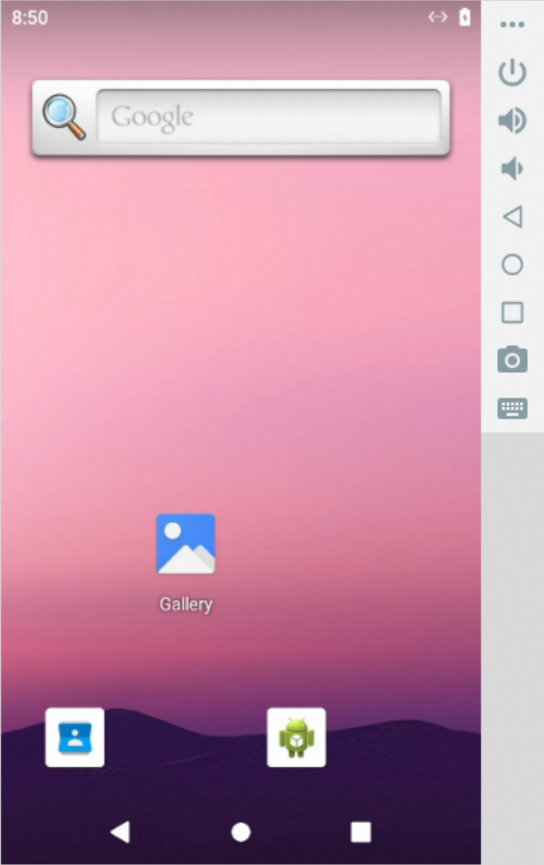
input("Press Enter to continue...")Provides a sandboxed Android emulator environment that allows executing various mobile operations, such as tapping, swiping, inputting text, and taking screenshots.
-
Linux Host: When running on a Linux host, this sandbox requires the
binderandashmemkernel modules to be loaded. If they are missing, execute the following commands on your host to install and load the required modules:# 1. Install extra kernel modules sudo apt update && sudo apt install -y linux-modules-extra-`uname -r` # 2. Load modules and create device nodes sudo modprobe binder_linux devices="binder,hwbinder,vndbinder" sudo modprobe ashmem_linux
-
Architecture Compatibility: When running on an ARM64/aarch64 architecture (e.g., Apple M-series chips), you may encounter compatibility or performance issues. It is recommended to run on an x86_64 host.
# --- Synchronous version ---
from agentscope_runtime.sandbox import MobileSandbox

with MobileSandbox() as box:
    # By default, pulls 'agentscope/runtime-sandbox-mobile:latest' from DockerHub
    print(box.list_tools())  # List all available tools
    print(box.mobile_get_screen_resolution())  # Get the screen resolution
    print(box.mobile_tap([500, 1000]))  # Tap at coordinate (500, 1000)
    print(box.mobile_input_text("Hello from AgentScope!"))  # Input text
    print(box.mobile_key_event(3))  # HOME key event
    screenshot_result = box.mobile_get_screenshot()  # Get screenshot
    print(screenshot_result)
    input("Press Enter to continue...")

# --- Asynchronous version ---
from agentscope_runtime.sandbox import MobileSandboxAsync

async with MobileSandboxAsync() as box:
    # Default image is 'agentscope/runtime-sandbox-mobile:latest'
    print(await box.list_tools_async())  # List all available tools
    print(await box.mobile_get_screen_resolution())  # Get the screen resolution
    print(await box.mobile_tap([500, 1000]))  # Tap at coordinate (500, 1000)
    print(await box.mobile_input_text("Hello from AgentScope!"))  # Input text
    print(await box.mobile_key_event(3))  # HOME key event
    screenshot_result = await box.mobile_get_screenshot()  # Get screenshot
    print(screenshot_result)
    input("Press Enter to continue...")
Note
To add tools to the AgentScope Toolkit:
-
Wrap sandbox tool with
sandbox_tool_adapter, so the AgentScope agent can call them:from agentscope_runtime.adapters.agentscope.tool import sandbox_tool_adapter wrapped_tool = sandbox_tool_adapter(sandbox.browser_navigate)
-
Register the tool with
register_tool_function:toolkit = Toolkit() Toolkit.register_tool_function(wrapped_tool)
If pulling images from DockerHub fails (for example, due to network restrictions), you can switch the image source to Alibaba Cloud Container Registry for faster access:
export RUNTIME_SANDBOX_REGISTRY="agentscope-registry.ap-southeast-1.cr.aliyuncs.com"A namespace is used to distinguish images of different teams or projects. You can customize the namespace via an environment variable:
export RUNTIME_SANDBOX_IMAGE_NAMESPACE="agentscope"For example, here agentscope will be used as part of the image path.
An image tag specifies the version of the image, for example:
export RUNTIME_SANDBOX_IMAGE_TAG="preview"Details:
- Default is
latest, which means the image version matches the PyPI latest release. previewmeans the latest preview version built in sync with the GitHub main branch.- You can also use a specified version number such as
20250909. You can check all available image versions at DockerHub.
The sandbox SDK will build the full image path based on the above environment variables:
<RUNTIME_SANDBOX_REGISTRY>/<RUNTIME_SANDBOX_IMAGE_NAMESPACE>/runtime-sandbox-base:<RUNTIME_SANDBOX_IMAGE_TAG>Example:
agentscope-registry.ap-southeast-1.cr.aliyuncs.com/agentscope/runtime-sandbox-base:previewAgentScope Runtime also supports serverless deployment, which is suitable for running sandboxes in a serverless environment, e.g. Alibaba Cloud Function Compute (FC).
First, please refer to the documentation to configure the serverless environment variables. Make CONTAINER_DEPLOYMENT to fc to enable serverless deployment.
Then, start a sandbox server, use the --config option to specify a serverless environment setup:
# This command will load the settings defined in the `custom.env` file
runtime-sandbox-server --config fc.env
After the server starts, you can access the sandbox server at baseurl http://localhost:8000 and invoke sandbox tools described above.
The AgentApp exposes a deploy method that takes a DeployManager instance and deploys the agent.
-
The service port is set as the parameter
portwhen creating theLocalDeployManager. -
The service endpoint path is set as the parameter
endpoint_pathto/processwhen deploying the agent. -
The deployer will automatically add common agent protocols, such as A2A, Response API.
After deployment, users can access the service at http://localhost:8090/process:
from agentscope_runtime.engine.deployers import LocalDeployManager

# Create deployment manager
deployer = LocalDeployManager(
    host="0.0.0.0",
    port=8090,
)

# Deploy the app as a streaming service
deploy_result = await app.deploy(
    deployer=deployer,
    endpoint_path="/process"
)
After deployment, users can also access this service using the Response API of the OpenAI SDK:
from openai import OpenAI

client = OpenAI(base_url="http://localhost:8090/compatible-mode/v1")

response = client.
Release History
| Version | Changes | Urgency | Date |
|---|---|---|---|
| v1.1.6.post2 | ## What's Changed * chore(version): bump to 1.1.6.post2 by @rayrayraykk in https://github.com/agentscope-ai/agentscope-runtime/pull/514 * fix(engine): use default_factory for BaseResponse.created_at by @Alajmah in https://github.com/agentscope-ai/agentscope-runtime/pull/512 ## New Contributors * @Alajmah made their first contribution in https://github.com/agentscope-ai/agentscope-runtime/pull/512 **Full Changelog**: https://github.com/agentscope-ai/agentscope-runtime/compare/v1.1.6.post | High | 6/4/2026 |
| v.1.1.6 | ## What's Changed * feat(agent_app): support per-task timeout for stream query background… by @zhijianma in https://github.com/agentscope-ai/agentscope-runtime/pull/506 * chore(version): bump to 1.1.6 by @rayrayraykk in https://github.com/agentscope-ai/agentscope-runtime/pull/507 ## New Contributors * @zhijianma made their first contribution in https://github.com/agentscope-ai/agentscope-runtime/pull/506 **Full Changelog**: https://github.com/agentscope-ai/agentscope-runtime/compare/v1. | High | 5/19/2026 |
| v1.1.5 | ## What's Changed * feat(modelstudio_memory): Update Memory SDK by @taoquanyus in https://github.com/agentscope-ai/agentscope-runtime/pull/483 **Full Changelog**: https://github.com/agentscope-ai/agentscope-runtime/compare/v1.1.4...v1.1.5 | High | 4/21/2026 |
| v1.1.5-beta.1 | ## What's Changed * feat(modelstudio_memory): Update Memory SDK by @taoquanyus in https://github.com/agentscope-ai/agentscope-runtime/pull/483 * chore: bump version to 1.1.5b1 by @rayrayraykk in https://github.com/agentscope-ai/agentscope-runtime/pull/491 **Full Changelog**: https://github.com/agentscope-ai/agentscope-runtime/compare/v1.1.4...v1.1.5-beta.1 | High | 4/20/2026 |
| v1.1.4 | ## What's Changed * chore: bump version to 1.1.4 by @rayrayraykk in https://github.com/agentscope-ai/agentscope-runtime/pull/479 * chore: fix task status and bump version by @rayrayraykk in https://github.com/agentscope-ai/agentscope-runtime/pull/489 **Full Changelog**: https://github.com/agentscope-ai/agentscope-runtime/compare/v1.1.3...v1.1.4 | High | 4/16/2026 |
| v1.1.3 | ## What's Changed * fix message output none by @rayrayraykk in https://github.com/agentscope-ai/agentscope-runtime/pull/474 **Full Changelog**: https://github.com/agentscope-ai/agentscope-runtime/compare/v1.1.2...v1.1.3 | Medium | 3/31/2026 |
| v1.1.2 | ## What's Changed * fix(storage): handle OSS folder marker objects in download_folder by @rainive in https://github.com/agentscope-ai/agentscope-runtime/pull/454 * fix: add `py.typed` file for type checking by @qwertycxz in https://github.com/agentscope-ai/agentscope-runtime/pull/456 * fix sandbox limit by @rayrayraykk in https://github.com/agentscope-ai/agentscope-runtime/pull/462 * fix sandbox reap session by @rayrayraykk in https://github.com/agentscope-ai/agentscope-runtime/pull/463 * f | Medium | 3/30/2026 |
| v1.1.2-beta.2 | ## What's Changed * feat: background task for agent request by @rayrayraykk in https://github.com/agentscope-ai/agentscope-runtime/pull/471 **Full Changelog**: https://github.com/agentscope-ai/agentscope-runtime/compare/v1.1.2-beta.1...v1.1.2-beta.2 | Medium | 3/26/2026 |
| v1.1.2-beta.1 | ## What's Changed * fix(storage): handle OSS folder marker objects in download_folder by @rainive in https://github.com/agentscope-ai/agentscope-runtime/pull/454 * fix: add `py.typed` file for type checking by @qwertycxz in https://github.com/agentscope-ai/agentscope-runtime/pull/456 * fix sandbox limit by @rayrayraykk in https://github.com/agentscope-ai/agentscope-runtime/pull/462 * fix sandbox reap session by @rayrayraykk in https://github.com/agentscope-ai/agentscope-runtime/pull/463 # | Low | 3/19/2026 |
| v1.1.1 | ## What's Changed * docs: Bump version to 1.1.1a1 by @rayrayraykk in https://github.com/agentscope-ai/agentscope-runtime/pull/448 * Add Kruise Sandbox deployer feature by @bcfre in https://github.com/agentscope-ai/agentscope-runtime/pull/442 * fix a2a version by @rayrayraykk in https://github.com/agentscope-ai/agentscope-runtime/pull/460 **Full Changelog**: https://github.com/agentscope-ai/agentscope-runtime/compare/v1.1.0...v1.1.1 | Low | 3/17/2026 |
| v1.1.0 | # AgentScope Runtime v1.1.0 ## Core / Engine - Added session heartbeat lifecycle management (timeout-based reaping, distributed locking, and safe integration with prewarm pools). #380 - Refactored **AgentApp** to inherit from FastAPI and added interrupt support. #416 - Added **A2UI** message type. #437 - Added MCP approval response schema. #424 - Added end-to-end video support: - Support video URL input. #409 - Support video block conversion in AgentScope. #417 - Added **FileBlo | Low | 2/13/2026 |
| v1.1.0-beta.5 | ## What's Changed * feat: fix docs format and mirror bugs by @rayrayraykk in https://github.com/agentscope-ai/agentscope-runtime/pull/445 **Full Changelog**: https://github.com/agentscope-ai/agentscope-runtime/compare/v1.1.0-beta.4...v1.1.0-beta.5 | Low | 2/11/2026 |
| v1.1.0-beta.4 | ## What's Changed * fix(build): correct docker build process for mobile sandbox by @XiuShenAl in https://github.com/agentscope-ai/agentscope-runtime/pull/353 * feat: a2ui message type by @rayrayraykk in https://github.com/agentscope-ai/agentscope-runtime/pull/437 * fix: get package version from installed module instead of pyproject.toml by @bcfre in https://github.com/agentscope-ai/agentscope-runtime/pull/438 * docs: add bcfre as a contributor for code by @allcontributors[bot] in https://git | Low | 2/11/2026 |
| v1.1.0-beta.3 | ## What's Changed * fix:audio block type check by @Shun-Chu in https://github.com/agentscope-ai/agentscope-runtime/pull/434 * docs: add Shun-Chu as a contributor for bug by @allcontributors[bot] in https://github.com/agentscope-ai/agentscope-runtime/pull/435 * feature (fileblock): Support FileBlock in AgentScope and Bump to v1.1.0b3 by @rayrayraykk in https://github.com/agentscope-ai/agentscope-runtime/pull/436 ## New Contributors * @Shun-Chu made their first contribution in https://githu | Low | 2/5/2026 |
| v1.1.0-beta.2 | ## What's Changed * docs: Bump version to 1.0.6a1 by @rayrayraykk in https://github.com/agentscope-ai/agentscope-runtime/pull/398 * feature: improve logging setup and deprecation warnings by @rayrayraykk in https://github.com/agentscope-ai/agentscope-runtime/pull/399 * docs: Update WebUI doc by @rayrayraykk in https://github.com/agentscope-ai/agentscope-runtime/pull/400 * docs: fix mermaid by @rayrayraykk in https://github.com/agentscope-ai/agentscope-runtime/pull/401 * docs: Fix url in REA | Low | 2/2/2026 |
| v1.0.5.post1 | ### Notes - The **service modules are deprecated**. For new projects, we recommend using AgentScope-native **Memory** and **Session** implementations (e.g., `InMemoryMemory` + `JSONSession`) instead of `agentscope_runtime.adapters.agentscope.memory.AgentScopeSessionHistoryMemory`. - If you cannot upgrade, a workaround is to **downgrade AgentScope to `<= 1.0.11`**. For AgentScope `>=1.0.12` Example: ```python # -*- coding: utf-8 -*- import os from agentscope.agent import ReActAgent | Low | 1/26/2026 |
| v1.0.5 | # AgentScope V1.0.5 Release **AgentScope Runtime v1.0.5** focuses on improving deployment flexibility and UI/protocol integrations. This release adds a new PAI deployer with CLI support, introduces Boxlite as an additional sandbox backend, and provides a container client factory to unify container-based deployments. It also brings AG-UI protocol support, integrates ModelStudio Memory SDK and demos, and includes multiple hotfixes for FC replacement maps, MS-Agent-Framework compatibility, and m | Low | 1/16/2026 |
| v1.0.4 | # AgentScope V1.0.4 Release 🚀🚀🚀 Building on the extensibility and consistency of the v1.x framework, **AgentScope Runtime v1.0.4** introduces several new deployment features, including Knative and Serverless FC deployers, native support for the MS-Agent-Framework, and an asynchronous Sandbox SDK to reduce blocking and improve responsiveness. This release also enhances safety handling for existing OpenTelemetry tracer providers, updates dependencies, and fixes compatibility issues with non-s | Low | 1/8/2026 |
| v1.0.4-alpha.1 | ## What's Changed * feature: bump version to v1.0.4a1 by @rayrayraykk in https://github.com/agentscope-ai/agentscope-runtime/pull/349 * hotfix: minor patch to support non-stream tool by @rayrayraykk in https://github.com/agentscope-ai/agentscope-runtime/pull/351 **Full Changelog**: https://github.com/agentscope-ai/agentscope-runtime/compare/v1.0.3...v1.0.4-alpha.1 | Low | 12/24/2025 |
| v1.0.3 | # 🚀 AgentScope V1.0.3 ## What's Changed * version: Bump version to 1.0.3a1 by @rayrayraykk in https://github.com/agentscope-ai/agentscope-runtime/pull/310 * Add A2A Registry Support for AgentScope-Runtime by @qiacheng7 in https://github.com/agentscope-ai/agentscope-runtime/pull/283 * hotfix on doc about middleware by @zhilingluo in https://github.com/agentscope-ai/agentscope-runtime/pull/315 * docs: add qiacheng7 as a contributor for code, and doc by @allcontributors[bot] in https://gith | Low | 12/23/2025 |
| v1.0.2 | # 🚀 AgentScope V1.0.2 ## What's Changed * docs: Bump version to v1.0.2a1 by @rayrayraykk in https://github.com/agentscope-ai/agentscope-runtime/pull/274 * Feat/support langgraph by @zhiyong0412 in https://github.com/agentscope-ai/agentscope-runtime/pull/247 * [Fix] add langchain dependence by @zhiyong0412 in https://github.com/agentscope-ai/agentscope-runtime/pull/276 * [fix] add langchain_openai dependence by @zhiyong0412 in https://github.com/agentscope-ai/agentscope-runtime/pull/277 | Low | 12/17/2025 |
| v1.0.1 | # Agentscope Runtime v1.0.1 Release Notes We are excited to announce the release of **Agentscope Runtime v1.0.1**, bringing a series of important fixes, new features, and documentation updates to enhance stability, usability, and developer experience. This version includes improvements in runtime configuration, compatibility fixes for Windows WebUI startup, new service factory support, and better tool call distinctions within AgentScope. We have also updated dependencies for AgentScope 1.0. | Low | 12/8/2025 |
| v1.0.0 | ## AgentScope Runtime V1.0 Release AgentScope Runtime V1.0 builds upon the solid foundation of efficient agent deployment and secure sandbox execution, now offering **a unified “Agent as API” experience** across the full agent development lifecycle — from local development to production deployment — with expanded sandbox types, protocol compatibility, and a richer set of built‑in tools. At the same time, the way agents integrate with runtime services has evolved from **black‑box module rep | Low | 12/3/2025 |
| v1.0.0-beta.2 | ## What's Changed * [Hotfix] Bump version to v1.0.0b2 and fix KeyError when only one tool call message is received by @rayrayraykk in https://github.com/agentscope-ai/agentscope-runtime/pull/246 **Full Changelog**: https://github.com/agentscope-ai/agentscope-runtime/compare/v1.0.0-beta.1...v1.0.0-beta.2 | Low | 12/1/2025 |
| v1.0.0-beta.1 | AgentScope Runtime V1.0 builds upon the solid foundation of efficient agent deployment and secure sandbox execution, now offering **a unified “Agent as API” experience** across the full agent development lifecycle — from local development to production deployment — with expanded sandbox types, protocol compatibility, and a richer set of built‑in tools. At the same time, the way agents integrate with runtime services has evolved from **black‑box module replacement** to a ***white‑box adapter p | Low | 11/28/2025 |
| v0.2.0 | # 🚀 AgentScope Runtime v0.2.0 Release We’re excited to announce **v0.2.0** of `agentscope-runtime`! This release includes several **new features**, **bug fixes**, **documentation improvements**, and some **breaking changes** merging `develop` into `main`. ------ ## 🚀 New Features - Updated **Agent App** with improved `run` method for better execution handling ([#161](https://github.com/agentscope-ai/agentscope-runtime/pull/161)). - Added **HTTP timeout** configuration for sandbox | Low | 11/6/2025 |
| v0.2.0-beta.2 | ## 🚀 v0.2.0-beta.2 Release This update focuses on fixing minor bugs, improving stability, and refining tests for smoother development and deployment. ### 🛠 What's Changed - **Fix:** Agno Agent compatibility with the latest version — by @ms-cs in #162 - **Hotfix:** Correct versioning & fix Kubernetes-related issue caused by merge — by @rayrayraykk in #167 - **Test:** Refactor unit test classification and update CI triggers for API key–dependent tests — by @rayrayraykk in #170 ### | Low | 11/5/2025 |
| v0.2.0-beta.1 | ## 🚀 AgentScope Runtime v0.2.0-beta.1 Release Notes The **AgentScope Runtime** v0.2.0-beta.1 introduces **AgentApp**, a new way to run and manage agents with improved execution flow. This release also includes important feature upgrades, bug fixes, and a major branch merge for better long-term maintainability. ### 🎯 Key Highlights - New: `AgentApp` - A unified interface to build, configure, and run agents directly in **AgentScope Runtime** - Updated `run()` method for smoother | Low | 11/4/2025 |
| v0.1.6 | # 🚀 Agentscope Runtime v0.1.6 Release Notes **This release enhances native support for the full range of Agentscope agent capabilities, while making sandbox usage more intuitive, powerful, and scalable.** Key improvements include **multi-pool sandbox management**, **async execution**, and a **built-in web frontend**, providing both interactive control and automation-friendly workflows. ## 🆕 New Features - **GUI Sandbox** with desktop-accessible URL. - Support for **multi-sandbox poo | Low | 10/28/2025 |
| v0.1.5 | ## What's Changed * [Version] Bump version to 0.1.5 by @rayrayraykk in https://github.com/agentscope-ai/agentscope-runtime/pull/77 * fix(history_service): exception while message is None by @kevinlin09 in https://github.com/agentscope-ai/agentscope-runtime/pull/82 * docs: add kevinlin09 as a contributor for code by @allcontributors[bot] in https://github.com/agentscope-ai/agentscope-runtime/pull/84 * add mem0 by @Osier-Yi in https://github.com/agentscope-ai/agentscope-runtime/pull/80 * docs | Low | 10/16/2025 |
| v0.1.5-beta.2 | ## 🚀 v0.1.5-beta.2 (Beta Release) ⚠️ **Note:** This is a **beta** version intended for testing and feedback. Please avoid using in production environments. ### 🛠 What's Changed - **Fix**: `modelscope` deployment bug ([#88](https://github.com/agentscope-ai/agentscope-runtime/pull/88)) by @taoquanyus - **Enhancement**: Show both **Console URL** and **Deploy ID** when available ([#90](https://github.com/agentscope-ai/agentscope-runtime/pull/90)) by @taoquanyus - **Bugfix**: Conso | Low | 9/23/2025 |
| v0.1.5-beta.1 | ## 🚀 Pre-release v0.1.5-beta.1 This **beta release** introduces major new capabilities along with fixes and enhancements. The highlights of this version are **Kubernetes deployment support** and **Responses API** support — making it easier to scale and extend your Agentscope Runtime deployments. ------ ### 🌟 Highlights #### 🛠 Kubernetes Deployment Support You can now deploy Agentscope Runtime to Kubernetes clusters using the newly added manifests and configurations ([#78](htt | Low | 9/22/2025 |
| v0.1.4 | ## What's Changed - **Feature**: Update `reme` dependency version to `0.1.9` by @jinliyl in [#71](https://github.com/agentscope-ai/agentscope-runtime/pull/71) - **Enhancement**: Add `context_composer_cls` parameter to `create_context_manager` by @Osier-Yi in [#73](https://github.com/agentscope-ai/agentscope-runtime/pull/73) - **Docs Fix**: Resolve documentation bugs by @ericczq in [#75](https://github.com/agentscope-ai/agentscope-runtime/pull/75) - **Hotfix**: Update MCP dependency to fix | Low | 9/17/2025 |
| v0.1.3 | # 🚀 Agentscope Runtime v0.1.3 Release Notes We are excited to announce the release of **Agentscope Runtime v0.1.3**! This update includes several new features, important bug fixes, and documentation improvements — enhancing stability, flexibility, and developer experience. ## ✨ New Features - **Sandbox Browser WebSocket Relay** — Support WebSocket relay for browser-based sandbox interactions ([#48](https://github.com/agentscope-ai/agentscope-runtime/pull/48)) - **Extended MCP Config | Low | 9/16/2025 |
| v0.1.2 | # AgentScope Runtime v0.1.2 We're excited to announce the release of AgentScope Runtime v0.1.2! This version brings new features, and important bug fixes to improve your agent development experience. ## 🚀 New Features - **BFCL Sandbox Integration**: Added Berkeley Function Calling Leaderboard (BFCL) Sandbox support for enhanced function calling capabilities by @rankesterc in https://github.com/agentscope-ai/agentscope-runtime/pull/24 - **RAG Support**: Integrated Retrieval-Augmented G | Low | 9/4/2025 |
| v0.1.1 | # AgentScope Runtime v0.1.1 We're excited to announce AgentScope Runtime v0.1.1, bringing enhanced deployment capabilities, improved stability, and expanded framework support. ## 🚀 What's New ### Enhanced Deployment Options - **Sandbox Kubernetes Support**: Deploy sandboxes seamlessly in Kubernetes environments for better scalability and orchestration - **Redis Integration**: Improved session management and caching capabilities with Redis support ### Expanded Framework Compatibi | Low | 8/21/2025 |
| v0.1.0 | # AgentScope Runtime v0.1.0 ## Welcome to AgentScope Runtime We are pleased to announce the initial release of AgentScope Runtime v0.1.0, designed to streamline agent deployment and ensure secure tool execution. ### Key Features - **Agent Deployment Engine:** - Efficiently deploy and manage agent applications with essential context management and environment control. - **Tool Execution Sandbox:** - Secure, isolated environments for executing tools safely, including control ove | Low | 8/15/2025 |