





Your systems don't talk to each other. FIM One is the AI-powered bridge — embed as a Copilot, or connect them all as a Hub.
🌐 Website · 📖 Docs · 📋 Changelog · 🐛 Report Bug · 💬 Discord · 🐦 Twitter · 🏆 Product Hunt
Tip
☁️ Skip the setup — try FIM One on Cloud. A managed version is live at cloud.fim.ai: no Docker, no API keys, no config. Sign in and start connecting your systems in seconds. Early access, feedback welcome.
Every company has systems that don't talk to each other — ERP, CRM, OA, finance, HR, custom databases. FIM One is the AI-powered hub that connects them all without modifying your existing infrastructure.
| Mode | What it is | Access |
|---|---|---|
| Standalone | General-purpose AI assistant — search, code, KB | Portal |
| Copilot | AI embedded in a host system's UI | iframe / widget / embed |
| Hub | Central AI orchestration across all connected systems | Portal / API |
graph LR
    ERP <--> Hub["🔗 FIM One Hub"]
    Database <--> Hub
    Lark <--> Hub
    Hub <--> CRM
    Hub <--> OA
    Hub <--> API[Custom API]
Dashboard — stats, activity trends, token usage, and quick access to agents and conversations.

Agent Chat — ReAct reasoning with multi-step tool calling against a connected database.

DAG Planner — LLM-generated execution plan with parallel steps and live status tracking.

Using Agents

Using Planner Mode

git clone https://github.com/fim-ai/fim-one.git
cd fim-one

cp example.env .env
# Edit .env: set LLM_API_KEY (and optionally LLM_BASE_URL, LLM_MODEL)

docker compose up --build -d
Open http://localhost:3000 — on first launch you'll create an admin account. That's it.
docker compose up -d          # start
docker compose down           # stop
docker compose logs -f # view logsPrerequisites: Python 3.11+, uv, Node.js 18+, pnpm.
git clone https://github.com/fim-ai/fim-one.git && cd fim-one

cp example.env .env           # Edit: set LLM_API_KEY

uv sync --all-extras
cd frontend && pnpm install && cd ..

./start.sh dev # hot reload: Python --reload + Next.js HMR| Command | What starts | URL |
|---|---|---|
./start.sh |
Next.js + FastAPI | localhost:3000 (UI) + :8000 |
./start.sh dev |
Same, with hot reload | Same |
./start.sh dev:api |
API only, dev mode (hot reload) | localhost:8000 |
./start.sh dev:ui |
Frontend only, dev mode (HMR) | localhost:3000 |
./start.sh api |
FastAPI only (headless) | localhost:8000/api |
For production deployment (Docker, reverse proxy, zero-downtime updates), see the Deployment Guide.
- Three delivery modes — Standalone assistant, embedded Copilot, or central Hub; same agent core.
- Any system, one pattern — Connect APIs, databases, MCP servers. Actions auto-register as agent tools with auth injection. Progressive disclosure meta-tools reduce token usage by 80%+ across all tool types.
- Database connectors — PostgreSQL, MySQL, Oracle, SQL Server, plus Chinese legacy DBs (DM, KingbaseES, GBase, Highgo). Schema introspection and AI-powered annotation.
- Three ways to build — Import OpenAPI spec, AI chat builder, or connect MCP servers directly.
- Dynamic DAG planning — LLM decomposes goals into dependency graphs at runtime. No hard-coded workflows.
- Concurrent execution — Independent steps run in parallel via asyncio; auto re-plan up to 3 rounds.
- ReAct agent — Structured reasoning-and-acting loop with automatic error recovery.
- Agent harness — Production-grade execution environment: ContextGuard for 5-layer token-budget management, progressive-disclosure meta-tools to keep the tool surface tractable, and self-reflection loops to counter goal drift.
- Hook System — Deterministic enforcement that runs outside the LLM loop. First shipped:
FeishuGateHookgates sensitive tool calls behind a human approval card posted to a Feishu group. Extensible to audit logging, read-only-mode guards, and rate limits (v0.9). - Auto-routing — Classifies queries and routes to optimal mode (ReAct or DAG). Configurable via
AUTO_ROUTING. - Extended thinking — Chain-of-thought for OpenAI o-series, Gemini 2.5+, Claude.
- Visual workflow editor — 12 node types, drag-and-drop canvas (React Flow v12), import/export as JSON.
- Smart file handling — Uploaded files auto-inlined into context (small) or readable on-demand via
read_uploaded_filetool. Intelligent document processing: PDFs, DOCX, and PPTX files get vision-aware processing with embedded image extraction when the model supports vision. Smart PDF mode extracts text from text-rich pages and renders scanned pages as images. - Pluggable tools — Python, Node.js, shell exec with optional Docker sandbox (
CODE_EXEC_BACKEND=docker). - Full RAG pipeline — Jina embedding + LanceDB + hybrid retrieval + reranker + inline
[N]citations. - Tool artifacts — Rich outputs (HTML previews, files) rendered in-chat.
- Org-scoped IM bridge —
BaseChannelabstraction for outbound messaging to Feishu (Lark) today; Slack / WeCom / Teams / Email on the v0.9 roadmap. - Fernet-encrypted credentials — App secrets and encrypt keys encrypted at rest; every inbound callback signature-verified.
- Interactive approval cards —
FeishuGateHookposts an Approve / Reject card to your Feishu group when a sensitive tool call fires; the tool blocks until a group member taps a verdict. Human-in-the-loop approval without a custom workflow engine. - Browse-and-pick UI — No copying raw
chat_idvalues from the Feishu console; the portal calls the Feishu API and shows a group picker.
- Multi-tenant — JWT auth, org isolation, admin panel with usage analytics and connector metrics.
- Marketplace — Publish and subscribe to agents, connectors, KBs, skills, workflows.
- Global skills (SOPs) — Reusable operating procedures loaded for every user; progressive mode cuts tokens ~80%.
- 6 languages — EN, ZH, JA, KO, DE, FR. Translations are fully automated.
- First-run setup wizard, dark/light theme, command palette, streaming SSE, DAG visualization.
Deep dive: Architecture · Hook System · Channels · Execution Modes · Why FIM One · Competitive Landscape
graph TB
    subgraph app["Application Layer"]
        a["Portal · API · iframe · Feishu · Slack · WeCom · DingTalk · Teams · Email · Contract Systems · Custom Webhooks"]
    end
    subgraph mid["FIM One"]
        direction LR
        m1["Connectors<br/>+ MCP Hub"] ~~~ m2["Orch Engine<br/>ReAct / DAG"] ~~~ m3["RAG /<br/>Knowledge"] ~~~ m5["Hook System<br/>+ Channels"] ~~~ m4["Auth /<br/>Admin"]
    end
    subgraph biz["Business Systems"]
        b["ERP · CRM · OA · Finance · Databases · Contract Mgmt · Custom APIs"]
    end
    app --> mid --> biz
Each connector and channel is a standardized bridge — the agent doesn't know or care whether it's talking to SAP, a custom contract system, or a Feishu group. The Hook System runs platform code outside the LLM loop for approvals, audit, and rate limits; Channels carry outbound notifications and approval cards to external IM platforms. See Connector Architecture, Hook System, and Channels for details.
FIM One works with any OpenAI-compatible provider:
| Provider | LLM_API_KEY |
LLM_BASE_URL |
LLM_MODEL |
|---|---|---|---|
| OpenAI | sk-... |
(default) | gpt-4o |
| DeepSeek | sk-... |
https://api.deepseek.com/v1 |
deepseek-chat |
| Anthropic | sk-ant-... |
https://api.anthropic.com/v1 |
claude-sonnet-4-6 |
| Ollama (local) | ollama |
http://localhost:11434/v1 |
qwen2.5:14b |
Minimal .env:
LLM_API_KEY=sk-your-key
# LLM_BASE_URL=https://api.openai.com/v1   # default
# LLM_MODEL=gpt-4o                         # default
JINA_API_KEY=jina_...                       # unlocks web tools + RAG
Full reference: Environment Variables
| Layer | Technology |
|---|---|
| Backend | Python 3.11+, FastAPI, SQLAlchemy, Alembic, asyncio |
| Frontend | Next.js 14, React 18, Tailwind CSS, shadcn/ui, React Flow v12 |
| AI / RAG | OpenAI-compatible LLMs, Jina AI (embed + search), LanceDB |
| Database | SQLite (dev) / PostgreSQL (prod) |
| Messaging | Feishu Open Platform (Lark), Fernet-encrypted credentials, HMAC signature verification |
| Infra | Docker, uv, pnpm, SSE streaming |
uv sync --all-extras          # install dependencies
pytest                         # run tests
pytest --cov=fim_one           # with coverage
ruff check src/ tests/         # lint
mypy src/                      # type check
bash scripts/setup-hooks.sh # install git hooks (enables auto i18n)See the full Roadmap for version history and planned features.
Common questions about deployment, LLM providers, system requirements, and more — see the FAQ.
We welcome contributions of all kinds — code, docs, translations, bug reports, and ideas.
Pioneer Program: The first 100 contributors who get a PR merged are recognized as Founding Contributors with permanent credits, a badge, and priority issue support. Learn more →
Quick links:
- Contributing Guide — setup, conventions, PR process
- Development Conventions — type safety, testing, and code quality standards
- Good First Issues — curated for newcomers
- Open Issues — bugs & feature requests
Security: To report a vulnerability, please open a GitHub issue with the [SECURITY] tag. For sensitive disclosures, contact us via Discord DM.
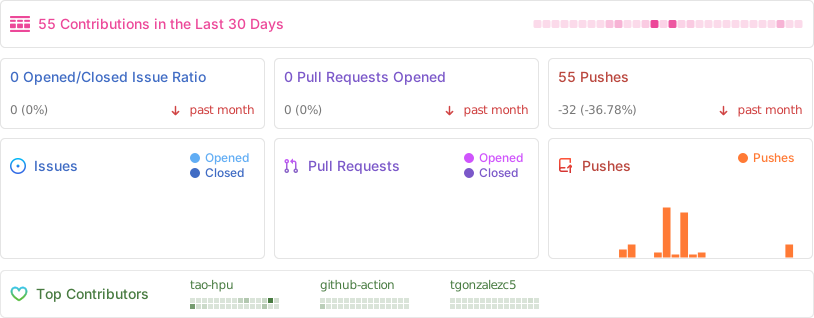
Thanks to these wonderful people (emoji key):
 Tao An 💻 🚧 🎨 📖 📆 🤔 🚇 |
 Teo Gonzalez Collazo 💻 |
This project follows the all-contributors specification. Contributions of any kind welcome!
FIM One Source Available License. This is not an OSI-approved open source license.
Permitted: internal use, modification, distribution with license intact, embedding in non-competing applications.
Restricted: multi-tenant SaaS, competing agent platforms, white-labeling, removing branding.
For commercial licensing inquiries, please open an issue on GitHub.
See LICENSE for full terms.
🌐 Website · 📖 Docs · 📋 Changelog · 🐛 Report Bug · 💬 Discord · 🐦 Twitter · 🏆 Product Hunt