
icdiff
improved colored diff
Description
# Icdiff Improved colored diff 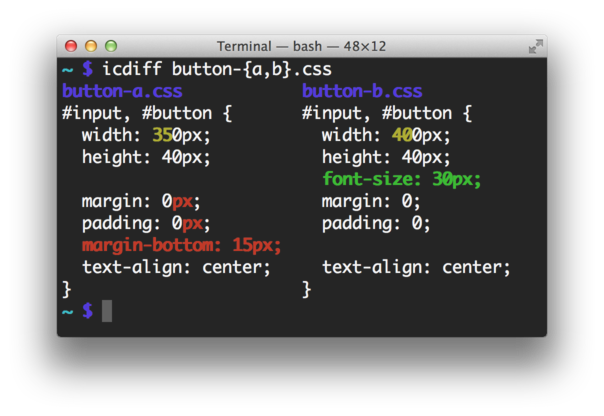 ## Installation Download the [latest](https://github.com/jeffkaufman/icdiff/tags) `icdiff` and put it on your PATH. Alternatively, install with packaging tools: ``` # pip pip install icdiff # apt sudo apt install icdiff # homebrew brew install icdiff # aur yay -S icdiff # nix nix-env -i icdiff ``` ## Usage ```sh icdiff [options] left_file right_file ``` Show differences between files in a two column view. ### Options ``` --version show program's version number and exit -h, --help show this help message and exit --cols=COLS specify the width of the screen. Autodetection is Unix only --encoding=ENCODING specify the file encoding; defaults to utf8 -E MATCHER, --exclude-lines=MATCHER Do not diff lines that match this regex. Not compatible with the 'line-numbers' option --head=HEAD consider only the first N lines of each file -H, --highlight color by changing the background color instead of the foreground color. Very fast, ugly, displays all changes -L LABELS, --label=LABELS override file labels with arbitrary tags. Use twice, one for each file -N, --line-numbers generate output with line numbers. Not compatible with the 'exclude-lines' option. --no-bold use non-bold colors; recommended for solarized --no-headers don't label the left and right sides with their file names --output-encoding=OUTPUT_ENCODING specify the output encoding; defaults to utf8 -r, --recursive recursively compare subdirectories -s, --report-identical-files report when two files are the same --show-all-spaces color all non-matching whitespace including that which is not needed for drawing the eye to changes. Slow, ugly, displays all changes --tabsize=TABSIZE tab stop spacing -t, --truncate truncate long lines instead of wrapping them -u, --patch generate patch. This is always true, and only exists for compatibility -U NUM, --unified=NUM, --numlines=NUM how many lines of context to print; can't be combined with --whole-file -W, --whole-file show the whole file instead of just changed lines and context --strip-trailing-cr strip any trailing carriage return at the end of an input line --color-map=COLOR_MAP choose which colors are used for which items. Default is --color-map='add:green_bold,change:yellow_bold,desc ription:blue,meta:magenta,separator:blue,subtract:red_ bold'. You don't have to override all of them: '--color-map=separator:white,description:cyan ``` ## Using with Git To see what it looks like, try: ```sh git difftool --extcmd icdiff ``` To install this as a tool you can use with Git, copy `git-icdiff` into your PATH and run: ```sh git icdiff ``` You can configure `git-icdiff` in Git's config: ``` git config --global icdiff.options '--highlight --line-numbers' ``` ## Using with subversion To try it out, run: ```sh svn diff --diff-cmd icdiff ``` ## Using with Mercurial Add the following to your `~/.hgrc`: ```sh [extensions] extdiff= [extdiff] cmd.icdiff=icdiff opts.icdiff=--recursive --line-numbers ``` Or check more [in-depth setup instructions](https://ianobermiller.com/blog/2016/07/14/side-by-side-diffs-for-mercurial-hg-icdiff-revisited/). ## Setting up a dev environment Create a virtualenv and install the dev dependencies. This is not needed for normal usage. ```sh virtualenv venv source venv/bin/activate pip install -r requirements-dev.txt ``` ## Running tests ```sh ./test.sh python3 ``` ## Making a release - Update ChangeLog with all the changes since the last release - Update `__version__` in `icdiff` - Run tests, make sure they pass - `git commit -a -m "release ${version}"` - `git push` - `git tag release-${version}` - `git push origin release-${version}` - A GitHub Action should be triggered due to the release tag being pushed, and will upload to PyPI. ## License This file is derived from `difflib.HtmlDiff` which is under [license](https://www.python.org/download/releases/2.6.2/license/). I release my changes here under the same license. This is GPL compatible.
Release History
| Version | Changes | Urgency | Date |
|---|---|---|---|
| 2.0.10 | Imported from PyPI (2.0.10) | Low | 4/21/2026 |
| master@2026-02-08 | Latest activity on master branch | Low | 2/8/2026 |
| master@2026-02-08 | Latest activity on master branch | Low | 2/8/2026 |
| master@2026-02-08 | Latest activity on master branch | Low | 2/8/2026 |
| master@2026-02-08 | Latest activity on master branch | Low | 2/8/2026 |
| master@2026-02-08 | Latest activity on master branch | Low | 2/8/2026 |
| master@2026-02-08 | Latest activity on master branch | Low | 2/8/2026 |
| master@2026-02-08 | Latest activity on master branch | Low | 2/8/2026 |
| master@2026-02-08 | Latest activity on master branch | Low | 2/8/2026 |
| master@2026-02-08 | Latest activity on master branch | Low | 2/8/2026 |
| master@2026-02-08 | Latest activity on master branch | Low | 2/8/2026 |
| master@2026-02-08 | Latest activity on master branch | Low | 2/8/2026 |
| master@2026-02-08 | Latest activity on master branch | Low | 2/8/2026 |
| master@2026-02-08 | Latest activity on master branch | Low | 2/8/2026 |
| master@2026-02-08 | Latest activity on master branch | Low | 2/8/2026 |
| master@2026-02-08 | Latest activity on master branch | Low | 2/8/2026 |
| master@2026-02-08 | Latest activity on master branch | Low | 2/8/2026 |
| master@2026-02-08 | Latest activity on master branch | Low | 2/8/2026 |
| master@2026-02-08 | Latest activity on master branch | Low | 2/8/2026 |
| master@2026-02-08 | Latest activity on master branch | Low | 2/8/2026 |
| master@2026-02-08 | Latest activity on master branch | Low | 2/8/2026 |
| master@2026-02-08 | Latest activity on master branch | Low | 2/8/2026 |
| master@2026-02-08 | Latest activity on master branch | Low | 2/8/2026 |
| master@2026-02-08 | Latest activity on master branch | Low | 2/8/2026 |
| master@2026-02-08 | Latest activity on master branch | Low | 2/8/2026 |
| master@2026-02-08 | Latest activity on master branch | Low | 2/8/2026 |
| master@2026-02-08 | Latest activity on master branch | Low | 2/8/2026 |
| master@2026-02-08 | Latest activity on master branch | Low | 2/8/2026 |
| master@2026-02-08 | Latest activity on master branch | Low | 2/8/2026 |
| master@2026-02-08 | Latest activity on master branch | Low | 2/8/2026 |
| master@2026-02-08 | Latest activity on master branch | Low | 2/8/2026 |
| master@2026-02-08 | Latest activity on master branch | Low | 2/8/2026 |
| master@2026-02-08 | Latest activity on master branch | Low | 2/8/2026 |
| master@2026-02-08 | Latest activity on master branch | Low | 2/8/2026 |
| master@2026-02-08 | Latest activity on master branch | Low | 2/8/2026 |
| master@2026-02-08 | Latest activity on master branch | Low | 2/8/2026 |
| master@2026-02-08 | Latest activity on master branch | Low | 2/8/2026 |
| master@2026-02-08 | Latest activity on master branch | Low | 2/8/2026 |
| master@2026-02-08 | Latest activity on master branch | Low | 2/8/2026 |
| master@2026-02-08 | Latest activity on master branch | Low | 2/8/2026 |
| master@2026-02-08 | Latest activity on master branch | Low | 2/8/2026 |
| master@2026-02-08 | Latest activity on master branch | Low | 2/8/2026 |
| master@2026-02-08 | Latest activity on master branch | Low | 2/8/2026 |
| master@2026-02-08 | Latest activity on master branch | Low | 2/8/2026 |
| master@2026-02-08 | Latest activity on master branch | Low | 2/8/2026 |
| master@2026-02-08 | Latest activity on master branch | Low | 2/8/2026 |
| master@2026-02-08 | Latest activity on master branch | Low | 2/8/2026 |
| master@2026-02-08 | Latest activity on master branch | Low | 2/8/2026 |
| master@2026-02-08 | Latest activity on master branch | Low | 2/8/2026 |
| master@2026-02-08 | Latest activity on master branch | Low | 2/8/2026 |
| master@2026-02-08 | Latest activity on master branch | Low | 2/8/2026 |
| master@2026-02-08 | Latest activity on master branch | Low | 2/8/2026 |
| master@2026-02-08 | Latest activity on master branch | Low | 2/8/2026 |
| master@2026-02-08 | Latest activity on master branch | Low | 2/8/2026 |
| master@2026-02-08 | Latest activity on master branch | Low | 2/8/2026 |
| master@2026-02-08 | Latest activity on master branch | Low | 2/8/2026 |
| master@2026-02-08 | Latest activity on master branch | Low | 2/8/2026 |
| master@2026-02-08 | Latest activity on master branch | Low | 2/8/2026 |
| master@2026-02-08 | Latest activity on master branch | Low | 2/8/2026 |
| master@2026-02-08 | Latest activity on master branch | Low | 2/8/2026 |
| master@2026-02-08 | Latest activity on master branch | Low | 2/8/2026 |
| master@2026-02-08 | Latest activity on master branch | Low | 2/8/2026 |
| master@2026-02-08 | Latest activity on master branch | Low | 2/8/2026 |
| master@2026-02-08 | Latest activity on master branch | Low | 2/8/2026 |
| master@2026-02-08 | Latest activity on master branch | Low | 2/8/2026 |
| master@2026-02-08 | Latest activity on master branch | Low | 2/8/2026 |
| master@2026-02-08 | Latest activity on master branch | Low | 2/8/2026 |
| master@2026-02-08 | Latest activity on master branch | Low | 2/8/2026 |
| master@2026-02-08 | Latest activity on master branch | Low | 2/8/2026 |
| master@2026-02-08 | Latest activity on master branch | Low | 2/8/2026 |
| master@2026-02-08 | Latest activity on master branch | Low | 2/8/2026 |
| master@2026-02-08 | Latest activity on master branch | Low | 2/8/2026 |
| master@2026-02-08 | Latest activity on master branch | Low | 2/8/2026 |
| master@2026-02-08 | Latest activity on master branch | Low | 2/8/2026 |
| master@2026-02-08 | Latest activity on master branch | Low | 2/8/2026 |
| master@2026-02-08 | Latest activity on master branch | Low | 2/8/2026 |
| master@2026-02-08 | Latest activity on master branch | Low | 2/8/2026 |
| master@2026-02-08 | Latest activity on master branch | Low | 2/8/2026 |
| master@2026-02-08 | Latest activity on master branch | Low | 2/8/2026 |
| master@2026-02-08 | Latest activity on master branch | Low | 2/8/2026 |
| master@2026-02-08 | Latest activity on master branch | Low | 2/8/2026 |
| master@2026-02-08 | Latest activity on master branch | Low | 2/8/2026 |
| master@2026-02-08 | Latest activity on master branch | Low | 2/8/2026 |
| master@2026-02-08 | Latest activity on master branch | Low | 2/8/2026 |
| master@2026-02-08 | Latest activity on master branch | Low | 2/8/2026 |
| master@2026-02-08 | Latest activity on master branch | Low | 2/8/2026 |
| master@2026-02-08 | Latest activity on master branch | Low | 2/8/2026 |
| master@2026-02-08 | Latest activity on master branch | Low | 2/8/2026 |
| master@2026-02-08 | Latest activity on master branch | Low | 2/8/2026 |
| master@2026-02-08 | Latest activity on master branch | Low | 2/8/2026 |
| master@2026-02-08 | Latest activity on master branch | Low | 2/8/2026 |
| master@2026-02-08 | Latest activity on master branch | Low | 2/8/2026 |
| master@2026-02-08 | Latest activity on master branch | Low | 2/8/2026 |
| master@2026-02-08 | Latest activity on master branch | Low | 2/8/2026 |
| master@2026-02-08 | Latest activity on master branch | Low | 2/8/2026 |
| master@2026-02-08 | Latest activity on master branch | Low | 2/8/2026 |
| master@2026-02-08 | Latest activity on master branch | Low | 2/8/2026 |
| master@2026-02-08 | Latest activity on master branch | Low | 2/8/2026 |
| master@2026-02-08 | Latest activity on master branch | Low | 2/8/2026 |
| master@2026-02-08 | Latest activity on master branch | Low | 2/8/2026 |
| master@2026-02-08 | Latest activity on master branch | Low | 2/8/2026 |
| master@2026-02-08 | Latest activity on master branch | Low | 2/8/2026 |
| master@2026-02-08 | Latest activity on master branch | Low | 2/8/2026 |
| master@2026-02-08 | Latest activity on master branch | Low | 2/8/2026 |
| master@2026-02-08 | Latest activity on master branch | Low | 2/8/2026 |
| master@2026-02-08 | Latest activity on master branch | Low | 2/8/2026 |
| master@2026-02-08 | Latest activity on master branch | Low | 2/8/2026 |
| master@2026-02-08 | Latest activity on master branch | Low | 2/8/2026 |
| master@2026-02-08 | Latest activity on master branch | Low | 2/8/2026 |
| master@2026-02-08 | Latest activity on master branch | Low | 2/8/2026 |
| master@2026-02-08 | Latest activity on master branch | Low | 2/8/2026 |
| master@2026-02-08 | Latest activity on master branch | Low | 2/8/2026 |
| master@2026-02-08 | Latest activity on master branch | Low | 2/8/2026 |
| master@2026-02-08 | Latest activity on master branch | Low | 2/8/2026 |
| master@2026-02-08 | Latest activity on master branch | Low | 2/8/2026 |
| master@2026-02-08 | Latest activity on master branch | Low | 2/8/2026 |
| master@2026-02-08 | Latest activity on master branch | Low | 2/8/2026 |
| master@2026-02-08 | Latest activity on master branch | Low | 2/8/2026 |
| master@2026-02-08 | Latest activity on master branch | Low | 2/8/2026 |
| master@2026-02-08 | Latest activity on master branch | Low | 2/8/2026 |
| master@2026-02-08 | Latest activity on master branch | Low | 2/8/2026 |
| master@2026-02-08 | Latest activity on master branch | Low | 2/8/2026 |
| master@2026-02-08 | Latest activity on master branch | Low | 2/8/2026 |
| master@2026-02-08 | Latest activity on master branch | Low | 2/8/2026 |
| master@2026-02-08 | Latest activity on master branch | Low | 2/8/2026 |
| master@2026-02-08 | Latest activity on master branch | Low | 2/8/2026 |
| master@2026-02-08 | Latest activity on master branch | Low | 2/8/2026 |
| master@2026-02-08 | Latest activity on master branch | Low | 2/8/2026 |
| master@2026-02-08 | Latest activity on master branch | Low | 2/8/2026 |
| master@2026-02-08 | Latest activity on master branch | Low | 2/8/2026 |
| master@2026-02-08 | Latest activity on master branch | Low | 2/8/2026 |
| master@2026-02-08 | Latest activity on master branch | Low | 2/8/2026 |
| master@2026-02-08 | Latest activity on master branch | Low | 2/8/2026 |
| master@2026-02-08 | Latest activity on master branch | Low | 2/8/2026 |
| master@2026-02-08 | Latest activity on master branch | Low | 2/8/2026 |
| master@2026-02-08 | Latest activity on master branch | Low | 2/8/2026 |
| master@2026-02-08 | Latest activity on master branch | Low | 2/8/2026 |
| master@2026-02-08 | Latest activity on master branch | Low | 2/8/2026 |
| master@2026-02-08 | Latest activity on master branch | Low | 2/8/2026 |
| master@2026-02-08 | Latest activity on master branch | Low | 2/8/2026 |
| master@2026-02-08 | Latest activity on master branch | Low | 2/8/2026 |
| master@2026-02-08 | Latest activity on master branch | Low | 2/8/2026 |
| master@2026-02-08 | Latest activity on master branch | Low | 2/8/2026 |
| master@2026-02-08 | Latest activity on master branch | Low | 2/8/2026 |
| master@2026-02-08 | Latest activity on master branch | Low | 2/8/2026 |
| master@2026-02-08 | Latest activity on master branch | Low | 2/8/2026 |
| master@2026-02-08 | Latest activity on master branch | Low | 2/8/2026 |
| master@2026-02-08 | Latest activity on master branch | Low | 2/8/2026 |
| master@2026-02-08 | Latest activity on master branch | Low | 2/8/2026 |
| master@2026-02-08 | Latest activity on master branch | Low | 2/8/2026 |
| master@2026-02-08 | Latest activity on master branch | Low | 2/8/2026 |
| master@2026-02-08 | Latest activity on master branch | Low | 2/8/2026 |
| master@2026-02-08 | Latest activity on master branch | Low | 2/8/2026 |
| master@2026-02-08 | Latest activity on master branch | Low | 2/8/2026 |
| master@2026-02-08 | Latest activity on master branch | Low | 2/8/2026 |
| master@2026-02-08 | Latest activity on master branch | Low | 2/8/2026 |
| master@2026-02-08 | Latest activity on master branch | Low | 2/8/2026 |
| master@2026-02-08 | Latest activity on master branch | Low | 2/8/2026 |
| master@2026-02-08 | Latest activity on master branch | Low | 2/8/2026 |
| master@2026-02-08 | Latest activity on master branch | Low | 2/8/2026 |
| master@2026-02-08 | Latest activity on master branch | Low | 2/8/2026 |
| master@2026-02-08 | Latest activity on master branch | Low | 2/8/2026 |
| master@2026-02-08 | Latest activity on master branch | Low | 2/8/2026 |
| master@2026-02-08 | Latest activity on master branch | Low | 2/8/2026 |
| master@2026-02-08 | Latest activity on master branch | Low | 2/8/2026 |
| master@2026-02-08 | Latest activity on master branch | Low | 2/8/2026 |
| master@2026-02-08 | Latest activity on master branch | Low | 2/8/2026 |
| master@2026-02-08 | Latest activity on master branch | Low | 2/8/2026 |
| master@2026-02-08 | Latest activity on master branch | Low | 2/8/2026 |
| master@2026-02-08 | Latest activity on master branch | Low | 2/8/2026 |
| master@2026-02-08 | Latest activity on master branch | Low | 2/8/2026 |
| master@2026-02-08 | Latest activity on master branch | Low | 2/8/2026 |
| master@2026-02-08 | Latest activity on master branch | Low | 2/8/2026 |
| master@2026-02-08 | Latest activity on master branch | Low | 2/8/2026 |
| master@2026-02-08 | Latest activity on master branch | Low | 2/8/2026 |
| master@2026-02-08 | Latest activity on master branch | Low | 2/8/2026 |
| master@2026-02-08 | Latest activity on master branch | Low | 2/8/2026 |
| master@2026-02-08 | Latest activity on master branch | Low | 2/8/2026 |
| master@2026-02-08 | Latest activity on master branch | Low | 2/8/2026 |
| master@2026-02-08 | Latest activity on master branch | Low | 2/8/2026 |
| master@2026-02-08 | Latest activity on master branch | Low | 2/8/2026 |
| master@2026-02-08 | Latest activity on master branch | Low | 2/8/2026 |
| master@2026-02-08 | Latest activity on master branch | Low | 2/8/2026 |
| master@2026-02-08 | Latest activity on master branch | Low | 2/8/2026 |
| master@2026-02-08 | Latest activity on master branch | Low | 2/8/2026 |
| master@2026-02-08 | Latest activity on master branch | Low | 2/8/2026 |
| master@2026-02-08 | Latest activity on master branch | Low | 2/8/2026 |
| master@2026-02-08 | Latest activity on master branch | Low | 2/8/2026 |
| master@2026-02-08 | Latest activity on master branch | Low | 2/8/2026 |
| master@2026-02-08 | Latest activity on master branch | Low | 2/8/2026 |
| master@2026-02-08 | Latest activity on master branch | Low | 2/8/2026 |
| master@2026-02-08 | Latest activity on master branch | Low | 2/8/2026 |
| master@2026-02-08 | Latest activity on master branch | Low | 2/8/2026 |
| master@2026-02-08 | Latest activity on master branch | Low | 2/8/2026 |
| master@2026-02-08 | Latest activity on master branch | Low | 2/8/2026 |
| release-2.0.10 | Tag release-2.0.10 | Low | 2/8/2026 |
| release-2.0.9 | Tag release-2.0.9 | Low | 1/16/2026 |
| release-2.0.7 | Tag release-2.0.7 | Low | 8/21/2023 |
| release-2.0.6 | Tag release-2.0.6 | Low | 12/21/2022 |
| release-2.0.5 | Tag release-2.0.5 | Low | 4/8/2022 |
| release-2.0.4 | Tag release-2.0.4 | Low | 8/4/2021 |
| release-2.0.3 | Tag release-2.0.3 | Low | 8/1/2021 |
| release-2.0.1 | Tag release-2.0.1 | Low | 8/1/2021 |
| release-2.0.0 | Tag release-2.0.0 | Low | 3/2/2021 |
| release-1.9.5 | Tag release-1.9.5 | Low | 9/22/2019 |
| release-1.9.4 | Tag release-1.9.4 | Low | 10/17/2018 |
| release-1.9.3 | Tag release-1.9.3 | Low | 8/9/2018 |
| release-1.9.2 | Tag release-1.9.2 | Low | 8/9/2018 |
| release-1.9.1 | Tag release-1.9.1 | Low | 10/2/2017 |
| release-1.9.0 | Tag release-1.9.0 | Low | 4/16/2017 |
| release-1.8.1 | Tag release-1.8.1 | Low | 5/2/2016 |
| release-1.8.0 | Tag release-1.8.0 | Low | 5/2/2016 |
| release-1.7.6 | Tag release-1.7.6 | Low | 5/2/2016 |
| release-1.7.3 | Tag release-1.7.3 | Low | 3/30/2015 |
| release-1.7.2 | Tag release-1.7.2 | Low | 12/23/2014 |