
An open source registry and proxy that federates MCP, A2A, and REST/gRPC APIs with centralized governance, discovery, and observability. Optimizes Agent & Tool calling, and supports plugins.





ContextForge is an open source registry and proxy that federates tools, agents, and APIs into one clean endpoint for your AI clients. It provides centralized governance, discovery, and observability across your AI infrastructure:
- Tools Gateway — MCP, REST, gRPC-to-MCP translation, and TOON compression
- Agent Gateway — A2A protocol, OpenAI-compatible and Anthropic agent routing
- API Gateway — Rate limiting, auth, retries, and reverse proxy for REST services
- Plugin Extensibility — 40+ plugins for additional transports, protocols, and integrations
- Observability — OpenTelemetry tracing with Phoenix, Jaeger, Zipkin, and other OTLP backends
It runs as a fully compliant MCP server, deployable via PyPI or Docker, and scales to multi-cluster environments on Kubernetes with Redis-backed federation and caching.
- Overview & Goals
- Quick Start - PyPI
- Quick Start - Containers
- VS Code Dev Container
- Installation
- Upgrading
- Configuration
- Running
- Cloud Deployment
- API Reference
- Testing
- Project Structure
- Development
- Troubleshooting
- Contributing
| Resource | Description |
|---|---|
| 5-Minute Setup | Get started fast — uvx, Docker, Compose, or local dev |
| Getting Help | Support options, FAQ, community channels |
| Issue Guide | How to file bugs, request features, contribute |
| Full Documentation | Complete guides, tutorials, API reference |
ContextForge is an open source registry and proxy that federates any Model Context Protocol (MCP) server, A2A server, or REST/gRPC API, providing centralized governance, discovery, and observability. It optimizes agent and tool calling, and supports plugins. See the project roadmap for more details.
It currently supports:
- Federation across multiple MCP and REST services
- A2A (Agent-to-Agent) integration for external AI agents (OpenAI, Anthropic, custom)
- gRPC-to-MCP translation via automatic reflection-based service discovery
- Virtualization of legacy APIs as MCP-compliant tools and servers
- Transport over HTTP, JSON-RPC, WebSocket, SSE (with configurable keepalive), stdio and streamable-HTTP
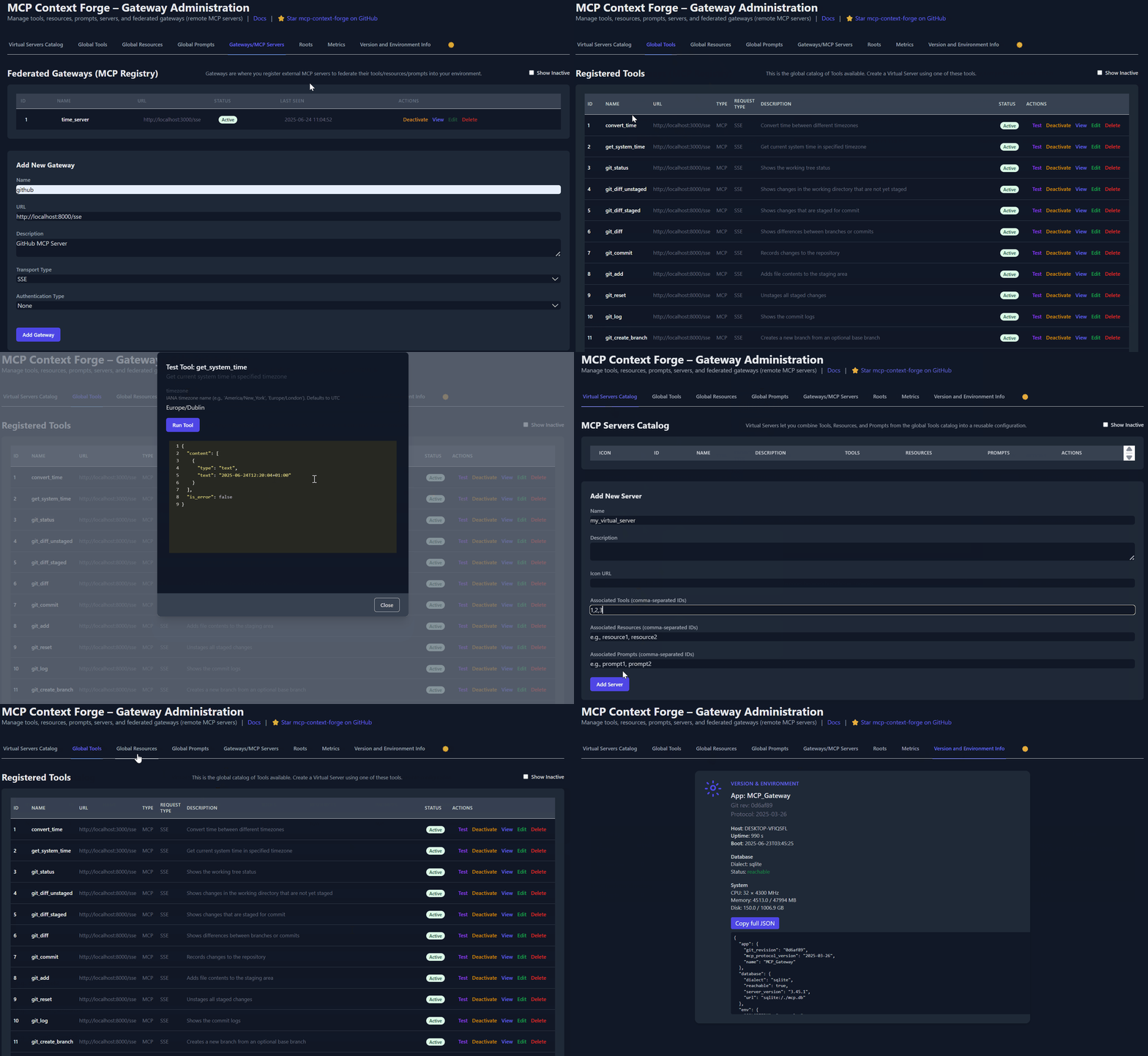
- An Admin UI for real-time management, configuration, and log monitoring (with airgapped deployment support)
- Built-in auth, retries, and rate-limiting with user-scoped OAuth tokens and unconditional X-Upstream-Authorization header support
- OpenTelemetry observability with Phoenix, Jaeger, Zipkin, and other OTLP backends
- Scalable deployments via Docker or PyPI, Redis-backed caching, and multi-cluster federation

For a list of upcoming features, check out the ContextForge Roadmap
🔌 Gateway Layer with Protocol Flexibility
- Federates any MCP server or REST API
- Lets you choose your MCP protocol version (e.g.,
2025-11-25) - Exposes a single, unified interface for diverse backends
🧩 Virtualization of REST/gRPC Services
- Wraps non-MCP services as virtual MCP servers
- Registers tools, prompts, and resources with minimal configuration
- gRPC-to-MCP translation via server reflection protocol
- Automatic service discovery and method introspection
🔁 REST-to-MCP Tool Adapter
-
Adapts REST APIs into tools with:
- Automatic JSON Schema extraction
- Support for headers, tokens, and custom auth
- Retry, timeout, and rate-limit policies
🧠 Unified Registries
- Prompts: Jinja2 templates, multimodal support, rollback/versioning
- Resources: URI-based access, MIME detection, caching, SSE updates
- Tools: Native or adapted, with input validation and concurrency controls
📈 Admin UI, Observability & Dev Experience
- Admin UI built with HTMX + Alpine.js
- Real-time log viewer with filtering, search, and export capabilities
- Auth: Basic, JWT, or custom schemes
- Structured logs, health endpoints, metrics
- 7,000+ tests, Makefile targets, live reload, pre-commit hooks
🔍 OpenTelemetry Observability
- Vendor-agnostic tracing with OpenTelemetry (OTLP) protocol support
- Multiple backend support: Phoenix (LLM-focused), Jaeger, Zipkin, Tempo, DataDog, New Relic
- Distributed tracing across federated gateways and services
- Automatic instrumentation of tools, prompts, resources, and gateway operations
- LLM-specific metrics: Token usage, costs, model performance
- Zero-overhead when disabled with graceful degradation
See Observability Documentation for setup guides with Phoenix, Jaeger, and other backends.
ContextForge is published on PyPI as mcp-contextforge-gateway.
TLDR;: (single command using uv)
# Quick start with environment variables
BASIC_AUTH_PASSWORD=pass \
MCPGATEWAY_UI_ENABLED=true \
MCPGATEWAY_ADMIN_API_ENABLED=true \
PLATFORM_ADMIN_EMAIL=admin@example.com \
PLATFORM_ADMIN_PASSWORD=changeme \
PLATFORM_ADMIN_FULL_NAME="Platform Administrator" \
uvx --from mcp-contextforge-gateway mcpgateway --host 0.0.0.0 --port 4444

# Or better: use the provided .env.example
cp .env.example .env
# Edit .env to customize your settings
uvx --from mcp-contextforge-gateway mcpgateway --host 0.0.0.0 --port 4444
📋 Prerequisites
- Python ≥ 3.11
- curl + jq - only for the last smoke-test step
# 1️⃣  Isolated env + install from pypi
mkdir mcpgateway && cd mcpgateway
python3 -m venv .venv && source .venv/bin/activate
pip install --upgrade pip
pip install mcp-contextforge-gateway

# 2️⃣  Copy and customize the configuration
# Download the example environment file
curl -O https://raw.githubusercontent.com/IBM/mcp-context-forge/main/.env.example
cp .env.example .env
# Edit .env to customize your settings (especially passwords!)

# Or set environment variables directly:
export MCPGATEWAY_UI_ENABLED=true
export MCPGATEWAY_ADMIN_API_ENABLED=true
export PLATFORM_ADMIN_EMAIL=admin@example.com
export PLATFORM_ADMIN_PASSWORD=changeme
export PLATFORM_ADMIN_FULL_NAME="Platform Administrator"

BASIC_AUTH_PASSWORD=pass JWT_SECRET_KEY=my-test-key-but-now-longer-than-32-bytes \
  mcpgateway --host 0.0.0.0 --port 4444 &   # admin/pass

# 3️⃣  Generate a bearer token & smoke-test the API
export MCPGATEWAY_BEARER_TOKEN=$(python3 -m mcpgateway.utils.create_jwt_token \
    --username admin@example.com --exp 10080 --secret my-test-key-but-now-longer-than-32-bytes)

curl -s -H "Authorization: Bearer $MCPGATEWAY_BEARER_TOKEN" \
     http://127.0.0.1:4444/version | jq
Windows (PowerShell) quick-start
# 1️⃣  Isolated env + install from PyPI
mkdir mcpgateway ; cd mcpgateway
python3 -m venv .venv ; .\.venv\Scripts\Activate.ps1
pip install --upgrade pip
pip install mcp-contextforge-gateway

# 2️⃣  Copy and customize the configuration
# Download the example environment file
Invoke-WebRequest -Uri "https://raw.githubusercontent.com/IBM/mcp-context-forge/main/.env.example" -OutFile ".env.example"
Copy-Item .env.example .env
# Edit .env to customize your settings

# Or set environment variables (session-only)
$Env:MCPGATEWAY_UI_ENABLED        = "true"
$Env:MCPGATEWAY_ADMIN_API_ENABLED = "true"
# Note: Basic auth for API is disabled by default (API_ALLOW_BASIC_AUTH=false)
$Env:JWT_SECRET_KEY               = "my-test-key-but-now-longer-than-32-bytes"
$Env:PLATFORM_ADMIN_EMAIL         = "admin@example.com"
$Env:PLATFORM_ADMIN_PASSWORD      = "changeme"
$Env:PLATFORM_ADMIN_FULL_NAME     = "Platform Administrator"

# 3️⃣  Launch the gateway
mcpgateway.exe --host 0.0.0.0 --port 4444

#   Optional: background it
# Start-Process -FilePath "mcpgateway.exe" -ArgumentList "--host 0.0.0.0 --port 4444"

# 4️⃣  Bearer token and smoke-test
$Env:MCPGATEWAY_BEARER_TOKEN = python3 -m mcpgateway.utils.create_jwt_token `
    --username admin@example.com --exp 10080 --secret my-test-key-but-now-longer-than-32-bytes

curl -s -H "Authorization: Bearer $Env:MCPGATEWAY_BEARER_TOKEN" `
     http://127.0.0.1:4444/version | jq
⚡ Alternative: uv (faster)
# 1️⃣  Isolated env + install from PyPI using uv
mkdir mcpgateway ; cd mcpgateway
uv venv
.\.venv\Scripts\activate
uv pip install mcp-contextforge-gateway

# Continue with steps 2️⃣-4️⃣ above...
More configuration
Copy .env.example to .env and tweak any of the settings (or use them as env variables).
🚀 End-to-end demo (register a local MCP server)
# 1️⃣  Spin up the sample GO MCP time server using mcpgateway.translate & docker (replace docker with podman if needed)
python3 -m mcpgateway.translate \
     --stdio "docker run --rm -i ghcr.io/ibm/fast-time-server:latest -transport=stdio" \
     --expose-sse \
     --port 8003

# Or using the official mcp-server-git using uvx:
pip install uv # to install uvx, if not already installed
python3 -m mcpgateway.translate --stdio "uvx mcp-server-git" --expose-sse --port 9000

# Alternative: running the local binary
# cd mcp-servers/go/fast-time-server; make build
# python3 -m mcpgateway.translate --stdio "./dist/fast-time-server -transport=stdio" --expose-sse --port 8002

# NEW: Expose via multiple protocols simultaneously!
python3 -m mcpgateway.translate \
     --stdio "uvx mcp-server-git" \
     --expose-sse \
     --expose-streamable-http \
     --port 9000
# Now accessible via both /sse (SSE) and /mcp (streamable HTTP) endpoints

# 2️⃣  Register it with the gateway
curl -s -X POST -H "Authorization: Bearer $MCPGATEWAY_BEARER_TOKEN" \
     -H "Content-Type: application/json" \
     -d '{"name":"fast_time","url":"http://localhost:8003/sse"}' \
     http://localhost:4444/gateways

# 3️⃣  Verify tool catalog
curl -s -H "Authorization: Bearer $MCPGATEWAY_BEARER_TOKEN" http://localhost:4444/tools | jq

# 4️⃣  Create a *virtual server* bundling those tools. Use the ID of tools from the tool catalog (Step #3) and pass them in the associatedTools list.
curl -s -X POST -H "Authorization: Bearer $MCPGATEWAY_BEARER_TOKEN" \
     -H "Content-Type: application/json" \
     -d '{"server":{"name":"time_server","description":"Fast time tools","associated_tools":[<ID_OF_TOOLS>]}}' \
     http://localhost:4444/servers | jq

# Example curl
curl -s -X POST -H "Authorization: Bearer $MCPGATEWAY_BEARER_TOKEN" \
     -H "Content-Type: application/json" \
     -d '{"server":{"name":"time_server","description":"Fast time tools","associated_tools":["6018ca46d32a4ac6b4c054c13a1726a2"]}}' \
     http://localhost:4444/servers | jq

# 5️⃣  List servers (should now include the UUID of the newly created virtual server)
curl -s -H "Authorization: Bearer $MCPGATEWAY_BEARER_TOKEN" http://localhost:4444/servers | jq

# 6️⃣  Client HTTP endpoint. Inspect it interactively with the MCP Inspector CLI (or use any MCP client)
npx -y @modelcontextprotocol/inspector
# Transport Type: Streamable HTTP, URL: http://localhost:4444/servers/UUID_OF_SERVER_1/mcp,  Header Name: "Authorization", Bearer Token
🖧 Using the stdio wrapper (mcpgateway-wrapper)
export MCP_AUTH="Bearer ${MCPGATEWAY_BEARER_TOKEN}"
export MCP_SERVER_URL=http://localhost:4444/servers/UUID_OF_SERVER_1/mcp
python3 -m mcpgateway.wrapper  # Ctrl-C to exit
You can also run it with uv or inside Docker/Podman - see the Containers section above.
In MCP Inspector, define MCP_AUTH and MCP_SERVER_URL env variables, and select python3 as the Command, and -m mcpgateway.wrapper as Arguments.
echo $PWD/.venv/bin/python3 # Using the Python3 full path ensures you have a working venv
export MCP_SERVER_URL='http://localhost:4444/servers/UUID_OF_SERVER_1/mcp'
export MCP_AUTH="Bearer ${MCPGATEWAY_BEARER_TOKEN}"
npx -y @modelcontextprotocol/inspector
or
Pass the url and auth as arguments (no need to set environment variables)
npx -y @modelcontextprotocol/inspector
command as `python`
Arguments as `-m mcpgateway.wrapper --url "http://localhost:4444/servers/UUID_OF_SERVER_1/mcp" --auth "Bearer <your token>"`
When using a MCP Client such as Claude with stdio:
{
  "mcpServers": {
    "mcpgateway-wrapper": {
      "command": "python",
      "args": ["-m", "mcpgateway.wrapper"],
      "env": {
        "MCP_AUTH": "Bearer your-token-here",
        "MCP_SERVER_URL": "http://localhost:4444/servers/UUID_OF_SERVER_1",
        "MCP_TOOL_CALL_TIMEOUT": "120"
      }
    }
  }
}Use the official OCI image from GHCR with Docker or Podman. Please note: Currently, arm64 is not supported on production. If you are e.g. running on MacOS with Apple Silicon chips (M1, M2, etc), you can run the containers using Rosetta or install via PyPi instead.
Get a full stack running with PostgreSQL and Redis in under 30 seconds:
# Clone and start the stack
git clone https://github.com/IBM/mcp-context-forge.git
cd mcp-context-forge

# Start with PostgreSQL (recommended for production)
docker compose up -d

# Check status
docker compose ps

# View logs
docker compose logs -f gateway

# Access Admin UI: http://localhost:8080/admin (login with PLATFORM_ADMIN_EMAIL/PASSWORD)
# Generate API token
docker compose exec gateway python3 -m mcpgateway.utils.create_jwt_token \
  --username admin@example.com --exp 10080 --secret my-test-key-but-now-longer-than-32-bytes
What you get:
- 🗄️ PostgreSQL - Production-ready database with 55+ tables
- 🚀 ContextForge - Full-featured gateway with Admin UI
- 📊 Redis - High-performance caching and session storage
- 🔧 Admin Tools - pgAdmin, Redis Insight for database management
- 🌐 Nginx Proxy - Caching reverse proxy on port 8080
Enable HTTPS (optional):
# Start with TLS enabled (auto-generates self-signed certs)
make compose-tls

# Access via HTTPS: https://localhost:8443/admin

# Or bring your own certificates:
# Unencrypted key:
mkdir -p certs
cp your-cert.pem certs/cert.pem && cp your-key.pem certs/key.pem
make compose-tls

# Passphrase-protected key:
mkdir -p certs
cp your-cert.pem certs/cert.pem && cp your-encrypted-key.pem certs/key-encrypted.pem
echo "KEY_FILE_PASSWORD=your-passphrase" >> .env
make compose-tlsDeploy to Kubernetes with enterprise-grade features:
# Add Helm repository (when available)
# helm repo add mcp-context-forge https://ibm.github.io/mcp-context-forge
# helm repo update

# For now, use local chart
git clone https://github.com/IBM/mcp-context-forge.git
cd mcp-context-forge/charts/mcp-stack

# Install with PostgreSQL (default)
helm install mcp-gateway . \
  --set mcpContextForge.secret.PLATFORM_ADMIN_EMAIL=admin@yourcompany.com \
  --set mcpContextForge.secret.PLATFORM_ADMIN_PASSWORD=changeme \
  --set mcpContextForge.secret.JWT_SECRET_KEY=your-secret-key

# Check deployment status
kubectl get pods -l app.kubernetes.io/name=mcp-context-forge

# Port forward to access Admin UI
kubectl port-forward svc/mcp-gateway-mcp-context-forge 4444:80
# Access: http://localhost:4444/admin

# Generate API token
kubectl exec deployment/mcp-gateway-mcp-context-forge -- \
  python3 -m mcpgateway.utils.create_jwt_token \
  --username admin@yourcompany.com --exp 10080 --secret your-secret-key
SSRF note: Helm defaults to strict SSRF settings (
SSRF_ALLOW_PRIVATE_NETWORKS=false). If you register in-cluster tool URLs (for example fast-time or fast-test services), allow only your cluster CIDRs viamcpContextForge.config.SSRF_ALLOWED_NETWORKSor, for local-only benchmark setups, temporarily setSSRF_ALLOW_PRIVATE_NETWORKS=true. Seedocs/docs/manage/configuration.md#ssrf-protectionanddocs/docs/deployment/helm.md.
Enterprise Features:
- 🔄 Auto-scaling - HPA with CPU/memory targets
- 🗄️ Database Choice - PostgreSQL (prod), SQLite (dev)
- 📊 Observability - Prometheus metrics, OpenTelemetry tracing
- 🔒 Security - RBAC, network policies, secret management
- 🚀 High Availability - Multi-replica deployments with Redis clustering
- 📈 Monitoring - Built-in Grafana dashboards and alerting
docker run -d --name mcpgateway \
  -p 4444:4444 \
  -e MCPGATEWAY_UI_ENABLED=true \
  -e MCPGATEWAY_ADMIN_API_ENABLED=true \
  -e HOST=0.0.0.0 \
  -e JWT_SECRET_KEY=my-test-key-but-now-longer-than-32-bytes \
  -e AUTH_REQUIRED=true \
  -e PLATFORM_ADMIN_EMAIL=admin@example.com \
  -e PLATFORM_ADMIN_PASSWORD=changeme \
  -e PLATFORM_ADMIN_FULL_NAME="Platform Administrator" \
  -e DATABASE_URL=sqlite:///./mcp.db \
  -e SECURE_COOKIES=false \
  ghcr.io/ibm/mcp-context-forge:1.0.0-RC-3

# Tail logs and generate API key
docker logs -f mcpgateway
docker run --rm -it ghcr.io/ibm/mcp-context-forge:1.0.0-RC-3 \
  python3 -m mcpgateway.utils.create_jwt_token --username admin@example.com --exp 10080 --secret my-test-key-but-now-longer-than-32-bytes
Browse to http://localhost:4444/admin and login with PLATFORM_ADMIN_EMAIL / PLATFORM_ADMIN_PASSWORD.
Advanced: Persistent storage, host networking, airgapped
Persist SQLite database:
mkdir -p $(pwd)/data && touch $(pwd)/data/mcp.db && chmod 777 $(pwd)/data
docker run -d --name mcpgateway --restart unless-stopped \
  -p 4444:4444 -v $(pwd)/data:/data \
  -e DATABASE_URL=sqlite:////data/mcp.db \
  -e MCPGATEWAY_UI_ENABLED=true -e MCPGATEWAY_ADMIN_API_ENABLED=true \
  -e HOST=0.0.0.0 -e JWT_SECRET_KEY=my-test-key-but-now-longer-than-32-bytes \
  -e PLATFORM_ADMIN_EMAIL=admin@example.com -e PLATFORM_ADMIN_PASSWORD=changeme \
  ghcr.io/ibm/mcp-context-forge:1.0.0-RC-3
Host networking (access local MCP servers):
docker run -d --name mcpgateway --network=host \
  -v $(pwd)/data:/data -e DATABASE_URL=sqlite:////data/mcp.db \
  -e MCPGATEWAY_UI_ENABLED=true -e HOST=0.0.0.0 -e PORT=4444 \
  ghcr.io/ibm/mcp-context-forge:1.0.0-RC-3
Airgapped deployment (no internet):
docker build -f Containerfile.lite -t mcpgateway:airgapped .
docker run -d --name mcpgateway -p 4444:4444 \
  -e MCPGATEWAY_UI_AIRGAPPED=true -e MCPGATEWAY_UI_ENABLED=true \
  -e HOST=0.0.0.0 -e JWT_SECRET_KEY=my-test-key-but-now-longer-than-32-bytes \
mcpgateway:airgappedpodman run -d --name mcpgateway \
-p 4444:4444 -e HOST=0.0.0.0 -e DATABASE_URL=sqlite:///./mcp.db \
ghcr.io/ibm/mcp-context-forge:1.0.0-RC-3Advanced: Persistent storage, host networking
Persist SQLite:
mkdir -p $(pwd)/data && chmod 777 $(pwd)/data
podman run -d --name mcpgateway --restart=on-failure \
  -p 4444:4444 -v $(pwd)/data:/data \
  -e DATABASE_URL=sqlite:////data/mcp.db \
  ghcr.io/ibm/mcp-context-forge:1.0.0-RC-3
Host networking:
podman run -d --name mcpgateway --network=host \
  -v $(pwd)/data:/data -e DATABASE_URL=sqlite:////data/mcp.db \
  ghcr.io/ibm/mcp-context-forge:1.0.0-RC-3
✏️ Docker/Podman tips
-
.env files - Put all the
-e FOO=lines into a file and replace them with--env-file .env. See the provided .env.example for reference. -
Pinned tags - Use an explicit version (e.g.
1.0.0-RC-3) instead oflatestfor reproducible builds. -
JWT tokens - Generate one in the running container:
docker exec mcpgateway python3 -m mcpgateway.utils.create_jwt_token --username admin@example.com --exp 10080 --secret my-test-key-but-now-longer-than-32-bytes -
Upgrades - Stop, remove, and rerun with the same
-v $(pwd)/data:/datamount; your DB and config stay intact.
🚑 Smoke-test the running container
curl -s -H "Authorization: Bearer $MCPGATEWAY_BEARER_TOKEN" \
     http://localhost:4444/health | jq
curl -s -H "Authorization: Bearer $MCPGATEWAY_BEARER_TOKEN" \
     http://localhost:4444/tools | jq
curl -s -H "Authorization: Bearer $MCPGATEWAY_BEARER_TOKEN" \
     http://localhost:4444/version | jq
🖧 Running ContextForge stdio wrapper
The mcpgateway.wrapper lets you connect to the gateway over stdio while keeping JWT authentication. You should run this from the MCP Client. The example below is just for testing.
# Set environment variables
export MCPGATEWAY_BEARER_TOKEN=$(python3 -m mcpgateway.utils.create_jwt_token --username admin@example.com --exp 10080 --secret my-test-key-but-now-longer-than-32-bytes)
export MCP_AUTH="Bearer ${MCPGATEWAY_BEARER_TOKEN}"
export MCP_SERVER_URL='http://localhost:4444/servers/UUID_OF_SERVER_1/mcp'
export MCP_TOOL_CALL_TIMEOUT=120
export MCP_WRAPPER_LOG_LEVEL=DEBUG  # or OFF to disable logging

docker run --rm -i \
  -e MCP_AUTH=$MCP_AUTH \
  -e MCP_SERVER_URL=http://host.docker.internal:4444/servers/UUID_OF_SERVER_1/mcp \
  -e MCP_TOOL_CALL_TIMEOUT=120 \
  -e MCP_WRAPPER_LOG_LEVEL=DEBUG \
  ghcr.io/ibm/mcp-context-forge:1.0.0-RC-3 \
python3 -m mcpgateway.wrapperClone the repo and open in VS Code—it will detect .devcontainer and prompt to "Reopen in Container". The container includes Python 3.11, Docker CLI, and all project dependencies.
For detailed setup, workflows, and GitHub Codespaces instructions, see Developer Onboarding.
make venv install-dev      # create .venv + install deps + build Admin UI
make serve                 # gunicorn on :4444
Rust workspace note:
- Workspace-owned Rust crates live under
crates/and are picked up by the rootCargo.tomlviacrates/*. - Run
cargo build,cargo test, andcargo checkfrom the repo root to cover the shared workspace. mcp-servers/rust/stays outside the shared workspace on purpose and is managed separately.make venv install-devcreates the root.venv, which is also reused by the workspace's PyO3/maturin builds.
Alternative: UV or pip
# UV (faster)
uv venv && source .venv/bin/activate
uv pip install -e '.[dev]'

# pip
python3 -m venv .venv && source .venv/bin/activate
pip install -e ".[dev]"
PostgreSQL adapter setup
Install the psycopg driver for PostgreSQL:
# Install system dependencies first
# Debian/Ubuntu: sudo apt-get install libpq-dev
# macOS: brew install libpq

uv pip install 'psycopg[binary]'   # dev (pre-built wheels)
# or: uv pip install 'psycopg[c]'  # production (requires compiler)
Connection URL format:
DATABASE_URL=postgresql+psycopg://user:password@localhost:5432/mcpQuick Postgres container:
docker run --name mcp-postgres \
  -e POSTGRES_USER=postgres -e POSTGRES_PASSWORD=mysecretpassword \
-e POSTGRES_DB=mcp -p 5432:5432 -d postgresFor upgrade instructions, migration guides, and rollback procedures, see:
- Upgrade Guide — General upgrade procedures
- CHANGELOG.md — Version history and breaking changes
- MIGRATION-0.7.0.md — Multi-tenancy migration (v0.6.x → v0.7.x)
⚠️ If any required.envvariable is missing or invalid, the gateway will fail fast at startup with a validation error via Pydantic.
Copy the provided .env.example to .env and update the security-sensitive values below.
These variables have insecure defaults and must be changed before production deployment:
| Variable | Description | Default | Action Required |
|---|---|---|---|
JWT_SECRET_KEY |
Secret key for signing JWT tokens (32+ chars) | my-test-key-but-now-longer-than-32-bytes |
Generate with openssl rand -hex 32 |
AUTH_ENCRYPTION_SECRET |
Passphrase for encrypting stored credentials | my-test-salt |
Generate with openssl rand -hex 32 |
BASIC_AUTH_USER |
Username for HTTP Basic auth | admin |
Change for production |
BASIC_AUTH_PASSWORD |
Password for HTTP Basic auth | changeme |
Set a strong password |
PLATFORM_ADMIN_EMAIL |
Email for bootstrap admin user | admin@example.com |
Use real admin email |
PLATFORM_ADMIN_PASSWORD |
Password for bootstrap admin user | changeme |
Set a strong password |
PLATFORM_ADMIN_FULL_NAME |
Display name for bootstrap admin | Admin User |
Set admin name |
These settings are enabled by default for security—only disable for backward compatibility:
| Variable | Description | Default |
|---|---|---|
REQUIRE_JTI |
Require JTI claim in tokens for revocation support | true |
REQUIRE_TOKEN_EXPIRATION |
Require exp claim in tokens | true |
PUBLIC_REGISTRATION_ENABLED |
Allow public user self-registration | false |
Content size limits prevent DoS attacks and ensure system stability:
| Variable | Description | Default |
|---|---|---|
CONTENT_MAX_RESOURCE_SIZE |
Maximum resource content size (bytes) | 102400 (100KB) |
CONTENT_MAX_PROMPT_SIZE |
Maximum prompt template size (bytes) | 10240 (10KB) |
Note: Size limits apply only to new create/update operations. Existing content is not retroactively validated.
Security Implications:
- Remote Gateway Authentication: Target gateways receive unauthenticated requests. They MUST enforce
AUTH_REQUIRED=trueto protect their resources. - No Authorization Context: Cross-gateway calls execute with the target gateway's public access level. RBAC from the originating user is not preserved.
- Trust Boundary: Your gateway trusts the remote gateway's access control. Compromised remote gateways can become security vectors.
Configuration:
| Variable | Description | Default |
|---|---|---|
UAID_ALLOWED_DOMAINS |
JSON array of trusted domain suffixes for cross-gateway routing | [] (allow all) |
UAID_MAX_LENGTH |
Maximum UAID string length (DoS protection) | 2048 |
Recommended Actions:
- Set
UAID_ALLOWED_DOMAINS=["trusted.example.com"]to allowlist trusted gateways - Set
UAID_ALLOWED_DOMAINS=["your-trusted.domain"]to restrict to trusted gateways only (most secure) - Ensure
AUTH_REQUIRED=trueon ALL gateways in your federation - Monitor cross-gateway calls via correlation IDs in observability logs
Future Security Enhancements (Roadmap):
- Bearer token forwarding (gateway-to-gateway trust)
- Mutual TLS authentication
- Trusted gateway registry with signature verification
See UAID Implementation Guide for technical details.
These values differ from code defaults to provide a working local/dev setup:
| Variable | Description | Default |
|---|---|---|
HOST |
Bind address | 0.0.0.0 |
MCPGATEWAY_UI_ENABLED |
Enable Admin UI dashboard | true |
MCPGATEWAY_ADMIN_API_ENABLED |
Enable Admin API endpoints | true |
DATABASE_URL |
SQLAlchemy connection URL | sqlite:///./mcp.db |
SECURE_COOKIES |
Set false for HTTP (non-HTTPS) dev |
false |
For the complete list of 300+ environment variables organized by category (authentication, caching, SSO, observability, etc.), see the Configuration Reference.
| Command | Server | Port | Database | Use Case |
|---|---|---|---|---|
make dev |
Uvicorn | 8000 | SQLite | Development (single instance, auto-reload) |
make serve |
Gunicorn | 4444 | SQLite | Production single-node (multi-worker) |
make serve-ssl |
Gunicorn | 4444 | SQLite | Production single-node with HTTPS |
make compose-up |
Docker Compose + Nginx | 8080 | PostgreSQL + Redis | Full stack (3 replicas, load-balanced) |
make compose-sso |
Docker Compose + Keycloak | 8080 / 8180 | PostgreSQL + Redis | Local SSO testing (Keycloak profile) |
make testing-up |
Docker Compose + Nginx | 8080 | PostgreSQL + Redis | Testing environment |
make dev                 # Uvicorn on :8000 with auto-reload and SQLite
# or
./run.sh --reload --log debug --workers 2
run.shis a wrapper arounduvicornthat loads.env, supports reload, and passes arguments to the server.
Key flags:
| Flag | Purpose | Example |
|---|---|---|
-e, --env FILE |
load env-file | --env prod.env |
-H, --host |
bind address | --host 127.0.0.1 |
-p, --port |
listen port | --port 8080 |
-w, --workers |
gunicorn workers | --workers 4 |
-r, --reload |
auto-reload | --reload |
make serve               # Gunicorn on :4444 with multiple workers
make serve-ssl # Gunicorn behind HTTPS on :4444 (uses ./certs)make compose-up # Start full stack: PostgreSQL, Redis, 3 gateway replicas, Nginx on :8080
make compose-sso # Start SSO stack with Keycloak on :8180
make sso-test-login # Run SSO smoke checks (providers + login URL + test users)
make compose-logs # Tail logs from all services
make compose-down # Stop the stackuvicorn mcpgateway.main:app --host 0.0.0.0 --port 4444 --workers 4ContextForge can be deployed to any major cloud platform:
| Platform | Guide |
|---|---|
| AWS | ECS/EKS Deployment |
| Azure | AKS Deployment |
| Google Cloud | Cloud Run |
| IBM Cloud | Code Engine |
| Kubernetes | Helm Charts |
| OpenShift | OpenShift Deployment |
For comprehensive deployment guides, see Deployment Documentation.
Interactive API documentation is available when the server is running:
- Swagger UI — Try API calls directly in your browser
- ReDoc — Browse the complete endpoint reference
Quick Authentication:
# Generate a JWT token
export TOKEN=$(python3 -m mcpgateway.utils.create_jwt_token \
  --username admin@example.com --exp 10080 --secret my-test-key-but-now-longer-than-32-bytes)

# Test API access
curl -H "Authorization: Bearer $TOKEN" http://localhost:4444/health
For comprehensive curl examples covering all endpoints, see the API Usage Guide.
make test            # Run unit tests
make lint            # Run all linters
make doctest         # Run doctests
make coverage        # Generate coverage report
See Doctest Coverage Guide for documentation testing details.
mcpgateway/          # Core FastAPI application
├── main.py          # Entry point
├── config.py        # Pydantic Settings configuration
├── db.py            # SQLAlchemy ORM models
├── schemas.py       # Pydantic validation schemas
├── services/        # Business logic layer (50+ services)
├── routers/         # HTTP endpoint definitions
├── middleware/      # Cross-cutting concerns
└── transports/      # SSE, WebSocket, stdio, streamable HTTP

tests/               # Test suite (7,000+ tests)
docs/docs/           # Full documentation (MkDocs)
charts/              # Kubernetes/Helm charts
plugins/             # Plugin framework and implementations
mcp-servers/         # Sample/test MCP servers (see note below)
Note: The
mcp-servers/directory contains unsupported sample and test servers, most originating from community contributions, provided for demonstration and integration testing purposes only. They generally lack session management, persistent state, multi-tenancy, authentication, and other production concerns. They do not go through the same review, testing, and security rigor as the core ContextForge codebase and should not be run in production.Security: Never run untrusted MCP servers directly on your local filesystem. Always use a sandbox, container, or microVM (e.g. gVisor, Firecracker) with restricted capabilities. Exercise caution when registering any remote MCP server, including servers from public catalogs — perform your own security evaluation before granting access to your gateway.
For complete structure, see CONTRIBUTING.md or run tree -L 2.
make dev             # Dev server with auto-reload (:8000)
make test            # Run test suite
make lint            # Run all linters
make coverage        # Generate coverage report
Run make to see all available targets.
For development workflows, see:
Common issues and solutions:
| Issue | Quick Fix |
|---|---|
| SQLite "disk I/O error" on macOS | Avoid iCloud-synced directories; use ~/mcp-context-forge/data |
| Port 4444 not accessible on WSL2 | Configure WSL integration in Docker Desktop |
| Gateway exits immediately | Copy .env.example to .env and configure required vars |
ModuleNotFoundError |
Run make install-dev |
For detailed troubleshooting guides, see Troubleshooting Documentation.
- Fork the repo, create a feature branch.
- Run
make lintand fix any issues. - Keep
make testgreen. - Open a PR with signed commits (
git commit -s).
See CONTRIBUTING.md for full guidelines and Issue Guide #2502 for how to file bugs, request features, and find issues to work on.
A complete changelog can be found here: CHANGELOG.md
Licensed under the Apache License 2.0 - see LICENSE
- Mihai Criveti - Distinguished Engineer, Agentic AI
Special thanks to our contributors for helping us improve ContextForge:





