
      .-+###############+-.
    .##                   ##.
   ##    .----.   .----.    ##
  ##    /######\ /######\    ##
  ##    |######| |######|    ##
  ##    | [SD] | | wiki |    ##
  ##    |######| |######|    ##
  ##    \######/ \######/    ##
   ##    '----'   '----'    ##
    '##                   ##'
      '-+###############+-'

       S Y N T H A D O C
    Community Edition  v0.2.0
  ────────────────────────────────
  Domain-agnostic LLM wiki engine








Document version: v0.2.0 (in progress — not yet released)
Engineered for solo users and enterprises alike, providing a domain-specific knowledge base that scales seamlessly while maintaining accuracy through autonomous self-optimization.
Built for individuals, small teams, and large organizations who need a knowledge base that stays accurate as documents accumulate.
Synthadoc reads your raw source documents — PDFs, spreadsheets, web pages, images, Word files — and uses an LLM to synthesize them into a persistent, structured wiki. Cross-references are built automatically, contradictions are detected and surfaced, orphan pages are flagged, and every answer cites its sources. Outputs are stored as local Markdown files, ensuring seamless integration and autonomous management within Obsidian or any wiki-compliant ecosystem.
Synthadoc scales from a single researcher to a company-wide knowledge platform:
| Team size | Typical use case |
|---|---|
| Solo / 1–2 people | Personal research wiki, freelance knowledge base, indie hacker documentation — run it free on Gemini Flash or a local Ollama model with zero ongoing cost |
| Small team (3–20) | Centralized internal knowledge base for startups and departments that aggregates diverse individual data sources into a unified, high-integrity wiki. The system automatically resolves contradictions and scales autonomously, ensuring organizational intelligence grows in tandem with your team |
| Medium / enterprise | Compliance-sensitive knowledge bases that must stay local; per-department wikis on separate ports; audit trail for every ingest and cost event; hook system for CI/CD integration; OpenTelemetry for ops dashboards |
No cloud account. No vendor lock-in. The wiki is plain Markdown — open it in any editor, back it up with git, sync it with any cloud drive.
"The LLM should be able to maintain a wiki for you." — Andrej Karpathy, LLM Wiki gist
Most knowledge-management tools retrieve and summarize at query time. Synthadoc inverts this: it compiles knowledge at ingest time. Every new source enriches and cross-links the entire corpus, not just appends a new chunk. The wiki is the artifact — readable, editable, and browsable without any tool running.
Long-term alignment:
| Direction | How Synthadoc moves there |
|---|---|
| Agent orchestration | Orchestrator dispatches parallel IngestAgent, QueryAgent, LintAgent sub-agents with cost guards and retry backoff |
| Sub-agent skills/plugins | Featuring a 3-tier lazy-load capability system, the platform allows for the injection of custom skills and hooks via a plug-and-play interface, ensuring core stability is never compromised during extension |
| LLM wiki vs. RAG | Pre-compiled structured knowledge beats query-time synthesis for contradiction detection, graph traversal, and offline access |
| CLI / HTTP | A unified interface via CLI and RESTful endpoints, the system streamlines full-spectrum integration: from data ingestion and querying to automated linting, security auditing, and job orchestration |
| Local-first | All data stays on your machine; localhost-only network binding; no cloud dependency except the LLM API itself |
| Provider choice | Five LLM backends including free-tier Gemini and Groq — no single-vendor dependency |
When two sources disagree, vector search returns both and the LLM silently blends them. Synthadoc detects the conflict during ingest, flags the page with status: contradicted, preserves both claims with citations, and either auto-resolves (if confidence ≥ threshold) or queues the conflict for human review.
RAG chunks are isolated. Synthadoc builds [[wikilinks]] between related pages during every ingest pass. The resulting graph is visible in Obsidian's Graph view and queryable with Dataview.
Pages that exist but are referenced by nothing are surfaced by the lint system, with ready-to-paste index entries so you can quickly integrate them.
A 3-layer cache (embedding, LLM response, provider prompt cache) means repeated lint runs on unchanged pages cost near-zero tokens.
Every page is a plain Markdown file with YAML frontmatter. No proprietary format. Open the folder in any editor, put it in git, sync it with any cloud drive.
| Value | How |
|---|---|
| Faster onboarding | New team members query the wiki instead of digging through documents |
| Audit trail | Every ingest recorded in audit.db with source hash, token count, and timestamp |
| Cost control | Configurable soft-warn and hard-gate thresholds; 3-layer cache reduces repeat spend |
| Compliance | Local-first — source documents and compiled knowledge never leave your machine |
| Extensibility | Hooks fire on every event; custom skills load without a server restart |
| Capability | Synthadoc | Typical RAG | NotebookLM | Notion AI |
|---|---|---|---|---|
| Ingest-time synthesis | Yes | No | Partial | No |
| Contradiction detection | Yes | No | No | No |
| Orphan page detection | Yes | No | No | No |
| Persistent wikilink graph | Yes | No | No | No |
| Local-first (no cloud data) | Yes | Varies | No | No |
| Custom skill plugins | Yes | Limited | No | No |
| Obsidian integration | Yes | No | No | No |
| Cost guard + audit trail | Yes | No | No | No |
| Hook / CI integration | Yes (2 events) | No | No | No |
| Offline browsable artifact | Yes | No | No | No |
| Multi-wiki isolation | Yes | No | No | No |
| Web search → wiki pages | Yes | No | No | No |
| Free LLM tier support | Yes (Gemini, Groq) | No | No | No |
| Auto wiki overview page | Yes | No | No | No |
| Resumable job queue + retry | Yes | No | No | No |
RAG chunks documents and retrieves them at query time. Synthadoc compiles knowledge: every new source is synthesized into the existing wiki graph at ingest time.
- Contradictions are caught, not blended. When two sources disagree, Synthadoc flags the page — RAG silently averages both claims.
- Knowledge is linked, not scattered.
[[wikilinks]]connect related pages into a navigable graph visible in Obsidian and queryable with Dataview. - The artifact outlives the tool. Close the server, open the wiki folder in any Markdown editor — the knowledge is all there, human-readable, no proprietary format.
- Cost-efficient at scale. Two-step ingest with cached analysis means repeated ingest of similar sources costs near-zero tokens. Three cache layers stack for lint and query too.
- Ingest is durable, not fragile. Every ingest request becomes a queued job with automatic retry and a persistent audit record. Batch a hundred documents and resume after a crash — no work is lost.

For full architecture details, data models, API reference, and plugin development guide see docs/design.md.
See docs/design.md — Appendix A: Release Feature Index for a full feature list by version.
| Requirement | Version | Notes |
|---|---|---|
| Python | 3.11+ | |
| Node.js | 18+ | Obsidian plugin build only |
| Git | any | |
| LLM API key | — | At least one required (see below) |
| Tavily API key | — | Optional — web search feature only |
LLM API key — at least one required:
| Provider | Free tier | Get key |
|---|---|---|
| Gemini Flash | Yes — 15 RPM / 1M tokens/day, no credit card | aistudio.google.com |
| Groq | Yes — rate-limited | console.groq.com |
| Ollama | Yes — runs locally, no key | ollama.com |
| Anthropic | No | console.anthropic.com |
| OpenAI | No | platform.openai.com |
Tavily API key (optional — enables web search): Get a free key at tavily.com. Without it, web search jobs will fail but all other features work normally.
git clone https://github.com/paulmchen/synthadoc.git
cd synthadoc
pip3 install -e ".[dev]"Validate that the Python engine builds and all tests pass before proceeding:
pytest --ignore=tests/performance/ -qExpected: all tests pass, 0 failures. If any fail, check the error output before continuing.
Performance benchmarks (optional — Linux/macOS, measures SLOs):
pytest tests/performance/ -v --benchmark-disablecd obsidian-plugin
npm install
npm run build # produces main.js
npm test # runs Vitest unit tests
cd ..Synthadoc defaults to Gemini Flash as the LLM provider — it's free, requires no credit card, and offers 1 million tokens per day. Get a key at aistudio.google.com/app/apikey (click "Create API key").
Web search uses Tavily (TAVILY_API_KEY) — optional, only needed for
synthadoc ingest "search for: …" jobs.
# macOS / Linux — add to ~/.bashrc or ~/.zshrc to persist
export GEMINI_API_KEY=AIza…          # default — free tier, 1M tokens/day
export GROQ_API_KEY=gsk_…            # alternative free tier — 100K tokens/day
export ANTHROPIC_API_KEY=sk-ant-…    # paid alternative — highest quality
export TAVILY_API_KEY=tvly-…         # web search (optional)

# Windows cmd — current session only
set GEMINI_API_KEY=AIza…
set TAVILY_API_KEY=tvly-…

# Windows cmd — permanent (open a new cmd window after running)
setx GEMINI_API_KEY AIza…
setx TAVILY_API_KEY tvly-…
To switch provider, edit [agents] in <wiki-root>/.synthadoc/config.toml and restart
synthadoc serve. See Appendix — Switching LLM providers for step-by-step instructions.
synthadoc --versionA wiki is a self-contained, structured knowledge base — a folder of Markdown pages linked by topic, maintained and cross-referenced automatically by Synthadoc. Think of it as a living document that grows smarter with every source you feed it: each ingest pass adds new pages, updates existing ones, and flags contradictions. For your own work, you can build and grow a domain-specific wiki — whether that's market research, a technical knowledge base, or a team handbook — and query it in plain English at any time.
A wiki must be installed before the engine can serve it. The fastest way to get started is the History of Computing demo, which ships with 10 pre-built pages and sample source files — no LLM API key required to browse it.
Install the demo wiki:
# Linux / macOS
synthadoc install history-of-computing --target ~/wikis --demo

# Windows (cmd.exe)
synthadoc install history-of-computing --target %USERPROFILE%\wikis --demo
Then start the engine:
# Foreground — keeps the terminal; logs stream to the console
synthadoc serve -w history-of-computing

# Background — releases the terminal; logs go to the wiki log file
synthadoc serve -w history-of-computing --background
The server binds to http://127.0.0.1:7070 by default (port is set in <wiki-root>/.synthadoc/config.toml). Leave it running while you work — the Obsidian plugin, CLI ingest commands, and query commands all talk to it.
To stop a background server:
# Linux / macOS
kill <PID>

# Windows (cmd)
taskkill /PID <PID> /F
The PID is printed when the background server starts and saved to <wiki-root>/.synthadoc/server.pid.
The History of Computing demo includes 10 pre-built pages, raw source files covering clean-merge, contradiction, and orphan scenarios, and a full walkthrough of every Synthadoc feature.
Full step-by-step walkthrough: docs/demo-guide.md
The guide covers:
- Installing the demo vault and opening it in Obsidian
- Installing the Dataview and Synthadoc plugins
- Starting the engine and querying pre-built content
- Running batch ingest across all demo sources
- Resolving a contradiction (manual and LLM auto-resolve)
- Fixing an orphan page
- Web search ingestion, audit commands, hooks, and scheduling
Once you've walked through the demo, creating a wiki for your own domain takes two commands:
# "market-condition-canada" is the wiki name (used in all -w commands)
# "Market conditions and trends in Canada" is the subject domain the wiki will manage
synthadoc install market-condition-canada --target ~/wikis --domain "Market conditions and trends in Canada"
synthadoc serve -w market-condition-canada
--target is the parent folder where the wiki directory will be created. --domain is a free-text description of the subject area — the LLM uses it to tailor the scaffold content to your domain.
Then open the wiki in Obsidian as a new vault and install both plugins — each wiki is an independent vault, so this is required once per wiki:
- Open Obsidian → Open folder as vault → select the wiki folder (e.g.
~/wikis/market-condition-canada) - Settings → Community plugins → Turn on community plugins → Browse → install and enable Dataview
- Install and enable Synthadoc (or copy the plugin from an existing vault's
.obsidian/plugins/folder)
install creates the folder structure and, if an API key is set, runs a one-time LLM scaffold that generates four domain-aware starter files:
| File | Purpose |
|---|---|
wiki/index.md |
Table of contents — organises pages into domain-relevant categories with [[wikilinks]] |
wiki/purpose.md |
Scope declaration — tells the ingest agent what belongs in this wiki and what to ignore |
AGENTS.md |
LLM behaviour guidelines — domain-specific instructions for tone, terminology, and synthesis style |
wiki/dashboard.md |
Live Dataview dashboard — orphan pages, contradictions, and page count (requires Obsidian + Dataview plugin) |
These files are the wiki's "self-knowledge" — Synthadoc reads them on every ingest to decide how to classify, merge, and label new content for that domain.
Scaffold can be re-run at any time as your domain evolves. Pages already linked in index.md are protected and never overwritten:
synthadoc scaffold -w market-condition-canadaRecommended first steps after the plugins are configured and the scaffold files look right:
1. Seed the wiki with web searches — pull in real content for the topics you care about:
synthadoc ingest "search for: Economy, employment and labour market analysis and performance in Toronto GTA" -w market-condition-canada
synthadoc ingest "search for: Bank of Canada interest rate outlook 2025" -w market-condition-canada
synthadoc ingest "search for: Ontario housing affordability and rental market trends" -w market-condition-canada
Each search fans out into up to 20 URL ingest jobs. Watch them process:
synthadoc jobs list -w market-condition-canadaBoth query and web search ingest commands automatically decompose complex inputs into focused sub-tasks:
Query decomposition — a compound question is split into independent sub-questions, each retrieving its own pages, results merged before synthesis:
# Simple question — no decomposition (single BM25 search)
synthadoc query "What is FORTRAN?" -w history-of-computing

# Compound question — automatically decomposed into 2 parallel retrievals
synthadoc query "Who invented FORTRAN and what was the Bombe machine?" -w history-of-computing
# → sub-question 1: "Who invented FORTRAN?"
# → sub-question 2: "What was the Bombe machine?"
# → BM25 search runs in parallel for each; results merged before answering
Web search decomposition — a search topic is split into focused keyword strings, each firing a separate Tavily search:
# Single topic → automatically decomposed into focused keyword sub-queries
synthadoc ingest "search for: yard gardening in Canadian climate zones" -w my-garden-wiki
# Server log shows:
#   web search decomposed into 3 queries:
#     "Canada hardiness zones map" | "frost dates Canadian cities" | "planting guide by province Canada"
# → 3 parallel Tavily searches → URLs merged and deduplicated → ~60 pages ingested vs ~20 from a single search
Both features fall back gracefully — if the LLM decomposition call fails, the original input is used as-is.
By default Synthadoc uses BM25 keyword search. For better recall on conceptually related queries, enable the optional vector search layer — it re-ranks BM25 candidates using BAAI/bge-small-en-v1.5 cosine similarity.
Requires: pip install fastembed. On Python 3.12/3.13 this installs from a pre-built wheel. On Python 3.14+, pre-built wheels are not yet available — install will succeed once fastembed publishes Python 3.14 wheels, or if your environment allows Rust compilation from source.
pip install fastembedThen enable in config:
# .synthadoc/config.toml
[search]
vector = true                # downloads ~130 MB model once on first enable
vector_top_candidates = 20  # BM25 pool size; re-ranked down to top_n (default 8)
On first server start with vector = true:
- The model is downloaded from Hugging Face to your local cache
- All existing wiki pages are embedded in the background — BM25 continues serving during migration
- New and updated pages are embedded automatically after each ingest
If fastembed is not installed the server starts normally with a warning and falls back to BM25. BM25 is always used when vector search is disabled (the default). Vector search is purely additive — you can toggle it at any time.
When a query returns a thin or empty answer, the wiki doesn't yet cover that topic. Use the gap-filling workflow:
# 1. Query reveals a gap
synthadoc query "What are the employment trends in Toronto GTA?" -w market-wiki
# → "No relevant pages found."

# 2. Fill the gap with a web search ingest (decomposition fires automatically)
synthadoc ingest "search for: Toronto GTA employment market 2025" -w market-wiki
synthadoc jobs list -w market-wiki   # wait for jobs

# 3. Re-query — now draws from newly ingested pages
synthadoc query "What are the employment trends in Toronto GTA?" -w market-wiki
Each ingest cycle makes the wiki denser — future queries need the web less.
2. Run lint and query — once jobs complete, check what was built and whether anything conflicts:
synthadoc lint run -w market-condition-canada
synthadoc lint report -w market-condition-canada
synthadoc query "What are the current employment trends in the Toronto GTA?" -w market-condition-canada
# Compound question — automatically decomposed into two independent retrievals
synthadoc query "What are the employment trends in Toronto GTA and how do interest rates affect the housing market?" -w market-condition-canada
When a query finds nothing — filling knowledge gaps with web search:
If a query returns a thin or empty answer, it means the wiki doesn't yet cover that topic. The recommended workflow is:
- Run a targeted web search to pull in the missing knowledge:
synthadoc ingest "search for: Toronto GTA employment trends 2025, Bank of Canada rate impact on housing" -w market-condition-canada - Wait for ingest jobs to complete (
synthadoc jobs list -w market-condition-canada) - Re-run the query — it now finds the newly ingested pages
Web search fans out into up to 20 URL ingest jobs automatically. Each URL is ingested as a separate page and categorised against your purpose.md and AGENTS.md before being written to the wiki. The search for: command also decomposes your topic into multiple focused keyword sub-queries before hitting Tavily — see How decomposition works above.
3. Re-run scaffold — now that the wiki has real pages, scaffold can generate a much richer index with categories that reflect actual content:
synthadoc scaffold -w market-condition-canada4. Set up a daily scheduler — keep the wiki fresh automatically:
# Re-ingest key topics nightly at 2 AM
synthadoc schedule add --op "ingest" --source "search for: Toronto GTA economic indicators latest" --cron "0 2 * * *" -w market-condition-canada

# Re-run scaffold weekly on Sunday at 4 AM to keep the index current
synthadoc schedule add --op "scaffold" --cron "0 4 * * 0" -w market-condition-canada
See docs/design.md for a full description of how ingest, contradiction detection, and orphan tracking work under the hood.
You do not need to configure anything to run the demo. The demo wiki ships with its own settings and sensible built-in defaults cover everything else. Set your API key env var, run
synthadoc serve, and go.Read this section when you are ready to run a real wiki or change a default.
Settings are resolved in three layers — later layers win:
1. Built-in defaults          (always applied)
2. ~/.synthadoc/config.toml   (global — your preferences across all wikis)
3. <wiki-root>/.synthadoc/config.toml   (per-project — overrides for one wiki)
Neither file is required. If both are absent, the built-in defaults take effect.
Use this to set preferences that apply to every wiki on your machine — primarily your default LLM provider and the wiki registry.
[agents]
default = { provider = "gemini", model = "gemini-2.0-flash" }  # free tier
lint    = { provider = "groq",   model = "llama-3.3-70b-versatile" }  # cheaper for lint

[wikis]
research = "~/wikis/research"
work     = "~/wikis/work"
Common reason to edit: switching from the Anthropic default to Gemini Flash (free tier) so all wikis use it without touching each project config.
Use this when one wiki needs different settings from the global default — a different port, tighter cost limits, wiki-specific hooks, or web search.
[server]
port = 7071          # required if running more than one wiki simultaneously

[cost]
soft_warn_usd = 0.50
hard_gate_usd = 2.00

[web_search]
provider    = "tavily"
max_results = 20

# Optional: enable semantic re-ranking (downloads ~130 MB model once)
# [search]
# vector = true
# vector_top_candidates = 20   # BM25 candidate pool before cosine re-rank

[hooks]
on_ingest_complete = "python git-auto-commit.py"
Common reason to edit: each wiki needs its own port when running multiple wikis at the same time.
Full config reference: docs/design.md — Configuration.
# Create a new empty wiki (LLM scaffold runs automatically if API key is set)
synthadoc install my-wiki --target ~/wikis --domain "Machine Learning"

# Create a wiki on a specific port (useful when running multiple wikis)
synthadoc install my-wiki --target ~/wikis --domain "Machine Learning" --port 7071

# Install the demo (includes pre-built pages and raw sources — no LLM call needed)
synthadoc install history-of-computing --target ~/wikis --demo

# List available demo templates
synthadoc demo listAfter install, you can re-run the LLM scaffold at any time to regenerate domain-specific content (index categories, AGENTS.md guidelines, purpose.md scope). Pages already linked in index.md are protected and preserved.
# Regenerate scaffold for an existing wiki
synthadoc scaffold -w my-wiki

# Schedule weekly refresh (runs every Sunday at 4 AM)
synthadoc schedule add --op "scaffold" --cron "0 4 * * 0" -w my-wiki
config.toml and dashboard.md are never modified by scaffold.
# Start HTTP API + job worker (foreground — terminal stays attached)
synthadoc serve -w my-wiki

# Detach to background — banner shown, then shell is released
# All logs go to <wiki>/.synthadoc/logs/synthadoc.log
synthadoc serve -w my-wiki --background

# Custom port
synthadoc serve -w my-wiki --port 7071

# Verbose debug logging to console
synthadoc serve -w my-wiki --verbose# Single file or URL
synthadoc ingest report.pdf -w my-wiki
synthadoc ingest https://example.com/article -w my-wiki
# Entire folder (parallel, up to max_parallel_ingest at a time)
synthadoc ingest --batch raw_sources/ -w my-wiki
# Manifest file — ingest a curated list of sources in one shot.
# sources.txt: one entry per line; each line is either an absolute file path
# (PDF, DOCX, PPTX, MD, …) or a URL. Blank lines and # comments are ignored.
# Each entry becomes a separate job in the queue, processed sequentially.
#
# Example sources.txt:
# /home/user/docs/research-paper.pdf
# /home/user/slides/keynote.pptx
# https://en.wikipedia.org/wiki/Alan_Turing
# # this line is ignored
synthadoc ingest --file sources.txt -w my-wiki
# Force re-ingest (bypass deduplication and cache)
synthadoc ingest --force report.pdf -w my-wiki
# Web search — triggers a Tavily search, then ingests each result URL as a child job.
# Prefix the query with any recognised intent: "search for:", "find on the web:",
# "look up:", or "web search:" (prefix is stripped before the search is sent)
# Requires TAVILY_API_KEY to be set.
#
# Note: web search content is NOT saved to raw_sources/. The flow is direct:
# query → Tavily → URLs → each URL fetched → wiki pages written
# raw_sources/ is for user-provided local files (PDF, DOCX, PPTX, etc.) only.
# The wiki pages themselves are the persistent output of a web search.
synthadoc ingest "search for: Bank of Canada interest rate decisions 2024" -w my-wiki
synthadoc ingest "find on the web: unemployment trends Ontario Q1 2025" -w my-wiki
# Limit how many URLs are enqueued (default 20, overrides [web_search] max_results)
synthadoc ingest "search for: quantum computing basics" --max-results 5 -w my-wiki
# Multiple web searches at once via a manifest file
# web-searches.txt:
# search for: Bank of Canada interest rate decisions 2024
# find on the web: unemployment trends Ontario Q1 2025
# look up: Toronto housing market affordability index
synthadoc ingest --file web-searches.txt -w my-wiki# Ask a question — answer cites wiki pages
synthadoc query "What is Moore's Law?" -w my-wiki
# Save the answer as a new wiki page
synthadoc query "What is Moore's Law?" --save -w my-wiki# Run a full lint pass (enqueues job)
synthadoc lint run -w my-wiki
# Only contradictions
synthadoc lint run --scope contradictions -w my-wiki
# Auto-apply high-confidence resolutions
synthadoc lint run --auto-resolve -w my-wiki
# Instant report (reads wiki files directly, no server needed)
synthadoc lint report -w my-wiki# List all jobs (most recent first)
synthadoc jobs list -w my-wiki
# Filter by status
synthadoc jobs list --status pending -w my-wiki
synthadoc jobs list --status failed -w my-wiki
synthadoc jobs list --status dead -w my-wiki
# Single job detail
synthadoc jobs status <job-id> -w my-wiki
# Retry a dead job
synthadoc jobs retry <job-id> -w my-wiki
# Cancel all pending jobs at once (e.g. after a bad batch ingest)
synthadoc jobsRelease History
| Version | Changes | Urgency | Date |
|---|---|---|---|
| v1.4.3 | # Synthadoc Community Edition v1.4.3 Release Notes **Synthadoc Community Edition v1.4.3 is released.** --- v1.4.3 is a hardening and improvement release. Its headline additions are **Anthropic prompt caching** (lower cost and faster responses on repeated queries and 80-90% ingest cost savings), a **security hardening pass** that resolves all findings from an external static analysis audit, and **Docker in-container management commands** (`plugin upgrade` and `templates sync` now work di | High | 10/20/2026 |
| v1.4.2 | # Synthadoc Community Edition v1.4.2 Release Notes **Synthadoc Community Edition v1.4.2 is released.** --- v1.4.2 is a feature release with two headline additions: **an official Docker image** for server, team, and CI/CD deployments, and the **Content Health Resolver**, the 8th agentic maintenance workflow, which finds and repairs structural quality problems in wiki pages with side-by-side diff approval and one-step rollback. It also includes fixes for long-running Anthropic calls, | High | 10/13/2026 |
| v1.4.1 | # Synthadoc Community Edition v1.4.1 Release Notes **Synthadoc Community Edition v1.4.1 is released.** --- v1.4.1 is a fix release. It addresses bugs accumulated since v1.4.0, covering the DeepSeek provider, cross-wiki query routing, provider API key errors, OKF type mapping, and test-infrastructure reliability. --- ## Bug Fixes ### DeepSeek thinking config (#453) Two provider bugs corrected for users running `deepseek-v4-flash`: 1. `_build_extra_body()` was routing DeepSee | High | 10/5/2026 |
| v1.4.0 | # Synthadoc Community Edition v1.4.0 Release Notes **Synthadoc Community Edition v1.4.0 is released.** --- **v1.4.0 is a feature release.** Two major capabilities ship in this version: **OKF v0.2 Export** - support OKF v0.2 specification, and make your wiki directly consumable by any Open Knowledge Format-aware agent or tool **Cross-Wiki Queries** - fan out a single query across all registered running wikis and get a unified, cited answer. --- ## What's New ### OKF v0.2 Exp | High | 9/29/2026 |
| v1.3.5 | # Synthadoc Community Edition v1.3.5 Release Notes **Synthadoc Community Edition v1.3.5 is released.** --- **v1.3.5 is a fix and stability release. No breaking changes.** Key themes: concurrent database safety (WAL mode), a polished light/dark theme toggle in the web UI, and a round of targeted agent and CLI fixes since v1.3.4. --- ## Architecture 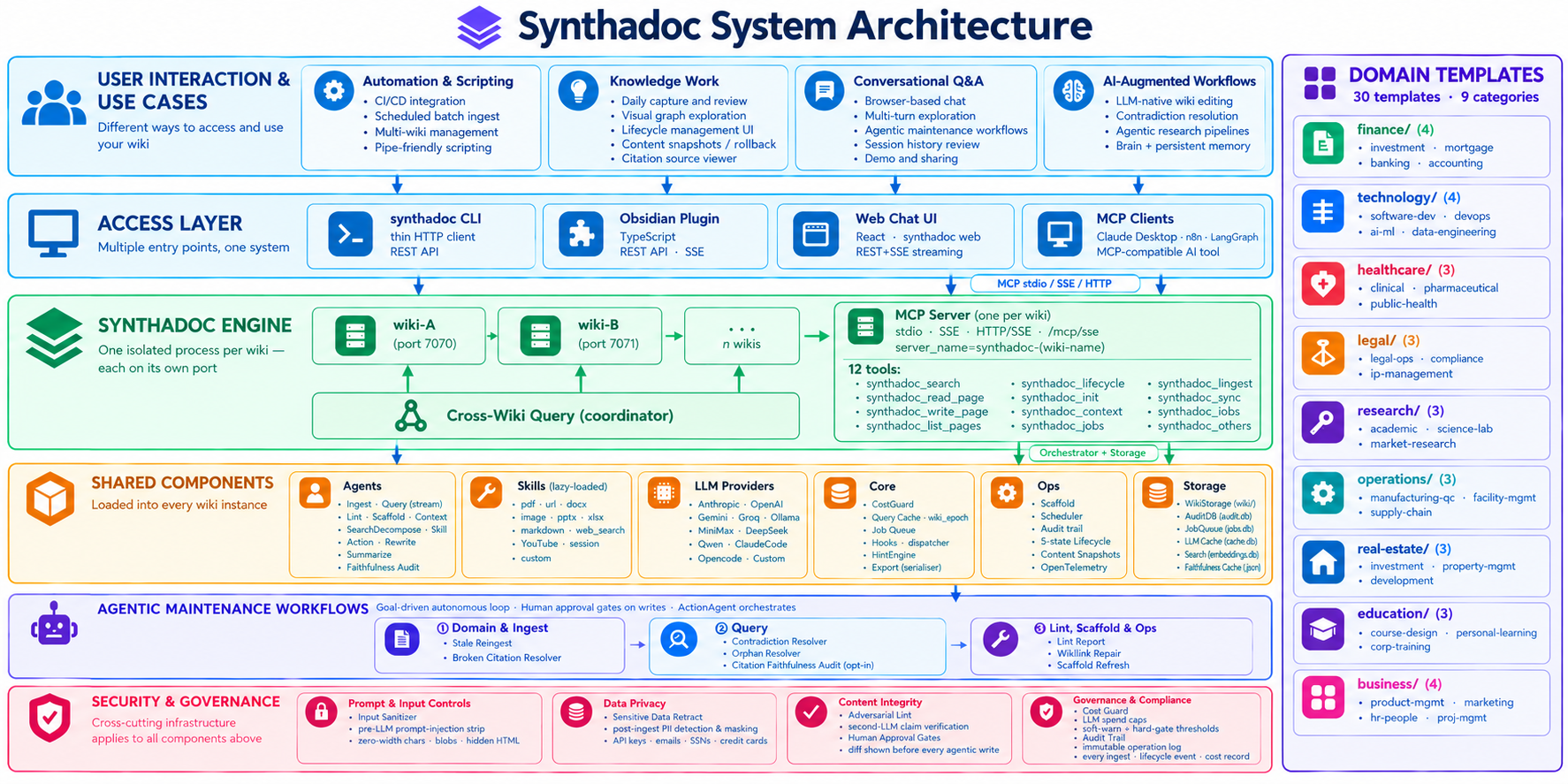 | High | 9/22/2026 |
| v1.3.4 | # Synthadoc Community Edition v1.3.4 Release Notes **Synthadoc Community Edition v1.3.4 is released.** --- ## Overview v1.3.4 is a bug-fix and polish release. No breaking changes. Key themes: hint chip reliability, domain template freshness, and a collection of server/CLI stability fixes accumulated since v1.3.3. --- ## Commits since v1.3.3 | Commit | Description | High | 9/17/2026 |
| v1.3.3 | # Synthadoc Community Edition v1.3.3 Release Notes **Synthadoc Community Edition v1.3.3 is released.** --- ## Summary This release ships **Domain Template Support** - 30 professionally authored wiki templates across 9 industry verticals. With one install command you get a fully-wired knowledge base: pre-built routing, domain-tuned agent guidelines, curated seed URLs, and blank intake forms for every source type your team uses. The template library spans finance, technology, healthcare, | High | 9/10/2026 |
| v1.3.2 | # Synthadoc Community Edition v1.3.2 Release Notes **Synthadoc Community Edition v1.3.2 is released.** --- ## Overview v1.3.2 delivers three major features across data privacy, citation integrity, and provider flexibility, alongside a set of targeted bug fixes. Every feature is accessible from both the web UI and the CLI, and all seven agentic maintenance workflows now also run cleanly under Claude Code and Opencode as CLI providers (no API key required). --- ## Major Features | High | 9/2/2026 |
| v1.3.0 | # Synthadoc Community Edition v1.3.0 Release Notes **Synthadoc Community Edition v1.3.0 is released.** --- ## Summary This release introduces three major features. The adversarial lint gate automatically demotes pages with dubious or unsupported claims. The contradiction resolver workflow interactively walks through contradicted pages one at a time, showing a full diff and asking for your approval before fixing contradiction issues. The pluggable workflow CLI unifies all six maintena | High | 8/19/2026 |
| v1.2.0 | # Synthadoc Community Edition v1.2.0 Release Notes **Synthadoc Community Edition v1.2.0 is released.** **Release Type:** Feature release — two major capabilities --- ## What's New in v1.2.0 ### 1. Content Snapshots & Rollback Every wiki page now carries a full audit trail of its content, not just who changed its lifecycle state, but exactly what the page said at each transition point. Snapshots are captured automatically; nothing needs to be configured. **When a snapshot is re | High | 8/7/2026 |
| v1.1.3 | # Synthadoc Community Edition v1.1.3 Release Notes **Synthadoc Community Edition v1.1.3 is released.** > **Patch release for the production env.** Single dependency fix. Upgrade recommended for all v1.1.2 users. --- ## Installation / Upgrade ### New Install ``` pip install synthadoc synthadoc --version # should print 1.1.3 synthadoc install history-of-computing --target ~/wikis --demo ``` ### Upgrade from v1.1.2 or an ealier release ``` pip install synthadoc --upgr | Medium | 7/27/2026 |
| v1.1.0 | # Synthadoc Community Edition v1.1.0 Release Notes **Synthadoc Community Edition v1.1.0 is released.** v1.1.0 ships five major features that deepen the knowledge graph experience, bring first-class support for every major AI coding tool, and let you capture knowledge that was previously ephemeral. --- ## Installation / Upgrade ### New install ```bash pip install synthadoc synthadoc --version # should print 1.1.0 synthadoc install history-of-computing --target ~/wikis --d | High | 7/20/2026 |
| v1.0.2 | # Synthadoc Community Edition v1.0.2 Release Notes **Synthadoc Community Edition v1.0.2 is released.** A fixpack release featuring cascade link cleanup on archive as the headline feature, alongside a comprehensive set of citation reliability fixes, truncation improvements, audit and cost recording corrections, and Obsidian plugin enhancements. --- ## Cascade Link Cleanup on Archive When any page is archived — via CLI, Obsidian Lifecycle modal, MCP `synthadoc_lifecycle` tool, or au | High | 7/14/2026 |
| v1.0.0 | Synthadoc Community Edition v1.0 Release Notes ## Synthadoc Community Edition v1.0 is released. Five features focused on source quality, retrieval accuracy, and knowledge structure. The foundation work that makes a wiki trustworthy at scale. --- ## 1. Pre-LLM Source Sanitizer Every source document is now cleaned before any LLM call. The sanitizer removes six categories of content that degrade synthesis quality or pose prompt-injection risk, at zero LLM cost. **What is removed:* | High | 7/4/2026 |
| v0.9.3 | Synthadoc Community Edition v0.9.3 Release Notes ## Synthadoc Community Edition v0.9.3 is released. Three features focused on operational reliability, distribution quality, and standalone agent extensibility. --- ## 1. Backup and Restore `synthadoc backup` and `synthadoc restore` give you a complete, portable snapshot of any wiki, including compiled pages, audit trail, lifecycle state, ingest sources, and the Obsidian plugin configuration. ```bash # Create a timestamped backup | High | 6/26/2026 |
| v0.9.0 | ## Synthadoc Community Edition v0.9.0 is released. Two new features focused on AI agent integration and knowledge interoperability. --- ## 1. MCP Full Support: Synthadoc as a Persistent AI Memory Layer Synthadoc now exposes a complete Model Context Protocol server with **12 tools** mounted on the existing HTTP server, no extra port or process required. **The key architectural point:** Claude is the brain (synthesis, editorial judgment, tool chaining); Synthadoc is the memory (BM25 | High | 6/19/2026 |
| v0.8.0 | ## Synthadoc Community Edition v0.8.0 is released. # Three new features focused on conversational depth, provider choice, and operational visibility: 1. Multi-turn Conversation: the Query Web UI now maintains full conversation history across turns within a session. Follow-up questions like "Which company did they work for?" or "What other inventions came out of that same lab?" resolve correctly because the server injects prior turns into every request and rewrites context-dependent phrases | High | 6/12/2026 |
| v0.7.0 | ## Synthadoc v0.7.0 Community Edition: Key Highlights ## Local Web Chat UI 'synthadoc web' CLI starts a local chat interface in your browser, local-only, nothing leaves your machine. Use it the same way you use the CLI: ask questions about your wiki's domain and get streamed, cited answers. Beyond content queries, the UI also auto-detects the health of your wiki (Explorer, Health Check, or Power User mode) and surfaces context-appropriate prompts: if your wiki has orphan pages or cont | High | 6/5/2026 |
| v0.6.0 | ## Synthadoc v0.6.0 Community Edition: Key Highlights # Page lifecycle machine 5-State Page Lifecycle: pages now move through five states: draft → active → stale → contradicted → archived. Transitions are mostly automatic: a clean lint pass promotes draft to active; a SHA-256 hash mismatch on the source file marks the page stale; ingesting a conflicting source marks it contradicted. Every transition is permanently logged with who triggered it, when, and why, so you have an auditable trail | High | 5/29/2026 |
| v0.5.0 | ## Synthadoc v0.5.0 Community Edition: Key Highlights ### Adversarial Review A second independent LLM interrogates every compiled page for epistemic overreach, unsupported generalisations, and internal contradictions - using a different model from the one that wrote the page. Warnings land in a dedicated tab in the Obsidian lint modal, in YAML frontmatter (lint_warnings) on each page, and in the lint report JSON. Assign any provider/model as the judge (agents.adversarial in config.toml) | High | 5/22/2026 |
| v0.4.0 | # Synthadoc v0.4.0 Feature Highlights v0.4.0 addresses what happens when the wiki grows large enough that a flat architecture starts showing cracks - query scope, write-path quality, and piping structured knowledge into external agents without losing control of the token envelope. - Routing layer with branch taxonomy: A ROUTING.md file at the wiki root maps topic branches to page slugs, using the same ## Heading → [[slug]] structure as index.md. At query time, an LLM selects the 1–2 most r | High | 5/11/2026 |
| v0.3.0 | ## Synthadoc v0.3.0 Feature Highlights v0.3.0 expands on the same architecture - the big additions this cycle are around what can go into the wiki, and removing the friction of needing a separate API key. ( https://github.com/axoviq-ai/synthadoc ) - Zero-API-key LLM providers - if you already pay for Claude Code or Opencode, one config line (provider = "claude-code") routes all three agents (ingest, query, lint) through your existing subscription. No separate API keys or Anthropic/OpenA | High | 5/4/2026 |
| v0.2.0 | ## Synthadoc v0.2.0 Feature Highlights: - Query decomposition: compound questions automatically split into parallel BM25 sub-queries and merged before synthesis - Knowledge gap detection: queries that hit thin coverage return targeted synthadoc ingest "search for: …" suggestions as an Obsidian callout - Web search decomposition: broad search intents split into focused keyword queries before Tavily fetch, with URL deduplication and a configurable result cap - Semantic re-ranking: opt-in vec | High | 4/24/2026 |
| v0.1.0 | ## What's Changed * Release v0.1 — skills v2, Obsidian plugin enhancements, bug fixes by @paulmchen in https://github.com/axoviq-ai/synthadoc/pull/1 * v0.1 complete — startup banner, doc updates, pyproject cleanup by @paulmchen in https://github.com/axoviq-ai/synthadoc/pull/2 * feat: v0.1 — multi-provider LLM, web search, two-step ingest, purpose/overview pages, audit CLI by @paulmchen in https://github.com/axoviq-ai/synthadoc/pull/3 * fix: add missing ingest_agent.py changes and update docs | High | 4/15/2026 |