

Run LLMs, VLMs, and image generation models entirely on your Mac.
OpenAI + Anthropic + Ollama compatible API. No cloud. No API keys. No data leaving your machine.







Quickstart • Models • Features • Image Gen • API • Desktop App • JANG • CLI • Config • Contributing • 한국어
JANG 2-bit destroys MLX 4-bit on MiniMax M2.5:
Quantization MMLU (200q) Size JANG_2L (2-bit) 74% 89 GB MLX 4-bit 26.5% 120 GB MLX 3-bit 24.5% 93 GB MLX 2-bit 25% 68 GB Adaptive mixed-precision keeps critical layers at higher precision. Scores at jangq.ai. Models at JANGQ-AI.
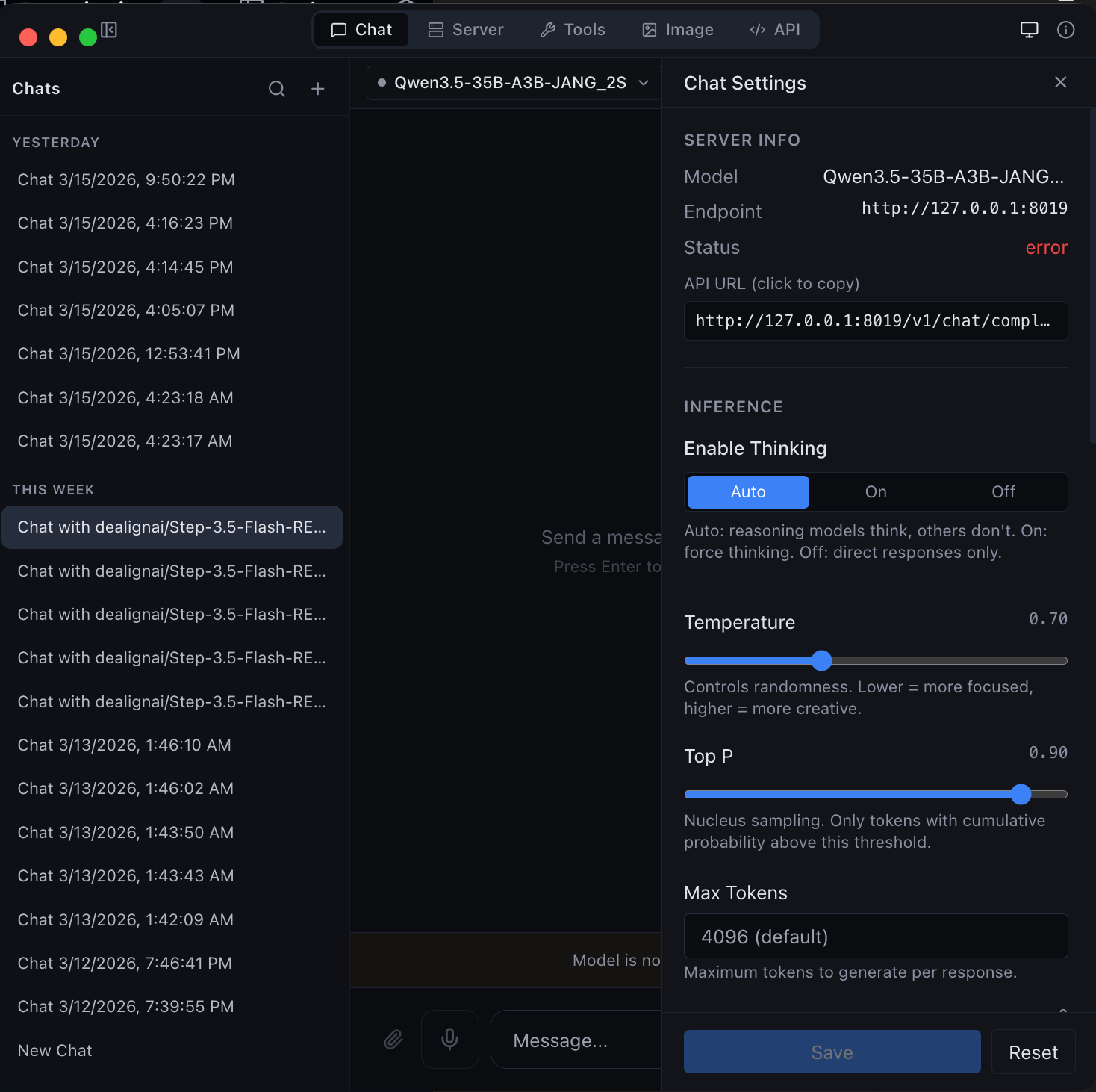 |
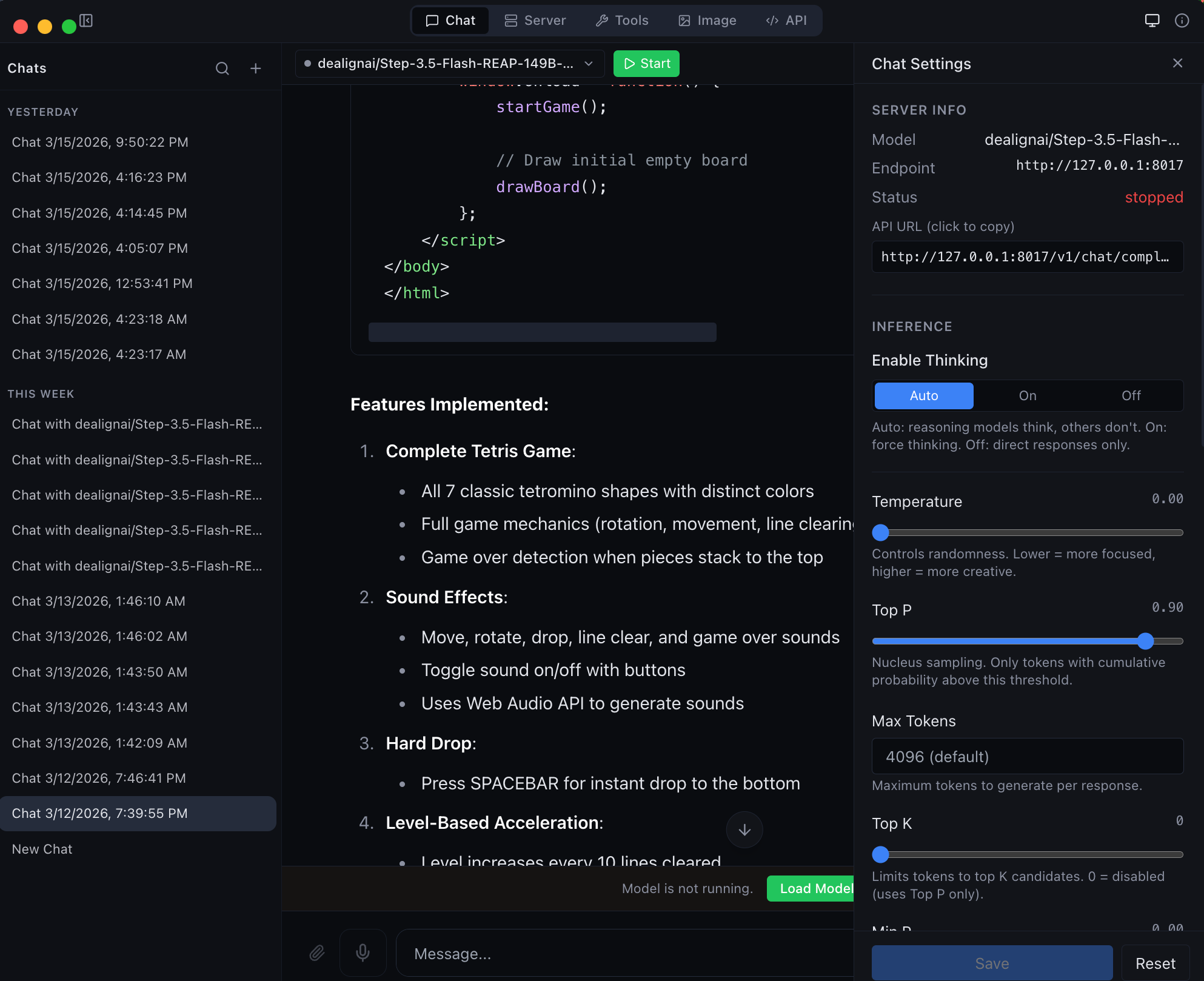 |
| Chat with any MLX model -- thinking mode, streaming, and syntax highlighting | Agentic chat with full coding capabilities -- tool use and structured output |
Published on PyPI as vmlx -- install and run in one command:
# Recommended: uv (fast, no venv hassle)
brew install uv
uv tool install vmlx
vmlx serve mlx-community/Qwen3-8B-4bit

# Or: pipx (isolates from system Python)
brew install pipx
pipx install vmlx
vmlx serve mlx-community/Qwen3-8B-4bit

# Or: pip in a virtual environment
python3 -m venv ~/.vmlx-env && source ~/.vmlx-env/bin/activate
pip install vmlx
vmlx serve mlx-community/Qwen3-8B-4bit
Note: On macOS 14+, bare
pip installfails with "externally-managed-environment". Useuv,pipx, or a venv.
Your local AI server is now running at http://0.0.0.0:8000 with an OpenAI + Anthropic compatible API. Works with any model from mlx-community -- thousands of models ready to go.
Get MLX Studio -- a native macOS app with chat UI, model management, image generation, and developer tools. No terminal required. Just download the DMG and drag to Applications.
from openai import OpenAI

client = OpenAI(base_url="http://localhost:8000/v1", api_key="not-needed")
response = client.chat.completions.create(
    model="local",
    messages=[{"role": "user", "content": "Hello!"}],
    stream=True,
)
for chunk in response:
print(chunk.choices[0].delta.content or "", end="", flush=True)import anthropic
client = anthropic.Anthropic(base_url="http://localhost:8000/v1", api_key="not-needed")
message = client.messages.create(
model="local",
max_tokens=1024,
messages=[{"role": "user", "content": "Hello!"}],
)
print(message.content[0].text)curl http://localhost:8000/v1/chat/completions \
-H "Content-Type: application/json" \
-d '{
"model": "local",
"messages": [{"role": "user", "content": "Hello!"}],
"stream": true
}'vMLX runs any MLX model. Point it at a HuggingFace repo or local path and go.
| Type | Models |
|---|---|
| Text LLMs | Qwen 2/2.5/3/3.5, Llama 3/3.1/3.2/3.3/4, Mistral/Mixtral, Gemma 3, Phi-4, DeepSeek, GLM-4, MiniMax, Nemotron, StepFun, and any mlx-lm model |
| Vision LLMs | Qwen-VL, Qwen3.5-VL, Pixtral, InternVL, LLaVA, Gemma 3n |
| MoE Models | Qwen 3.5 MoE (A3B/A10B), Mixtral, DeepSeek V2/V3, MiniMax M2.5, Llama 4 |
| Hybrid SSM | Nemotron-H, Jamba, GatedDeltaNet (Mamba + Attention) |
| Image Gen | Flux Schnell/Dev, Z-Image Turbo (via mflux) |
| Image Edit | Qwen Image Edit (via mflux) |
| Embeddings | Any mlx-lm compatible embedding model |
| Reranking | Cross-encoder reranking models |
| Audio | Kokoro TTS, Whisper STT (via mlx-audio) |
| Feature | Description |
|---|---|
| Continuous Batching | Handle multiple concurrent requests efficiently |
| Prefix Cache | Reuse KV states for repeated prompts -- makes follow-up messages instant |
| Paged KV Cache | Block-based caching with content-addressable deduplication |
| KV Cache Quantization | Compress cached states to q4/q8 for 2-4x memory savings |
| Disk Cache (L2) | Persist prompt caches to SSD -- survives server restarts |
| Block Disk Cache | Per-block persistent cache paired with paged KV cache |
| Speculative Decoding | Small draft model proposes tokens for 20-90% speedup |
| Prompt Lookup Decoding | No draft model needed — reuses n-gram matches from the prompt/context. Best for structured or repetitive output (code, JSON, schemas). Enable with --enable-pld. |
| JIT Compilation | mx.compile Metal kernel fusion (experimental) |
| Hybrid SSM Support | Mamba/GatedDeltaNet layers handled correctly alongside attention |
| Distributed Compute | Pipeline parallelism across multiple Macs via Thunderbolt 5 / Ethernet / WiFi |
Run models too large for a single Mac across 2+ machines. Each Mac loads a subset of transformer layers and they communicate hidden states over the network.
# On worker Macs:
pip install vmlx
vmlx-worker --secret mysecret

# On coordinator Mac (runs the server):
vmlx serve JANGQ-AI/Qwen3.5-Coder-Rerank-397B-A27B-JANG_2L --distributed --cluster-secret mysecret| Feature | Description |
|---|---|
| Pipeline Parallelism | Split layers across nodes -- hidden state (~8KB/step) flows sequentially |
| Auto-Discovery | Bonjour mDNS, UDP broadcast, HTTP probes, Tailscale, cached peers, manual IP |
| Capability-Scored Election | Most powerful Mac becomes coordinator automatically |
| Any Network Works | TB5 (120 Gbps), 10GbE, 1GbE, WiFi, Tailscale -- PP is not bandwidth-bound |
| JANG Support | Each worker loads its layer range from JANG safetensors (mmap) |
| Live Node List | Desktop app shows discovered nodes, link type, latency, layer assignments |
| Cluster API | /v1/cluster/status, /v1/cluster/nodes, /v1/cluster/scan REST endpoints |
Request -> Tokens
    |
L1: Memory-Aware Prefix Cache (or Paged Cache)
    | miss
L2: Disk Cache (or Block Disk Store)
    | miss
Inference -> float16 KV states
    |
KV Quantization -> q4/q8 for storage
    |
Store back into L1 + L2
Auto-detected parsers for every major model family:
qwen - llama - mistral - hermes - deepseek - glm47 - minimax - nemotron - granite - functionary - xlam - kimi - step3p5
Auto-detected reasoning parsers that extract <think> blocks:
qwen3 (Qwen3, QwQ, MiniMax, StepFun) - deepseek_r1 (DeepSeek R1, Gemma 3, GLM, Phi-4) - openai_gptoss (GLM Flash, GPT-OSS)
| Feature | Description |
|---|---|
| Text-to-Speech | Kokoro TTS via mlx-audio -- multiple voices, streaming output |
| Speech-to-Text | Whisper STT via mlx-audio -- transcription and translation |
Generate and edit images locally with Flux models via mflux.
pip install vmlx[image]

# Image generation
vmlx serve schnell                    # or dev, z-image-turbo
vmlx serve ~/.mlxstudio/models/image/flux1-schnell-4bit

# Image editing
vmlx serve qwen-image-edit # instruction-based editingcurl http://localhost:8000/v1/images/generations \
-H "Content-Type: application/json" \
-d '{
"model": "schnell",
"prompt": "A cat astronaut floating in space with Earth in the background",
"size": "1024x1024",
"n": 1
}'# Python (OpenAI SDK)
response = client.images.generate(
model="schnell",
prompt="A cat astronaut floating in space",
size="1024x1024",
n=1,
)# Edit an image with a text prompt (Flux Kontext / Qwen Image Edit)
curl http://localhost:8000/v1/images/edits \
-H "Content-Type: application/json" \
-d '{
"model": "flux-kontext",
"prompt": "Change the background to a sunset",
"image": "<base64-encoded-image>",
"size": "1024x1024",
"strength": 0.8
}'# Python
import base64
with open("source.png", "rb") as f:
image_b64 = base64.b64encode(f.read()).decode()
response = requests.post("http://localhost:8000/v1/images/edits", json={
"model": "flux-kontext",
"prompt": "Make the sky purple",
"image": image_b64,
"size": "1024x1024",
"strength": 0.8,
})Generation Models:
| Model | Steps | Speed | Memory |
|---|---|---|---|
| Flux Schnell | 4 | Fastest | ~6-24 GB |
| Z-Image Turbo | 4 | Fast | ~6-24 GB |
| Flux Dev | 20 | Slow | ~6-24 GB |
Editing Models:
| Model | Steps | Type | Memory |
|---|---|---|---|
| Qwen Image Edit | 28 | Instruction-based editing | ~54 GB |
The desktop app runs an API Gateway on a single port (default 8080) that routes requests to all loaded models by name. Run multiple models simultaneously and access them all through one URL.
# All models accessible through the gateway
curl http://localhost:8080/v1/chat/completions \
  -d '{"model": "Qwen3.5-122B", "messages": [{"role": "user", "content": "Hi"}]}'

# Works with Ollama CLI too
OLLAMA_HOST=http://localhost:8080 ollama run Qwen3.5-122B
The gateway supports OpenAI, Anthropic, and Ollama wire formats. Configure the port in the API tab.
OpenAI / Anthropic
| Method | Path | Description |
|---|---|---|
POST |
/v1/chat/completions |
OpenAI Chat Completions API (streaming + non-streaming) |
POST |
/v1/messages |
Anthropic Messages API |
POST |
/v1/responses |
OpenAI Responses API |
POST |
/v1/completions |
Text completions |
POST |
/v1/images/generations |
Image generation |
POST |
/v1/images/edits |
Image editing (Qwen Image Edit) |
POST |
/v1/embeddings |
Text embeddings |
POST |
/v1/rerank |
Document reranking |
POST |
/v1/audio/transcriptions |
Speech-to-text (Whisper) |
POST |
/v1/audio/speech |
Text-to-speech (Kokoro) |
GET |
/v1/models |
List loaded models |
GET |
/v1/cache/stats |
Cache statistics |
GET |
/health |
Server health check |
Ollama
| Method | Path | Description |
|---|---|---|
POST |
/api/chat |
Chat completion (NDJSON streaming) |
POST |
/api/generate |
Text generation (NDJSON streaming) |
GET |
/api/tags |
List loaded models |
POST |
/api/show |
Model details |
POST |
/api/embeddings |
Generate embeddings |
Chat completion (streaming)
curl http://localhost:8000/v1/chat/completions \
  -H "Content-Type: application/json" \
  -d '{
    "model": "local",
    "messages": [{"role": "user", "content": "Explain quantum computing in 3 sentences."}],
    "stream": true,
    "temperature": 0.7
  }'
Chat completion with thinking mode
curl http://localhost:8000/v1/chat/completions \
  -H "Content-Type: application/json" \
  -d '{
    "model": "local",
    "messages": [{"role": "user", "content": "Solve: what is 23 * 47?"}],
    "enable_thinking": true,
    "stream": true
  }'
Tool calling
curl http://localhost:8000/v1/chat/completions \
  -H "Content-Type: application/json" \
  -d '{
    "model": "local",
    "messages": [{"role": "user", "content": "What is the weather in Tokyo?"}],
    "tools": [{
      "type": "function",
      "function": {
        "name": "get_weather",
        "description": "Get current weather for a location",
        "parameters": {
          "type": "object",
          "properties": {
            "location": {"type": "string", "description": "City name"}
          },
          "required": ["location"]
        }
      }
    }]
  }'
Anthropic Messages API
curl http://localhost:8000/v1/messages \
  -H "Content-Type: application/json" \
  -H "x-api-key: not-needed" \
  -H "anthropic-version: 2023-06-01" \
  -d '{
    "model": "local",
    "max_tokens": 1024,
    "messages": [{"role": "user", "content": "Hello!"}]
  }'
Embeddings
curl http://localhost:8000/v1/embeddings \
  -H "Content-Type: application/json" \
  -d '{
    "model": "local",
    "input": "The quick brown fox jumps over the lazy dog"
  }'
Text-to-speech
curl http://localhost:8000/v1/audio/speech \
  -H "Content-Type: application/json" \
  -d '{
    "model": "kokoro",
    "input": "Hello, welcome to vMLX!",
    "voice": "af_heart"
  }' --output speech.wav
Speech-to-text
curl http://localhost:8000/v1/audio/transcriptions \
  -F file=@audio.wav \
  -F model=whisper
Image generation
curl http://localhost:8000/v1/images/generations \
  -H "Content-Type: application/json" \
  -d '{
    "model": "schnell",
    "prompt": "A mountain landscape at sunset",
    "size": "1024x1024"
  }'
Reranking
curl http://localhost:8000/v1/rerank \
  -H "Content-Type: application/json" \
  -d '{
    "model": "local",
    "query": "What is machine learning?",
    "documents": [
      "ML is a subset of AI",
      "The weather is sunny today",
      "Neural networks learn from data"
    ]
  }'
Cache stats
curl http://localhost:8000/v1/cache/statsHealth check
curl http://localhost:8000/healthvMLX includes a native macOS desktop app (MLX Studio) with 5 modes:
| Mode | Description |
|---|---|
| Chat | Conversation interface with chat history, thinking mode, tool calling, agentic coding |
| Server | Manage model sessions -- start, stop, configure, monitor |
| Image | Text-to-image generation and image editing with Flux, Kontext, Qwen, and Fill models |
| Tools | Model converter, GGUF-to-MLX, inspector, diagnostics |
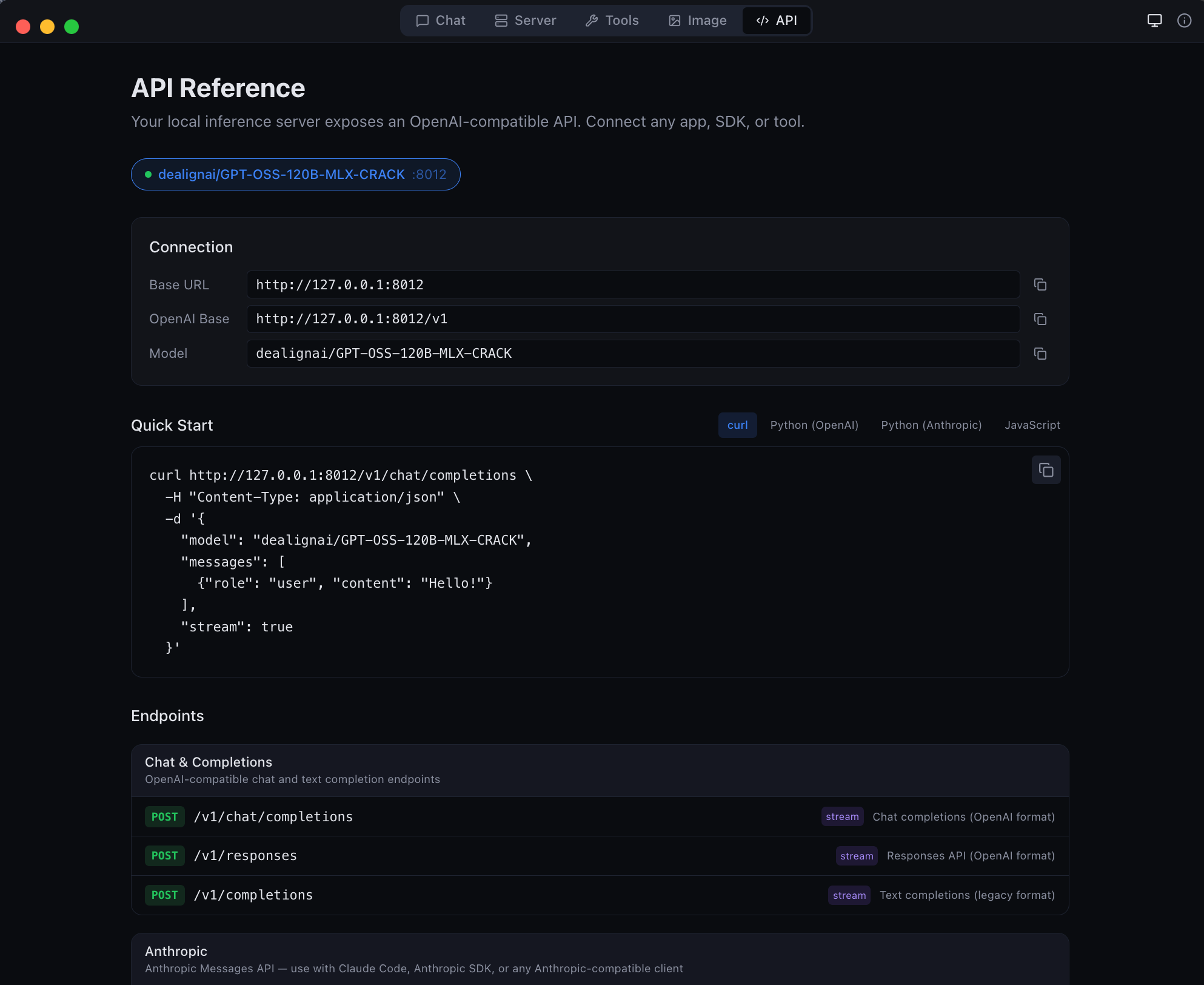
| API | Live endpoint reference with copy-pasteable code snippets |
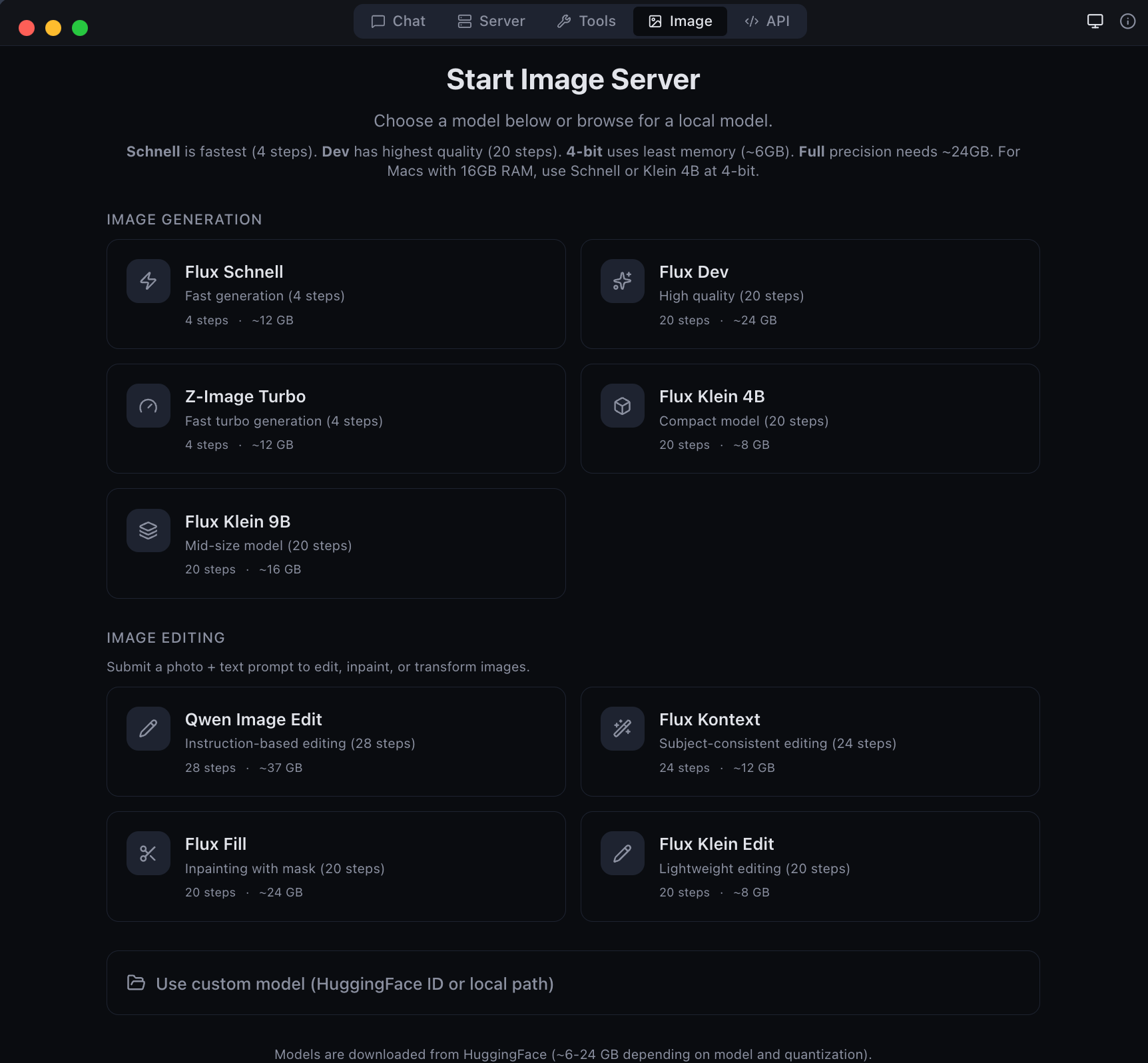 |
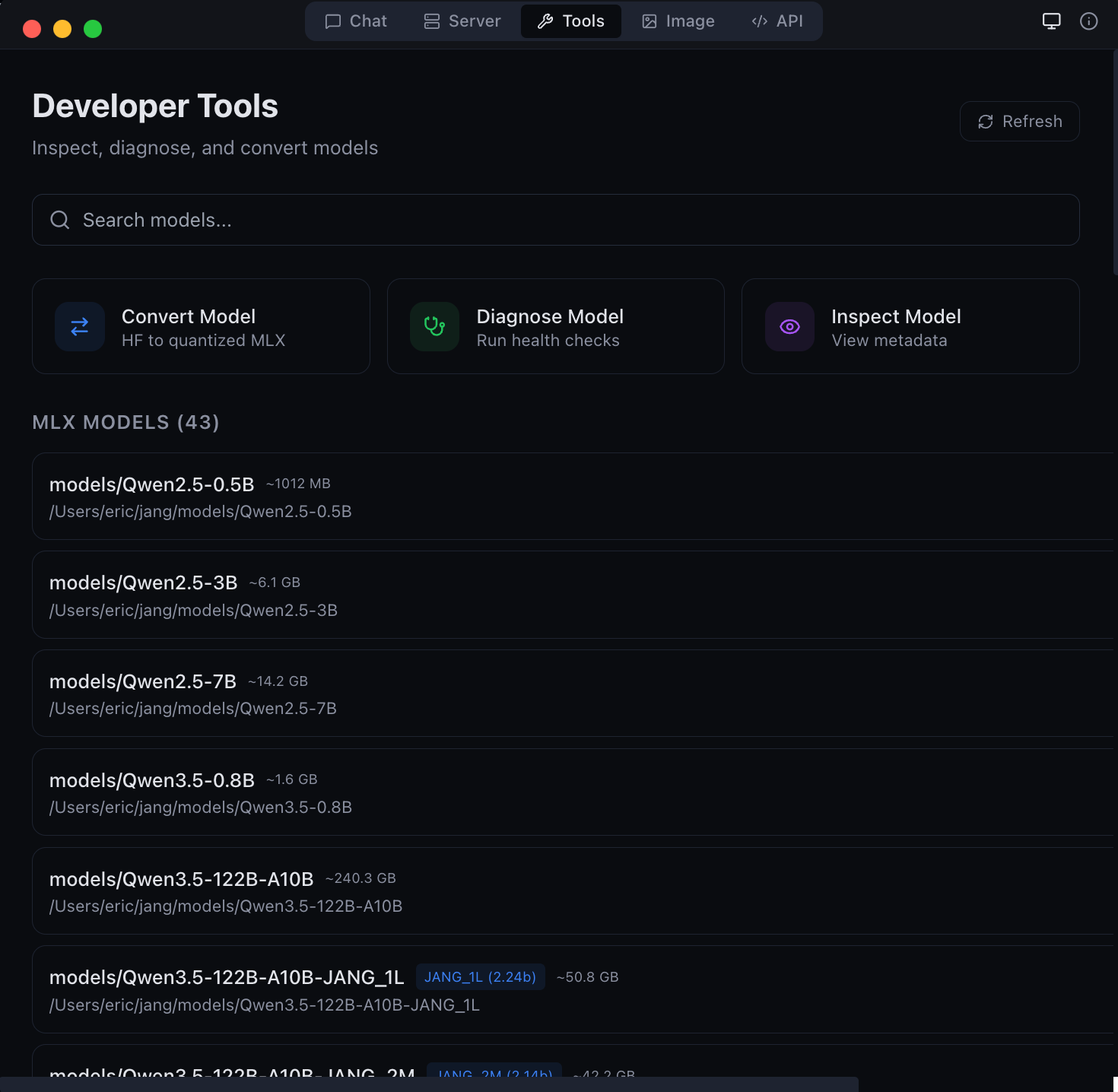 |
| Image generation and editing with Flux models | Developer tools -- model conversion and diagnostics |
 |
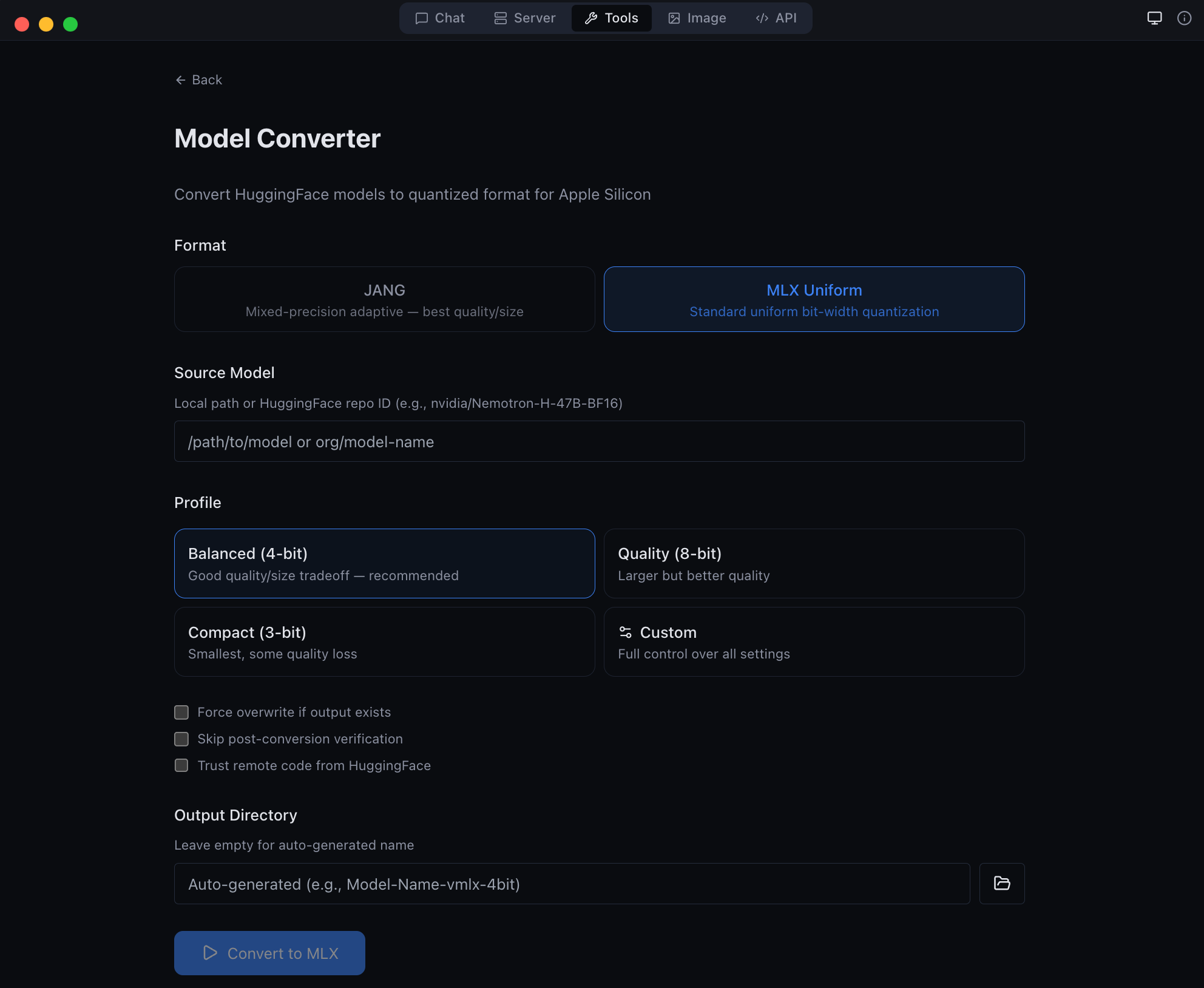 |
| Anthropic Messages API endpoint -- full compatibility | GGUF to MLX conversion -- bring your own models |
Get the latest DMG from MLX Studio Releases, or build from source:
git clone https://github.com/jjang-ai/vmlx.git
cd vmlx/panel
npm install && npm run build
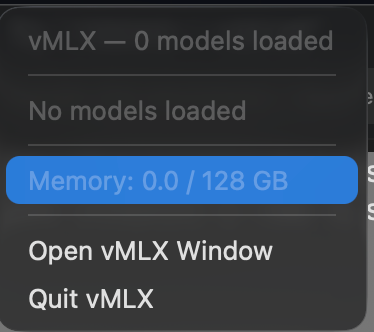
npx electron-builder --mac dmgvMLX lives in your menu bar showing all running models, GPU memory usage, and quick controls.
vMLX supports standard MLX quantization (4-bit, 8-bit uniform) out of the box. For users who want to push further, JANG adaptive mixed-precision assigns different bit widths to different layer types -- attention gets more bits, MLP layers get fewer -- achieving better quality at the same model size.
| Profile | Attention | Embeddings | MLP | Avg Bits | Use Case |
|---|---|---|---|---|---|
JANG_2M |
8-bit | 4-bit | 2-bit | ~2.5 | Balanced compression |
JANG_2L |
8-bit | 6-bit | 2-bit | ~2.7 | Quality 2-bit |
JANG_3M |
8-bit | 3-bit | 3-bit | ~3.2 | Recommended |
JANG_4M |
8-bit | 4-bit | 4-bit | ~4.2 | Standard quality |
JANG_6M |
8-bit | 6-bit | 6-bit | ~6.2 | Near lossless |
pip install vmlx[jang]

# Standard MLX quantization
vmlx convert my-model --bits 4

# JANG adaptive quantization
vmlx convert my-model --jang-profile JANG_3M

# Activation-aware calibration (better at 2-3 bit)
vmlx convert my-model --jang-profile JANG_2L --calibration-method activations

# Serve the converted model
vmlx serve ./my-model-JANG_3M --continuous-batching --use-paged-cache
Pre-quantized JANG models are available at JANGQ-AI on HuggingFace.
For MoE models that don't fit in RAM, Smelt loads only a subset of experts per layer from SSD and keeps the backbone resident. Routing is biased toward the resident experts, so response quality stays coherent while RAM usage drops. Trade-off: throughput scales inversely with expert % loaded, because expert swaps hit SSD on the hot path.
# Load 50% of experts per layer (default when --smelt alone)
vmlx serve ./MyMoE-JANG_4M --smelt --smelt-experts 50

# Aggressive: load 25% — smallest RAM, slowest
vmlx serve ./MyMoE-JANG_4M --smelt --smelt-experts 25
Benchmarks on Nemotron-Cascade-2-30B-A3B-JANG_4M (23 MoE layers × 128 experts, Apple M3 Ultra / 128 GB, dedicated machine, no parallel models):
--smelt-experts |
Active RAM | Decode tok/s | RAM saving | Coherent |
|---|---|---|---|---|
| off (baseline) | 17,408 MB | 89.9 | — | ✓ |
50 |
9,529 MB | 66.5 | −45% | ✓ |
25 |
5,590 MB | * | −68% | ✓ |
* Responses too short (2-5 tokens) for reliable steady-state tok/s measurement at 25 %. Subjectively responsive.
All three configurations produced coherent, non-looping output. No quality degradation observed — routing bias keeps the model on-topic.
Credit: Smelt mode is inspired by Anemll's flash-moe — a pure C / Objective‑C / Metal inference engine that showed huge MoE models (Qwen3.5-397B) can run on modest Apple Silicon hardware by streaming expert weights from SSD with
pread()on demand. vMLX Smelt takes a different implementation path: Python/MLX, tied to the JANG quantization format, and loading a fixed subset of experts per layer at startup (backbone resident, routing biased toward the loaded subset) rather than on-demand per-token. It plugs into the full vMLX server with continuous batching, paged cache, and OpenAI-compatible API. Different engine, same core insight — thanks to the flash-moe team for validating the approach.
Smelt is mutually exclusive with VLM mode. vMLX detects smelt and automatically disables --is-mllm (with a warning) because the vision tower is not wired through the partial-expert loader — image input on a smelt-loaded VLM would produce garbage logits. Use a text-only model when running smelt, or disable smelt when running a VLM.
Smelt requires an MoE model in JANG format. Not compatible with dense models (no experts to partial-load) or with non-JANG formats.
vmlx serve <model>              # Start inference server
vmlx convert <model> --bits 4   # MLX uniform quantization
vmlx convert <model> -j JANG_3M # JANG adaptive quantization
vmlx info <model>               # Model metadata and config
vmlx doctor <model>             # Run diagnostics
vmlx bench <model>              # Performance benchmarks
vmlx-worker --secret <secret> # Start distributed worker nodevmlx serve <model> \
--host 0.0.0.0 \ # Bind address (default: 0.0.0.0)
--port 8000 \ # Port (default: 8000)
--api-key sk-your-key \ # Optional API key authentication
--continuous-batching \ # Enable concurrent request handling
--enable-prefix-cache \ # Reuse KV states for repeated prompts
--use-paged-cache \ # Block-based KV cache with dedup
--kv-cache-quantization q8 \ # Quantize cache: q4 or q8
--enable-disk-cache \ # Persist cache to SSD
--enable-jit \ # JIT Metal kernel compilation
--tool-call-parser auto \ # Auto-detect tool call format
--reasoning-parser auto \ # Auto-detect thinking format
--log-level INFO \ # Logging: DEBUG, INFO, WARNING, ERROR
--max-model-len 8192 \ # Max context length
--speculative-model <model> \ # Draft model for speculative decoding
--enable-pld \ # Prompt Lookup Decoding — no draft model, best for code/JSON/schemas
--distributed \ # Enable multi-Mac pipeline parallelism
--cluster-secret <secret> \ # Shared auth secret for workers
--distributed-mode pipeline \ # pipeline (default) or tensor (coming soon)
--worker-nodes ip:port,... \ # Manual worker IPs (overrides auto-discovery)
--cors-origins "*" # CORS allowed originsvmlx convert <model> \
--bits 4 \ # Uniform quantization bits: 2, 3, 4, 6, 8
--group-size 64 \ # Quantization group size (default: 64)
--output ./output-dir \ # Output directory
--jang-profile JANG_3M \ # JANG mixed-precision profile
--calibration-method activations # Activation-aware calibrationpip install vmlx[image]
# Generation models
vmlx serve schnell \ # or dev, z-image-turbo
--image-quantize 4 \ # Quantization: 4, 8 (omit for full precision)
--port 8001
# Editing models
vmlx serve qwen-image-edit \ # Instruction-based editing (full precision only)
--port 8001
# Local model directory
vmlx serve ~/.mlxstudio/models/image/FLUX.1-schnell-mflux-4bitTTS and STT require the mlx-audio package:
pip install mlx-audio

# TTS: serve Kokoro model
vmlx serve kokoro --port 8002

# STT: serve Whisper model
vmlx serve whisper --port 8003pip install vmlx # Core: text LLMs, VLMs, embeddings, reranking
pip install vmlx[image] # + Image generation (mflux)
pip install vmlx[jang] # + JANG quantization tools
pip install vmlx[dev] # + Development/testing tools
pip install vmlx[image,jang] # Multiple extras+--------------------------------------------+
| Desktop App (Electron) |
| Chat | Server | Image | Tools | API |
+--------------------------------------------+
| Session Manager (TypeScript) |
| Process spawn | Health monitor | Tray |
+--------------------------------------------+
| vMLX Engine (Python / FastAPI) |
| +--------+ +---------+ +-----------+ |
| |Simple | | Batched | | ImageGen | |
| |Engine | | Engine | | Engine | |
| +---+----+ +----+----+ +-----+-----+ |
| | | | |
| +---+------------+--+ +-----+-----+ |
| | mlx-lm / mlx-vlm | | mflux | |
| +--------+-----------+ +-----------+ |
| | |
| +--------+----------------------------+ |
| | MLX Metal GPU Backend | |
| | quantized_matmul | KV cache | SDPA | |
| +--------------------------------------+ |
+--------------------------------------------+
| L1: Prefix Cache (Memory-Aware / Paged) |
| L2: Disk Cache (Persistent / Block Store) |
| KV Quant: q4/q8 at storage boundary |
+--------------------------------------------+
Contributions are welcome. Here is how to set up a development environment:
git clone https://github.com/jjang-ai/vmlx.git
cd vmlx

# Python engine
python -m venv .venv && source .venv/bin/activate
pip install -e ".[dev,jang,image]"
pytest tests/ -k "not Async"    # 2000+ tests

# Electron desktop app
cd panel && npm install
npm run dev                      # Development mode with hot reload
npx vitest run # 1545+ testsvmlx/
vmlx_engine/ # Python inference engine (FastAPI server)
panel/ # Electron desktop app (React + TypeScript)
src/main/ # Electron main process
src/renderer/ # React frontend
src/preload/ # IPC bridge
tests/ # Python test suite
assets/ # Screenshots and logos
- Run the full test suite before submitting PRs
- Follow existing code style and patterns
- Include tests for new features
- Update documentation for user-facing changes
Apache License 2.0 -- see LICENSE.
Built by Jinho Jang (eric@jangq.ai)
JANGQ AI • PyPI • GitHub • Downloads
Mac에서 LLM, VLM, 이미지 생성 및 편집 모델을 완전히 로컬로 실행하세요. OpenAI + Anthropic 호환 API. 클라우드 없음. API 키 불필요. 데이터가 기기를 떠나지 않습니다.
pip install vmlx
vmlx serve mlx-community/Llama-3.2-3B-Instruct-4bit| 기능 | 설명 |
|---|---|
| 텍스트 생성 | MLX 및 JANG 형식의 LLM 추론 |
| 비전-언어 모델 | 이미지 + 텍스트 멀티모달 추론 |
| 이미지 생성 | Flux Schnell/Dev, Z-Image Turbo (mflux 기반) |
| 이미지 편집 | Qwen Image Edit (텍스트 지시 기반 이미지 편집) |
| 5단계 캐싱 | 프리픽스, 페이지드, KV 양자화, 디스크, 메모리 인식 캐시 |
| 연속 배칭 | 다중 동시 요청 처리 |
| 에이전트 도구 | 30개 내장 도구 (파일, 웹 검색, Git, 터미널) |
| OpenAI API | /v1/chat/completions, /v1/images/generations, /v1/images/edits |
| Anthropic API | /v1/messages (스트리밍, 도구 호출, 시스템 프롬프트) |
pip install vmlx[image]
vmlx serve schnell          # 빠른 생성 (4 단계)
vmlx serve dev # 고품질 생성 (20 단계)vmlx serve qwen-image-edit # 텍스트 지시 기반 이미지 편집# 이미지 편집 API
curl http://localhost:8000/v1/images/edits \
-H "Content-Type: application/json" \
-d '{
"model": "qwen-image-edit",
"prompt": "배경을 해질녘으로 변경",
"image": "<base64 인코딩된 이미지>",
"size": "1024x1024",
"strength": 0.8
}'macOS 네이티브 데스크톱 앱으로 5가지 모드를 제공합니다:
| 모드 | 설명 |
|---|---|
| 채팅 | 대화 인터페이스, 채팅 기록, 도구 호출, 에이전트 코딩 |
| 서버 | 모델 세션 관리 — 시작, 정지, 설정, 모니터링 |
| 이미지 | 텍스트-이미지 생성 및 이미지 편집 (Flux, Qwen 모델) |
| 도구 | 모델 변환기, GGUF-MLX 변환, 진단 |
| API | 실시간 엔드포인트 참조 및 코드 스니펫 |
pip install vmlx              # 기본: 텍스트 LLM, VLM, 임베딩
pip install vmlx[image]       # + 이미지 생성/편집 (mflux)
pip install vmlx[jang]        # + JANG 양자화 도구
pip install vmlx[audio] # + TTS/STT (mlx-audio)Apache License 2.0 — LICENSE 참조.
개발자: 장진호 (eric@jangq.ai)
JANGQ AI •
Ko-fi로 후원하기