



|
 🎉 News
Next-Generation Multimodal Intelligence Modern documents increasingly contain diverse multimodal content—text, images, tables, equations, charts, and multimedia—that traditional text-focused RAG systems cannot effectively process. RAG-Anything addresses this challenge as a comprehensive All-in-One Multimodal Document Processing RAG system built on LightRAG. As a unified solution, RAG-Anything eliminates the need for multiple specialized tools. It provides seamless processing and querying across all content modalities within a single integrated framework. Unlike conventional RAG approaches that struggle with non-textual elements, our all-in-one system delivers comprehensive multimodal retrieval capabilities. Users can query documents containing interleaved text, visual diagrams, structured tables, and mathematical formulations through one cohesive interface. This consolidated approach makes RAG-Anything particularly valuable for academic research, technical documentation, financial reports, and enterprise knowledge management where rich, mixed-content documents demand a unified processing framework. 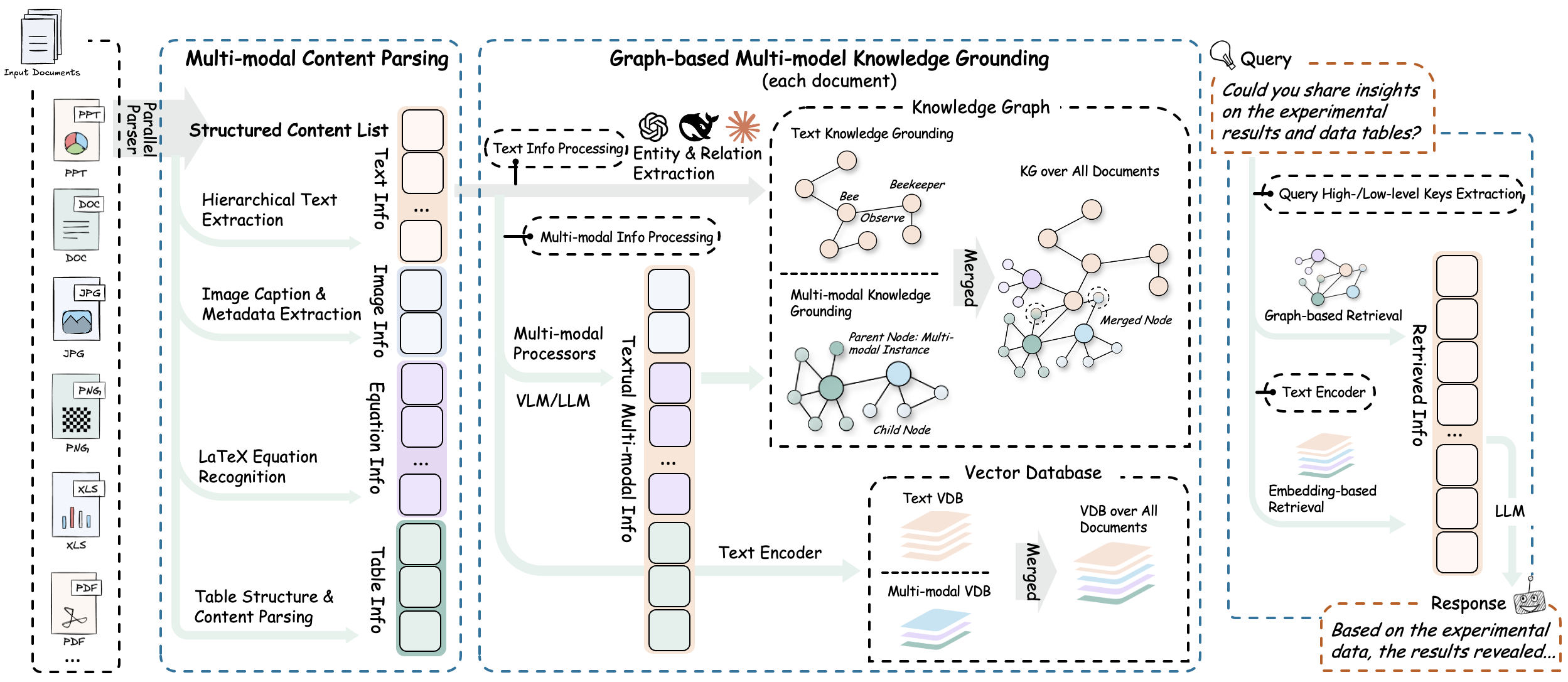
RAG-Anything implements an effective multi-stage multimodal pipeline that fundamentally extends traditional RAG architectures to seamlessly handle diverse content modalities through intelligent orchestration and cross-modal understanding. 📄
Document Parsing
→
🧠
Content Analysis
→
🔍
Knowledge Graph
→
🎯
Intelligent Retrieval
The system provides high-fidelity document extraction through adaptive content decomposition. It intelligently segments heterogeneous elements while preserving contextual relationships. Universal format compatibility is achieved via specialized optimized parsers. Key Components:
The system automatically categorizes and routes content through optimized channels. It uses concurrent pipelines for parallel text and multimodal processing. Document hierarchy and relationships are preserved during transformation. Key Components:
The system deploys modality-aware processing units for heterogeneous data modalities: Specialized Analyzers:
The multi-modal knowledge graph construction module transforms document content into structured semantic representations. It extracts multimodal entities, establishes cross-modal relationships, and preserves hierarchical organization. The system applies weighted relevance scoring for optimized knowledge retrieval. Core Functions:
The hybrid retrieval system combines vector similarity search with graph traversal algorithms for comprehensive content retrieval. It implements modality-aware ranking mechanisms and maintains relational coherence between retrieved elements to ensure contextually integrated information delivery. Retrieval Mechanisms:
Initialize Your AI Journey 
# Basic installation
pip install raganything

# With optional dependencies for extended format support:
pip install 'raganything[all]'              # All optional features
pip install 'raganything[image]'            # Image format conversion (BMP, TIFF, GIF, WebP)
pip install 'raganything[text]'             # Text file processing (TXT, MD)
pip install 'raganything[image,text]' # Multiple features# Install uv (if not already installed)
curl -LsSf https://astral.sh/uv/install.sh | sh
# Clone and setup the project with uv
git clone https://github.com/HKUDS/RAG-Anything.git
cd RAG-Anything
# Install the package and dependencies in a virtual environment
uv sync
# If you encounter network timeouts (especially for opencv packages):
# UV_HTTP_TIMEOUT=120 uv sync
# Run commands directly with uv (recommended approach)
uv run python examples/raganything_example.py --help
# Install with optional dependencies
uv sync --extra image --extra text # Specific extras
uv sync --all-extras # All optional features
Check MinerU installation: # Verify installation
mineru --version
# Check if properly configured
python -c "from raganything import RAGAnything; rag = RAGAnything(); print('✅ MinerU installed properly' if rag.check_parser_installation() else '❌ MinerU installation issue')"Models are downloaded automatically on first use. For manual download, refer to MinerU Model Source Configuration. import asyncio
from raganything import RAGAnything, RAGAnythingConfig
from lightrag.llm.openai import openai_complete_if_cache, openai_embed
from lightrag.utils import EmbeddingFunc
async def main():
# Set up API configuration
api_key = "your-api-key"
base_url = "your-base-url" # Optional
# Create RAGAnything configuration
config = RAGAnythingConfig(
working_dir="./rag_storage",
parser="mineru", # Parser selection: mineru, docling, or paddleocr
parse_method="auto", # Parse method: auto, ocr, or txt
enable_image_processing=True,
enable_table_processing=True,
enable_equation_processing=True,
)
# Define LLM model function
def llm_model_func(prompt, system_prompt=None, history_messages=[], **kwargs):
return openai_complete_if_cache(
"gpt-4o-mini",
prompt,
system_prompt=system_prompt,
history_messages=history_messages,
api_key=api_key,
base_url=base_url,
**kwargs,
)
# Define vision model function for image processing
def vision_model_func(
prompt, system_prompt=None, history_messages=[], image_data=None, messages=None, **kwargs
):
# If messages format is provided (for multimodal VLM enhanced query), use it directly
if messages:
return openai_complete_if_cache(
"gpt-4o",
"",
system_prompt=None,
history_messages=[],
messages=messages,
api_key=api_key,
base_url=base_url,
**kwargs,
)
# Traditional single image format
elif image_data:
return openai_complete_if_cache(
"gpt-4o",
"",
system_prompt=None,
history_messages=[],
messages=[
{"role": "system", "content": system_prompt}
if system_prompt
else None,
{
"role": "user",
"content": [
{"type": "text", "text": prompt},
{
"type": "image_url",
"image_url": {
"url": f"data:image/jpeg;base64,{image_data}"
},
},
],
}
if image_data
else {"role": "user", "content": prompt},
],
api_key=api_key,
base_url=base_url,
**kwargs,
)
# Pure text format
else:
return llm_model_func(prompt, system_prompt, history_messages, **kwargs)
# Define embedding function
embedding_func = EmbeddingFunc(
embedding_dim=3072,
max_token_size=8192,
func=lambda texts: openai_embed.func(
texts,
model="text-embedding-3-large",
api_key=api_key,
base_url=base_url,
),
)
# Initialize RAGAnything
rag = RAGAnything(
config=config,
llm_model_func=llm_model_func,
vision_model_func=vision_model_func,
embedding_func=embedding_func,
)
# Process a document
await rag.process_document_complete(
file_path="path/to/your/document.pdf",
output_dir="./output",
parse_method="auto"
)
# Query the processed content
# Pure text query - for basic knowledge base search
text_result = await rag.aquery(
"What are the main findings shown in the figures and tables?",
mode="hybrid"
)
print("Text query result:", text_result)
# Multimodal query with specific multimodal content
multimodal_result = await rag.aquery_with_multimodal(
"Explain this formula and its relevance to the document content",
multimodal_content=[{
"type": "equation",
"latex": "P(d|q) = \\frac{P(q|d) \\cdot P(d)}{P(q)}",
"equation_caption": "Document relevance probability"
}],
mode="hybrid"
)
print("Multimodal query result:", multimodal_result)
if __name__ == "__main__":
asyncio.run(main())import asyncio
from lightrag import LightRAG
from lightrag.llm.openai import openai_complete_if_cache, openai_embed
from lightrag.utils import EmbeddingFunc
from raganything.modalprocessors import ImageModalProcessor, TableModalProcessor
async def process_multimodal_content():
# Set up API configuration
api_key = "your-api-key"
base_url = "your-base-url" # Optional
# Initialize LightRAG
rag = LightRAG(
working_dir="./rag_storage",
llm_model_func=lambda prompt, system_prompt=None, history_messages=[], **kwargs: openai_complete_if_cache(
"gpt-4o-mini",
prompt,
system_prompt=system_prompt,
history_messages=history_messages,
api_key=api_key,
base_url=base_url,
**kwargs,
),
embedding_func=EmbeddingFunc(
embedding_dim=3072,
max_token_size=8192,
func=lambda texts: openai_embed.func(
texts,
model="text-embedding-3-large",
api_key=api_key,
base_url=base_url,
),
)
)
await rag.initialize_storages()
# Process an image
image_processor = ImageModalProcessor(
lightrag=rag,
modal_caption_func=lambda prompt, system_prompt=None, history_messages=[], image_data=None, **kwargs: openai_complete_if_cache(
"gpt-4o",
"",
system_prompt=None,
history_messages=[],
messages=[
{"role": "system", "content": system_prompt} if system_prompt else None,
{"role": "user", "content": [
{"type": "text", "text": prompt},
{"type": "image_url", "image_url": {"url": f"data:image/jpeg;base64,{image_data}"}}
]} if image_data else {"role": "user", "content": prompt}
],
api_key=api_key,
base_url=base_url,
**kwargs,
) if image_data else openai_complete_if_cache(
"gpt-4o-mini",
prompt,
system_prompt=system_prompt,
history_messages=history_messages,
api_key=api_key,
base_url=base_url,
**kwargs,
)
)
image_content = {
"img_path": "path/to/image.jpg",
"image_caption": ["Figure 1: Experimental results"],
"image_footnote": ["Data collected in 2024"]
}
description, entity_info = await image_processor.process_multimodal_content(
modal_content=image_content,
content_type="image",
file_path="research_paper.pdf",
entity_name="Experimental Results Figure"
)
# Process a table
table_processor = TableModalProcessor(
lightrag=rag,
modal_caption_func=lambda prompt, system_prompt=None, history_messages=[], **kwargs: openai_complete_if_cache(
"gpt-4o-mini",
prompt,
system_prompt=system_prompt,
history_messages=history_messages,
api_key=api_key,
base_url=base_url,
**kwargs,
)
)
table_content = {
"table_body": """
| Method | Accuracy | F1-Score |
|--------|----------|----------|
| RAGAnything | 95.2% | 0.94 |
| Baseline | 87.3% | 0.85 |
""",
"table_caption": ["Performance Comparison"],
"table_footnote": ["Results on test dataset"]
}
description, entity_info = await table_processor.process_multimodal_content(
modal_content=table_content,
content_type="table",
file_path="research_paper.pdf",
entity_name="Performance Results Table"
)
if __name__ == "__main__":
asyncio.run(process_multimodal_content())# Process multiple documents
await rag.process_folder_complete(
folder_path="./documents",
output_dir="./output",
file_extensions=[".pdf", ".docx", ".pptx"],
recursive=True,
max_workers=4
)from raganything.modalprocessors import GenericModalProcessor
class CustomModalProcessor(GenericModalProcessor):
async def process_multimodal_content(self, modal_content, content_type, file_path, entity_name):
# Your custom processing logic
enhanced_description = await self.analyze_custom_content(modal_content)
entity_info = self.create_custom_entity(enhanced_description, entity_name)
return await self._create_entity_and_chunk(enhanced_description, entity_info, file_path)RAG-Anything provides three types of query methods: Pure Text Queries - Direct knowledge base search using LightRAG: # Different query modes for text queries
text_result_hybrid = await rag.aquery("Your question", mode="hybrid")
text_result_local = await rag.aquery("Your question", mode="local")
text_result_global = await rag.aquery("Your question", mode="global")
text_result_naive = await rag.aquery("Your question", mode="naive")
# Synchronous version
sync_text_result = rag.query("Your question", mode="hybrid")VLM Enhanced Queries - Automatically analyze images in retrieved context using VLM: # VLM enhanced query (automatically enabled when vision_model_func is provided)
vlm_result = await rag.aquery(
"Analyze the charts and figures in the document",
mode="hybrid"
# vlm_enhanced=True is automatically set when vision_model_func is available
)
# Manually control VLM enhancement
vlm_enabled = await rag.aquery(
"What do the images show in this document?",
mode="hybrid",
vlm_enhanced=True # Force enable VLM enhancement
)
vlm_disabled = await rag.aquery(
"What do the images show in this document?",
mode="hybrid",
vlm_enhanced=False # Force disable VLM enhancement
)
# When documents contain images, VLM can see and analyze them directly
# The system will automatically:
# 1. Retrieve relevant context containing image paths
# 2. Load and encode images as base64
# 3. Send both text context and images to VLM for comprehensive analysisMultimodal Queries - Enhanced queries with specific multimodal content analysis: # Query with table data
table_result = await rag.aquery_with_multimodal(
"Compare these performance metrics with the document content",
multimodal_content=[{
"type": "table",
"table_data": """Method,Accuracy,Speed
RAGAnything,95.2%,120ms
Traditional,87.3%,180ms""",
"table_caption": "Performance comparison"
}],
mode="hybrid"
)
# Query with equation content
equation_result = await rag.aquery_with_multimodal(
"Explain this formula and its relevance to the document content",
multimodal_content=[{
"type": "equation",
"latex": "P(d|q) = \\frac{P(q|d) \\cdot P(d)}{P(q)}",
"equation_caption": "Document relevance probability"
}],
mode="hybrid"
)import asyncio
from raganything import RAGAnything, RAGAnythingConfig
from lightrag import LightRAG
from lightrag.llm.openai import openai_complete_if_cache, openai_embed
from lightrag.kg.shared_storage import initialize_pipeline_status
from lightrag.utils import EmbeddingFunc
import os
async def load_existing_lightrag():
# Set up API configuration
api_key = "your-api-key"
base_url = "your-base-url" # Optional
# First, create or load existing LightRAG instance
lightrag_working_dir = "./existing_lightrag_storage"
# Check if previous LightRAG instance exists
if os.path.exists(lightrag_working_dir) and os.listdir(lightrag_working_dir):
print("✅ Found existing LightRAG instance, loading...")
else:
print("❌ No existing LightRAG instance found, will create new one")
# Create/load LightRAG instance with your configuration
lightrag_instance = LightRAG(
working_dir=lightrag_working_dir,
llm_model_func=lambda prompt, system_prompt=None, history_messages=[], **kwargs: openai_complete_if_cache(
"gpt-4o-mini",
prompt,
system_prompt=system_prompt,
history_messages=history_messages,
api_key=api_key,
base_url=base_url,
**kwargs,
),
embedding_func=EmbeddingFunc(
embedding_dim=3072,
max_token_size=8192,
func=lambda texts: openai_embed.func(
texts,
model="text-embedding-3-large",
api_key=api_key,
base_url=base_url,
),
)
)
# Initialize storage (this will load existing data if available)
await lightrag_instance.initialize_storages()
await initialize_pipeline_status()
# Define vision model function for image processing
def vision_model_func(
prompt, system_prompt=None, history_messages=[], image_data=None, messages=None, **kwargs
):
# If messages format is provided (for multimodal VLM enhanced query), use it directly
if messages:
return openai_complete_if_cache(
"gpt-4o",
"",
system_prompt=None,
history_messages=[],
messages=messages,
api_key=api_key,
base_url=base_url,
**kwargs,
)
# Traditional single image format
elif image_data:
return openai_complete_if_cache(
"gpt-4o",
"",
system_prompt=None,
history_messages=[],
messages=[
{"role": "system", "content": system_prompt}
if system_prompt
else None,
{
"role": "user",
"content": [
{"type": "text", "text": prompt},
{
"type": "image_url",
"image_url": {
"url": f"data:image/jpeg;base64,{image_data}"
},
},
],
}
if image_data
else {"role": "user", "content": prompt},
],
api_key=api_key,
base_url=base_url,
**kwargs,
)
# Pure text format
else:
return lightrag_instance.llm_model_func(prompt, system_prompt, history_messages, **kwargs)
# Now use existing LightRAG instance to initialize RAGAnything
rag = RAGAnything(
lightrag=lightrag_instance, # Pass existing LightRAG instance
vision_model_func=vision_model_func,
# Note: working_dir, llm_model_func, embedding_func, etc. are inherited from lightrag_instance
)
# Query existing knowledge base
result = await rag.aquery(
"What data has been processed in this LightRAG instance?",
mode="hybrid"
)
print("Query result:", result)
# Add new multimodal document to existing LightRAG instance
await rag.process_document_complete(
file_path="path/to/new/multimodal_document.pdf",
output_dir="./output"
)
if __name__ == "__main__":
asyncio.run(load_existing_lightrag())For scenarios where you already have a pre-parsed content list (e.g., from external parsers or previous processing), you can directly insert it into RAGAnything without document parsing: import asyncio
from raganything import RAGAnything, RAGAnythingConfig
from lightrag.llm.openai import openai_complete_if_cache, openai_embed
from lightrag.utils import EmbeddingFunc
async def insert_content_list_example():
# Set up API configuration
api_key = "your-api-key"
base_url = "your-base-url" # Optional
# Create RAGAnything configuration
config = RAGAnythingConfig(
working_dir="./rag_storage",
enable_image_processing=True,
enable_table_processing=True,
enable_equation_processing=True,
)
# Define model functions
def llm_model_func(prompt, system_prompt=None, history_messages=[], **kwargs):
return openai_complete_if_cache(
"gpt-4o-mini",
prompt,
system_prompt=system_prompt,
history_messages=history_messages,
api_key=api_key,
base_url=base_url,
**kwargs,
)
def vision_model_func(prompt, system_prompt=None, history_messages=[], image_data=None, messages=None, **kwargs):
# If messages format is provided (for multimodal VLM enhanced query), use it directly
if messages:
return openai_complete_if_cache(
"gpt-4o",
"",
system_prompt=None,
history_messages=[],
messages=messages,
api_key=api_key,
base_url=base_url,
**kwargs,
)
# Traditional single image format
elif image_data:
return openai_complete_if_cache(
"gpt-4o",
"",
system_prompt=None,
history_messages=[],
messages=[
{"role": "system", "content": system_prompt} if system_prompt else None,
{
"role": "user",
"content": [
{"type": "text", "text": prompt},
{"type": "image_url", "image_url": {"url": f"data:image/jpeg;base64,{image_data}"}}
],
} if image_data else {"role": "user", "content": prompt},
],
api_key=api_key,
base_url=base_url,
**kwargs,
)
# Pure text format
else:
return llm_model_func(prompt, system_prompt, history_messages, **kwargs)
embedding_func = EmbeddingFunc(
embedding_dim=3072,
max_token_size=8192,
func=lambda texts: openai_embed.func(
texts,
model="text-embedding-3-large",
api_key=api_key,
base_url=base_url,
),
)
# Initialize RAGAnything
rag = RAGAnything(
config=config,
llm_model_func=llm_model_func,
vision_model_func=vision_model_func,
embedding_func=embedding_func,
)
# Example: Pre-parsed content list from external source
content_list = [
{
"type": "text",
"text": "This is the introduction section of our research paper.",
"page_idx": 0 # Page number where this content appears
},
{
"type": "image",
"img_path": "/absolute/path/to/figure1.jpg", # IMPORTANT: Use absolute path
"image_caption": ["Figure 1: System Architecture"],
"image_footnote": ["Source: Authors' original design"],
"page_idx": 1 # Page number where this image appears
},
{
"type": "table",
"table_body": "| Method | Accuracy | F1-Score |\n|--------|----------|----------|\n| Ours | 95.2% | 0.94 |\n| Baseline | 87.3% | 0.85 |",
"table_caption": ["Table 1: Performance Comparison"],
"table_footnote": ["Results on test dataset"],
"page_idx": 2 # Page number where this table appears
},
{
"type": "equation",
"latex": "P(d|q) = \\frac{P(q|d) \\cdot P(d)}{P(q)}",
"text": "Document relevance probability formula",
"page_idx": 3 # Page number where this equation appears
},
{
"type": "text",
"text": "In conclusion, our method demonstrates superior performance across all metrics.",
"page_idx": 4 # Page number where this content appears
}
]
# Insert the content list directly
await rag.insert_content_list(
content_list=content_list,
file_path="research_paper.pdf", # Reference file name for citation
split_by_character=None, # Optional text splitting
split_by_character_only=False, # Optional text splitting mode
doc_id=None, # Optional custom document ID (will be auto-generated if not provided)
display_stats=True # Show content statistics
)
# Query the inserted content
result = await rag.aquery(
"What are the key findings and performance metrics mentioned in the research?",
mode="hybrid"
)
print("Query result:", result)
# You can also insert multiple content lists with different document IDs
another_content_list = [
{
"type": "text",
"text": "This is content from another document.",
"page_idx": 0 # Page number where this content appears
},
{
"type": "table",
"table_body": "| Feature | Value |\n|---------|-------|\n| Speed | Fast |\n| Accuracy | High |",
"table_caption": ["Feature Comparison"],
"page_idx": 1 # Page number where this table appears
}
]
await rag.insert_content_list(
content_list=another_content_list,
file_path="another_document.pdf",
doc_id="custom-doc-id-123" # Custom document ID
)
if __name__ == "__main__":
asyncio.run(insert_content_list_example())Content List Format: The
Important Notes:
This method is particularly useful when:
Practical Implementation Demos 
The
Run examples: # End-to-end processing with parser selection
python examples/raganything_example.py path/to/document.pdf --api-key YOUR_API_KEY --parser mineru
# Direct modal processing
python examples/modalprocessors_example.py --api-key YOUR_API_KEY
# Office document parsing test (MinerU only)
python examples/office_document_test.py --file path/to/document.docx
# Image format parsing test (MinerU only)
python examples/image_format_test.py --file path/to/image.bmp
# Text format parsing test (MinerU only)
python examples/text_format_test.py --file path/to/document.md
# Check LibreOffice installation
python examples/office_document_test.py --check-libreoffice --file dummy
# Check PIL/Pillow installation
python examples/image_format_test.py --check-pillow --file dummy
# Check ReportLab installation
python examples/text_format_test.py --check-reportlab --file dummySystem Optimization Parameters Create a OPENAI_API_KEY=your_openai_api_key
OPENAI_BASE_URL=your_base_url # Optional
OUTPUT_DIR=./output # Default output directory for parsed documents
PARSER=mineru # Parser selection: mineru, docling, or paddleocr
PARSE_METHOD=auto # Parse method: auto, ocr, or txtNote: For backward compatibility, legacy environment variable names are still supported:
RAGAnything now supports multiple parsers, each with specific advantages:
Install PaddleOCR parser extras: pip install -e ".[paddleocr]"
# or
uv sync --extra paddleocr
# MinerU 2.0 uses command-line parameters instead of config files
# Check available options:
mineru --help

# Common configurations:
mineru -p input.pdf -o output_dir -m auto    # Automatic parsing mode
mineru -p input.pdf -o output_dir -m ocr     # OCR-focused parsing
mineru -p input.pdf -o output_dir -b pipeline --device cuda  # GPU acceleration
You can also configure parsing through RAGAnything parameters: # Basic parsing configuration with parser selection
await rag.process_document_complete(
file_path="document.pdf",
output_dir="./output/",
parse_method="auto", # or "ocr", "txt"
parser="mineru" # Optional: "mineru", "docling", or "paddleocr"
)
# Advanced parsing configuration with special parameters
await rag.process_document_complete(
file_path="document.pdf",
output_dir="./output/",
parse_method="auto", # Parsing method: "auto", "ocr", "txt"
parser="mineru", # Parser selection: "mineru", "docling", or "paddleocr"
# MinerU special parameters - all supported kwargs:
lang="ch", # Document language for OCR optimization (e.g., "ch", "en", "ja")
device="cuda:0", # Inference device: "cpu", "cuda", "cuda:0", "npu", "mps"
start_page=0, # Starting page number (0-based, for PDF)
end_page=10, # Ending page number (0-based, for PDF)
formula=True, # Enable formula parsing
table=True, # Enable table parsing
backend="pipeline", # Parsing backend: pipeline|hybrid-auto-engine|hybrid-http-client|vlm-auto-engine|vlm-http-client.
source="huggingface", # Model source: "huggingface", "modelscope", "local"
# vlm_url="http://127.0.0.1:3000" # Service address when using backend=vlm-http-client
# Standard RAGAnything parameters
display_stats=True, # Display content statistics
split_by_character=None, # Optional character to split text by
doc_id=None # Optional document ID
)
Different content types require specific optional dependencies:
For installation of format-specific dependencies, see the Configuration section. Academic Reference 📖
If you find RAG-Anything useful in your research, please cite our paper: @misc{guo2025raganythingallinoneragframework,
title={RAG-Anything: All-in-One RAG Framework},
author={Zirui Guo and Xubin Ren and Lingrui Xu and Jiahao Zhang and Chao Huang},
year={2025},
eprint={2510.12323},
archivePrefix={arXiv},
primaryClass={cs.AI},
url={https://arxiv.org/abs/2510.12323},
}Ecosystem & Extensions
Community Growth Trajectory Join the Innovation
We thank all our contributors for their valuable contributions.
Release History
Dependencies & License AuditLoading dependencies... Similar PackagesAGI-Alpha-Agent-v0META‑AGENTIC α‑AGI 👁️✨ — Mission 🎯 End‑to‑end: Identify 🔍 → Out‑Learn 📚 → Out‑Think 🧠 → Out‑Design 🎨 → Out‑Strategise ♟️ → Out‑Execute ⚡v1.43.0 More from HKUDSDeepCode"DeepCode: Open Agentic Coding (Paper2Code & Text2Web & Text2Backend)" More in Frameworksoh-my-opencodeThe Best AI Agent Harness - Batteries-Included OpenCode Plugin with Multi-Model Orchestration, Parallel Background Agents, and Crafted LSP/AST Tools tornadoTornado is a Python web framework and asynchronous networking library, originally developed at FriendFeed. bamlThe AI framework that adds the engineering to prompt engineering (Python/TS/Ruby/Java/C#/Rust/Go compatible) panderaA light-weight and flexible data validation and testing tool for statistical data objects. |


